How Do You Change the Visualization to Grayscale in Python AI in StarCraft II Tutorial Part 16?
TL;DR
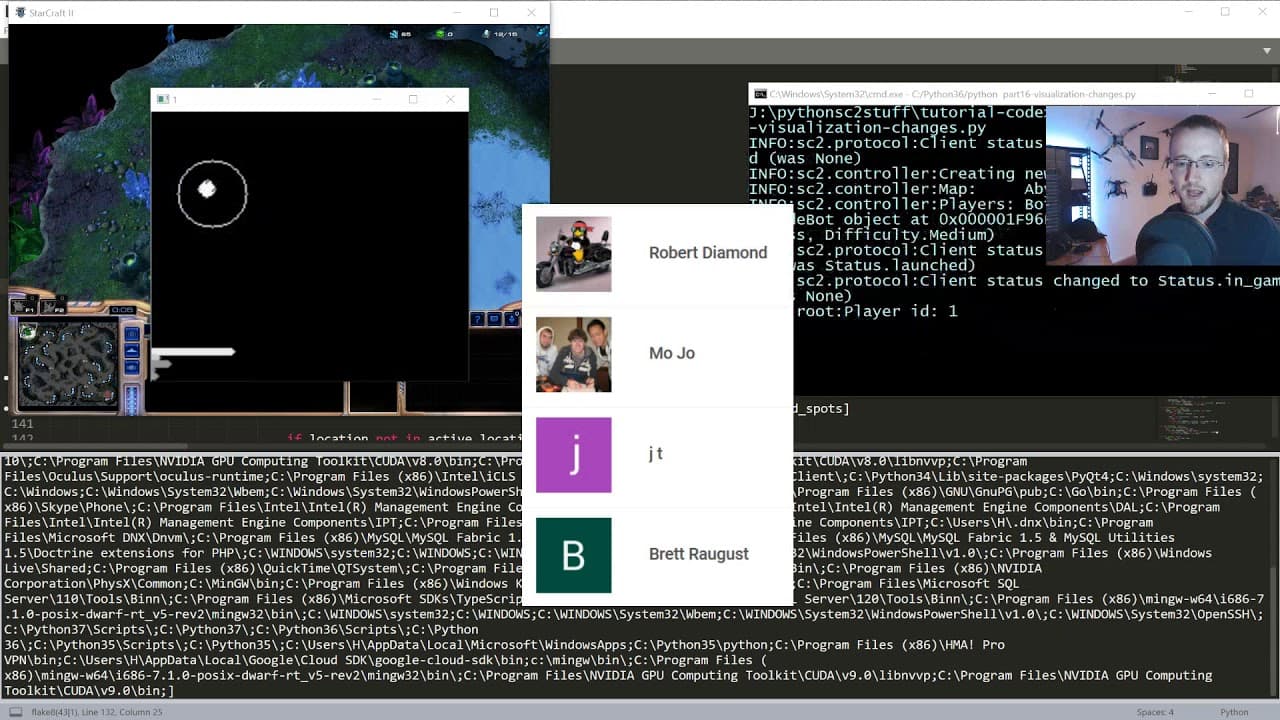
The visualization changes convert the Python AI in StarCraft II display to grayscale while adding support for newly encountered units. Friendly units appear white, known enemy units use values of 125, 125, 125, and circle sizes come from each unit’s radius attribute. The tutorial also simplifies worker tracking and improves pylon placement, so read on for the exact implementation choices and remaining limitations.
Transcript
what's going on everybody and welcome to part 16 of the Python hey i in starcraft 2 tutorial series in this video we're gonna be doing is working over some of the visualization changes that we would like to make here so one we definitely have new units that we need to be able to display but also someone posed the question to me why are we doing you... Read More
Key Insights
- Grayscale is an experiment: The change is not presented as a proven improvement over BGR. It begins because a viewer asks why three channels are necessary, and the presenter cannot identify a compelling reason. The tutorial therefore treats grayscale as something to try while observing how well the game state remains understandable.
- Conversion happens at the end: The internal drawing process continues to use a three-channel game-data image. All units, lines, and other required elements are drawn before the completed image is converted to grayscale. This lets the presenter reuse existing drawing operations, even though he explicitly suggests that a better implementation may be possible.
- Alpha remains unresolved: The presenter wanted overlapping circles to use an alpha-like effect, but he could not make it work. Circles are therefore drawn without the desired overlap behavior. He pauses to explain that limitation and asks viewers for a solution, leaving transparency as an open visualization problem rather than claiming it has been implemented.
- Unit radius improves representation: Circle sizes no longer depend solely on manually chosen dimensions. The drawing call uses the radius attribute already available on each unit, an option the presenter says he had previously overlooked. He credits Quyet, and possibly other viewers, for pointing it out, making unit size part of the data used by the visualization.
- Brightness separates opposing forces: Friendly units are rendered in all white, while known enemy units receive channel values of 125, 125, 125. After grayscale conversion, the player’s units remain bright and enemy units appear gray. This provides a simple distinction without creating a complex classification or color system.
- Classification could become richer: The presenter mentions that buildings, workers, and military units could each receive different colors. He deliberately postpones that level of detail to keep the visualization extremely simple. The immediate goal is to see how far the AI can progress with basic friendly-versus-enemy encoding before adding more categories.
- Enemy data uses known units: The enemy loop operates on self.known_enemy_units rather than assuming access to every opposing object. For each known enemy unit, the code obtains its position and draws a radius-based circle. This mirrors the friendly-unit loop closely, with the grayscale intensity serving as the primary difference between the two groups.
- Worker counting reduces bookkeeping: The line-related calculation switches from military-unit counts to worker counts because military counting requires awareness of all possible military unit types. The presenter considers workers easier to track as one category. This change simplifies the visualization’s input without changing the familiar line-drawing structure itself.
- Zero values need protection: The calculation code retains an exception block primarily to handle division by zero. Running out of workers is one explicit situation that could create the problem, although the presenter notes that another value might also equal zero. The safeguard allows the visualization routine to continue when these edge conditions arise.
- Grayscale preserves visible structure: During the test, the presenter can identify the scout entering enemy territory, the enemy Nexus, small worker markers, larger buildings, and signs that the opponent has started expanding. This suggests that the simplified tonal display still communicates several important spatial and strategic differences during the demonstrated game.
- Readiness may affect accuracy: The presenter suspects that objects are not being displayed perfectly because friendly units may have been required to be ready while enemy units were not subjected to the same condition. He does not establish a final diagnosis or correction. The observation identifies a possible mismatch in the filtering logic behind the visualization.
- Pylon direction protects pathways: Pylons can be built near the first Nexus position while directing placement toward the game-map center. The presenter describes this as an ingenious adjustment and reports that his pylon test works well. Its practical purpose is to prevent numerous buildings from occupying a pathway, which had previously been an unfortunate placement pattern.
Install to Summarize YouTube Videos and Get Transcripts
Explore YouTube Video Summarizer or Get YouTube Transcript Extractor
Questions & Answers
Q: How do you change the visualization to grayscale in Python AI in StarCraft II tutorial Part 16?
The tutorial keeps game data in three channels while drawing the required visualization elements. Friendly and enemy units are added first, along with the existing line-related information. The image is converted to grayscale only at the end of the intel method. This approach preserves the current drawing workflow, although the presenter says there is probably a better way to implement it.
Q: How are friendly and enemy units distinguished in the grayscale display?
The code iterates separately over friendly units and self.known_enemy_units. Friendly units are drawn as white circles, while enemy units use the values 125, 125, 125, which appear gray after conversion. Each circle is placed at the corresponding unit’s position. The brightness difference provides a simple visual separation without assigning distinct colors to workers, buildings, and military units.
Q: Why does the code use each unit’s radius attribute?
The radius attribute provides the size used when drawing a unit’s circle on the game data. The attribute had already been available, but the presenter had not used it previously. He credits Quyet, and possibly other viewers, for bringing it to his attention. Using it lets the visualization reflect unit sizes through existing unit data instead of relying only on a single manually chosen circle size.
Q: Why was the military-unit count replaced with a worker count?
Counting military units would require the code to know all of the military unit types the bot has. The presenter considers that more complicated than tracking workers. He therefore changes the existing line calculation to count workers, which he treats as a single unit category. The line-drawing code remains familiar, but its input becomes easier to maintain and interpret.
Q: What problem does the exception handling address?
The exception handling mainly protects calculations from division by zero. One example occurs if the bot runs out of workers and a worker-based value becomes zero. The presenter also notes that another value involved in the calculations could equal zero. Keeping the exception block prevents those states from breaking the intel visualization while the game continues.
Q: Why was an alpha channel not added to the unit circles?
The presenter wanted an alpha-like channel so circle overlaps could be represented more effectively. He could not determine how to implement the desired effect, so the tutorial continues with ordinary circles. The limitation is acknowledged rather than hidden, and viewers are invited to provide a solution. As a result, grayscale and brightness distinguish units, but overlap does not receive the intended alpha treatment.
Q: What could be causing imperfect enemy-unit visualization?
During the gameplay test, the presenter notices that some objects may not be displayed perfectly. He suspects that friendly units were required to be ready before being graphed, while enemy units may not have the same readiness requirement. That difference could cause inconsistent display behavior between the two sides. He does not confirm the cause or implement a correction in the provided segment.
Q: How does the revised pylon placement avoid blocking pathways?
The bot can build a pylon near the first Nexus position while directing that placement toward the game-map center. The presenter says this tested approach works well for pylons. Its purpose is to keep buildings from accumulating in the pathway, which had been happening with the earlier placement behavior. By influencing the direction of construction relative to the Nexus, the bot leaves movement routes less obstructed.
Summary & Key Takeaways
-
Choosing a grayscale visualization: Part 16 begins by reconsidering why the StarCraft II AI visualization uses three BGR channels instead of grayscale. The presenter has no strong reason to retain the existing RGB-style representation and decides to test a simpler grayscale output. New units also need to be displayed. Although an alpha-like channel could make overlapping circles more informative, the presenter could not find a workable implementation and invites viewers to suggest a solution.
-
Rebuilding the intel method: The presenter clears most of the existing intel method and reconstructs its visualization logic while retaining the game data. The intermediate image still starts with three channels. Rather than rewriting every drawing operation for a single channel, the code performs the required work first and converts the result to grayscale at the end. The presenter acknowledges that a better method may exist but adopts this approach as the practical implementation for the tutorial.
-
Drawing friendly and enemy units: The code iterates through friendly units, retrieves each position, and draws a circle on the game data. Circle size now uses the unit’s existing radius attribute, following a viewer suggestion credited to Quyet. Friendly units are drawn in white. The same process is then applied to known enemy units, except their circles use 125, 125, 125, making them gray and visually distinct from the brighter friendly units after conversion.
-
Simplifying the tracked unit count: The familiar line-drawing code is retained, but its underlying count changes from military units to workers. Tracking military strength required knowing every military unit type available to the bot. Counting workers is easier because the presenter treats the worker as a single category to follow. The surrounding calculations retain exception handling, mainly because division by zero can occur if the bot runs out of workers or another calculated value becomes zero.
-
Testing gameplay and building placement: The finished grayscale display makes the scout, an enemy Nexus, workers, buildings, and expansion activity recognizable during play. The presenter notes that enemy objects may not be displayed perfectly because friendly readiness might be checked differently from enemy readiness. He then highlights pylon placement near the first Nexus position toward the game-map center. This tested adjustment keeps structures out of the pathway, addressing the earlier problem of buildings obstructing movement routes.
Read in Other Languages (beta)
Share This Summary 📚
Summarize YouTube Videos and Get Video Transcripts with 1-Click
Try YouTube Summary with ChatGPT & Claude or YouTube Transcript Generator
Explore More Summaries from sentdex 📚

Summarize YouTube Videos and Get Video Transcripts with 1-Click
Try YouTube Summary with ChatGPT & Claude or YouTube Transcript Generator