120GB of VRAM - Boxx Workstation review
TL;DR
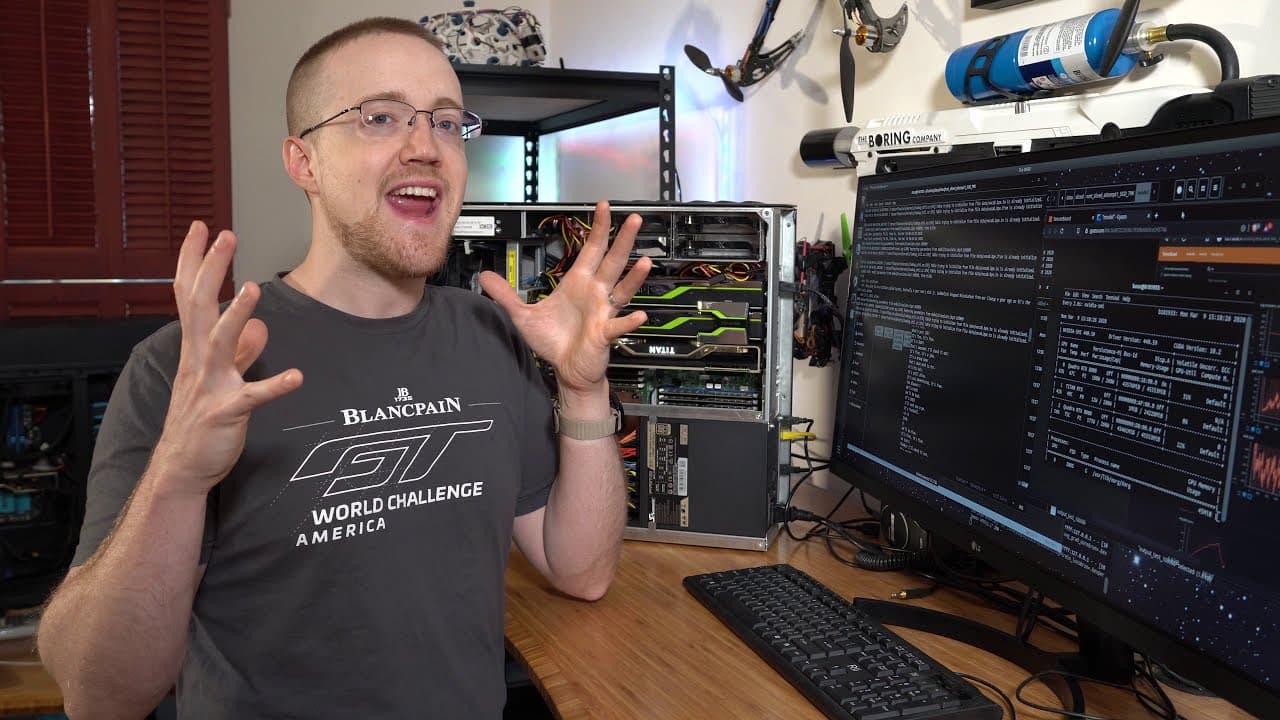
The Boxx Apex 4 is a customizable high-performance workstation with 120GB of total VRAM, built for demanding work such as training large models. This configuration combines two 48GB RTX 8000 GPUs, a 24GB Titan RTX, 256GB of RAM, and two 12-core Intel Xeon Gold CPUs. Read on to see how its hardware, multi-GPU setup, and local-versus-cloud economics affect real workloads.
Transcript
what is going on everybody and welcome to an exciting channel update both for me and hopefully for some of you so stay tuned for that what you see behind me is the box apex 4 although box everything is so customizable there's really no specific model I can give you but what I can say is the interior of this PC is very special so let me show you so ... Read More
Key Insights
- ❤️🩹 The Box Apex 4 is a highly customizable high-end data analysis PC designed for tasks like video editing and rendering.
- 🚂 Its powerful components, including multiple GPUs and CPUs, make it suitable for training large and complex models.
- 🙃 For certain tasks, owning the hardware can be more cost-effective than running it in the cloud.
Install to Summarize YouTube Videos and Get Transcripts
Explore YouTube Video Summarizer or Get YouTube Transcript Extractor
Questions & Answers
Q: How does the Boxx workstation provide 120GB of VRAM?
The workstation contains two RTX 8000 GPUs with 48GB of VRAM each and a Titan RTX with 24GB. Together, the three GPUs provide 120GB of VRAM.
Q: What are the Boxx Apex 4 workstation's specifications?
This configuration has two RTX 8000 GPUs, a Titan RTX, 256GB of RAM, and two Intel Xeon Gold CPUs with 12 cores each. It also includes a one-terabyte M.2 drive, water-cooled CPUs, and a 1,300-watt power supply.
Q: What is the Boxx Apex 4 used for?
Boxx builds the system for high-end data analysis, video editing, rendering, and other high-performance computing tasks. The creator primarily uses its GPUs for model training, while its CPUs and RAM help with preprocessing and reinforcement-learning workloads.
Q: Can the Boxx Apex 4 be customized or upgraded?
Yes, the Boxx system is highly customizable, so there is no single fixed configuration for the Apex 4 shown. Its power supply provides extra connections, allowing components such as GPUs to be selected or changed from the time of purchase.
Q: When can local hardware be more economical than cloud computing?
The creator says the comparison generally shifts toward buying local hardware after roughly two cumulative months of model training or operation. Those two months might occur continuously or across one or two years, depending on how long using older hardware remains acceptable.
Q: Does model training require GPUs, and can inference run on CPUs?
The creator says training a model definitely requires GPUs. Running a model can often be handled with CPU and RAM unless it must serve an exceptionally large number of queries per second.
Q: What chatbot model is being trained on the Boxx workstation?
The model has 20 total layers with 1,024 units per layer. It maxes out both RTX 8000 GPUs, with 10 layers assigned to the encoder on one GPU and 10 layers assigned to the decoder on the other.
Q: Does adding more GPUs always make model training faster?
No, multiple GPUs do not necessarily work for every architecture or always improve speed. In this setup, sending data from one GPU to another creates a performance cost, while the encoder-decoder split happens to fit naturally across the two RTX 8000 cards.
Summary & Key Takeaways
-
The content is a channel update discussing a high-end data analysis PC called the Box Apex 4, which is customizable and designed for tasks like video editing and rendering.
-
The PC features two RTX 8000 GPUs, a Titan RTX, 256GB RAM, two Intel Xeon Gold CPUs, and a one terabyte M.2 drive, among other components.
-
The creator discusses the potential uses for a machine like this, particularly for training large and complex models, and considers opening the opportunity for community code submissions.
Read in Other Languages (beta)
Share This Summary 📚
Summarize YouTube Videos and Get Video Transcripts with 1-Click
Try YouTube Summary with ChatGPT & Claude or YouTube Transcript Generator
Explore More Summaries from sentdex 📚

Summarize YouTube Videos and Get Video Transcripts with 1-Click
Try YouTube Summary with ChatGPT & Claude or YouTube Transcript Generator