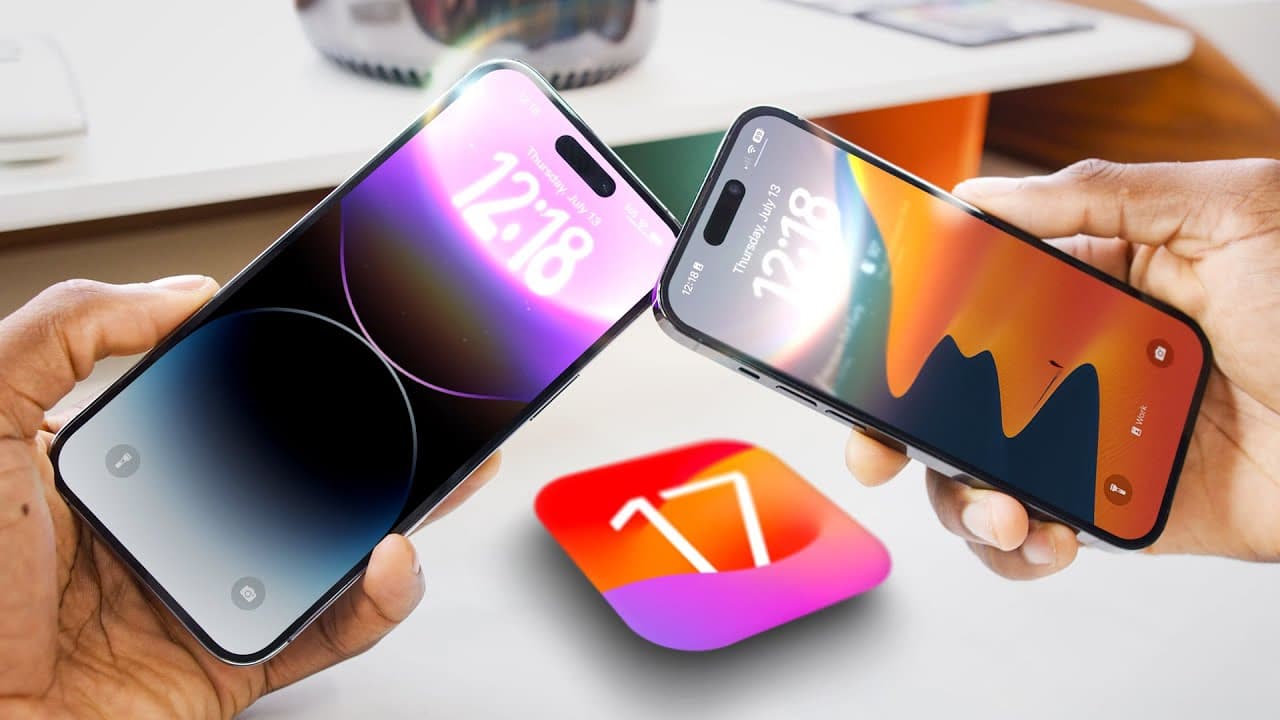
iOS 17 Hands-On: Top 5 Features!
TL;DR
iOS 17 brings a range of exciting new features to the iPhone, including expanded capabilities for AirDrop, personalized voice synthesis, refined stock app features, and a smart home display mode.
Transcript
foreign another year another version of iOS come into an iPhone near you it seems like usually these updates get smaller and smaller and less and less crazy but it feels like this year for whatever reason Apple has packed a ton of stuff into iOS 17. this is going to be launching in September when the new iPhone comes out on everybody's iPhone but i... Read More
Key Insights
- 😀 iOS 17 introduces numerous features tailored towards enhancing the iPhone user experience, ranging from improved sharing capabilities to personalized voice synthesis and refined stock app features.
- 👤 The update showcases Apple's focus on expanding the iPhone ecosystem, with many features depending on interaction with other iPhone users.
- 💁 Standby mode in iOS 17 provides a smart home display functionality that resembles the Apple Watch, offering convenient access to information and improved Siri interactions.
- 😀 The Phone app and FaceTime receive notable enhancements, including contact poster customization and live voicemail transcription, making communication more convenient and visually appealing.
Install to Summarize YouTube Videos and Get Transcripts
Explore YouTube Video Summarizer or Get YouTube Transcript Extractor
Questions & Answers
Q: How does the new AirDrop feature in iOS 17 make sharing easier?
The updated AirDrop feature allows users to share contact information, photos, videos, content links, and even start a share play session with another iPhone user by simply bumping their phones together, eliminating the need for complicated sharing processes.
Q: What is the purpose of the Personal Voice feature in iOS 17?
Personal Voice is an accessibility setting that allows users to create a personalized synthesized voice by recording a series of phrases. It is designed for individuals at risk of losing their voice or experiencing vocal fatigue, providing them with a unique and customizable voice option.
Q: What refinements have been made to stock apps in iOS 17?
iOS 17 brings various refinements to stock apps, including a smarter keyboard with transformer-based autocorrect, faster dictation, interactive widgets, and new features in the Messages app, such as the Check-In feature for location updates.
Q: What is Standby mode in iOS 17, and how does it enhance the user experience?
Standby mode turns the iPhone into a smart home display when it is charging and placed horizontally. It offers a clock display, customizable Widgets, and improved Siri functionality, allowing users to interact conversationally without needing to say "Hey Siri."
Summary & Key Takeaways
-
iOS 17 introduces a more capable and user-friendly version of AirDrop, allowing users to easily share contact information, photos, videos, and more with other iPhone users by simply bumping their phones together.
-
The accessibility setting called Personal Voice enables users to create a unique synthesized voice by recording a series of phrases, providing a personalized and human-like voice option for individuals at risk of losing their natural voice.
-
The update includes several refinements to stock apps, such as an improved keyboard and dictation, interactive widgets, and new features in the Messages app, like the Check-In feature for location updates.
-
Standby mode turns the iPhone into a smart home display when it is charging and placed horizontally, providing quick access to useful Widgets and allowing users to interact with Siri conversationally without needing to say "Hey Siri."
-
The Phone app and FaceTime receive significant updates, including contact poster customization for cleaner contacts and live voicemail transcription for improved call experiences.
Read in Other Languages (beta)
Share This Summary 📚
Summarize YouTube Videos and Get Video Transcripts with 1-Click
Try YouTube Summary with ChatGPT & Claude or YouTube Transcript Generator
Explore More Summaries from Marques Brownlee 📚

Summarize YouTube Videos and Get Video Transcripts with 1-Click
Try YouTube Summary with ChatGPT & Claude or YouTube Transcript Generator