You Can Now Change Images Within MidJourney!
TL;DR
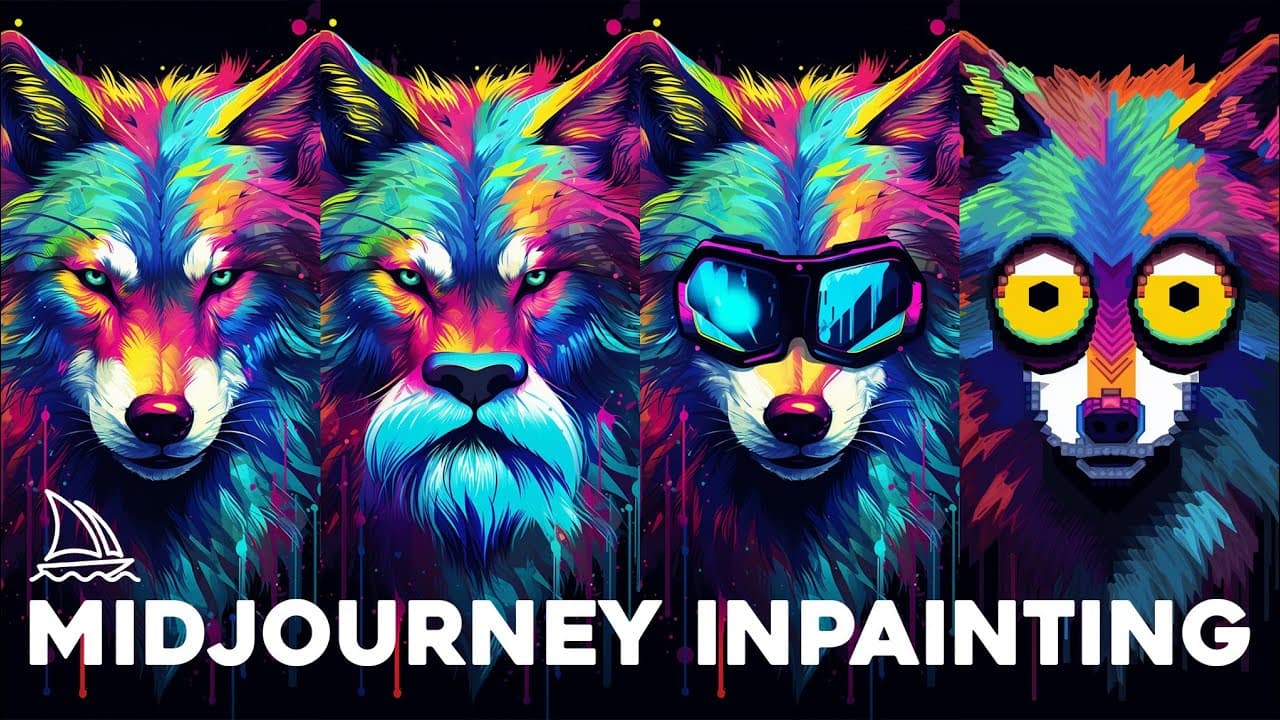
Mid-Journey Discord bot has added an in-painting feature, allowing users to edit images directly within Discord, with tips and tricks provided for optimal usage.
Transcript
today mid Journey just got a big upgrade They just added the ability to in paint inside of your images directly inside of Discord and they're calling the feature very region in their Discord announcement they did give some tips and tricks on how to use it this feature works best on large regions of the image 20 to 50 percent of the image changing t... Read More
Key Insights
- 🤖 Mid-Journey Discord bot now offers an in-painting feature for editing images within Discord.
- 👻 Enabling remix mode in the settings allows users to add more specific instructions for the in-painting process.
- 💌 The "very region" option lets users select a region of the image to generate changes specific to that area.
- 👨🎨 The in-painting feature is best suited for large regions of the image (20-50%).
- 👶 Adding new elements to existing images is possible with the very region option.
- 🧑🚒 The accuracy of the generated images may vary, and the system may fight against the user's intent in certain cases.
- 🐦 Small tweaks and additions, such as adding birds to a sky, tend to produce better results.
Install to Summarize YouTube Videos and Get Transcripts
Explore YouTube Video Summarizer or Get YouTube Transcript Extractor
Questions & Answers
Q: How does the in-painting feature in Mid-Journey Discord bot work?
The in-painting feature allows users to edit images within Discord by selecting a region of the image and adding new elements, such as objects or scenery. It generates variations of the image based on the prompt and the selected region.
Q: What is the benefit of using the remix mode in Mid-Journey?
Enabling remix mode in the settings allows users to add additional information to their prompts, providing more specific instructions for the in-painting feature. This enhances the accuracy and desired outcome of the generated images.
Q: Can the in-painting feature add elements to existing images?
Yes, users can add new elements to existing images using the very region option. By selecting a specific area and providing additional instructions, the feature will generate variations of the image with the desired changes in the selected region.
Q: Are there limitations to the in-painting feature?
While the in-painting feature in Mid-Journey is powerful, it may not always generate the desired results. The system may sometimes fight against the user's intent, leading to unexpected or inaccurate changes. Experimenting with different prompts and regions is encouraged for optimal results.
Summary & Key Takeaways
-
Mid-Journey Discord bot now offers an in-painting feature that works best on large regions of an image (20-50% of the image).
-
Users can add additional information to their prompts by enabling remix mode in the settings.
-
The new "very region" option allows users to select an area of the image and generate changes specific to that region.
Read in Other Languages (beta)
Share This Summary 📚
Summarize YouTube Videos and Get Video Transcripts with 1-Click
Try YouTube Summary with ChatGPT & Claude or YouTube Transcript Generator
Explore More Summaries from Matt Wolfe 📚

Summarize YouTube Videos and Get Video Transcripts with 1-Click
Try YouTube Summary with ChatGPT & Claude or YouTube Transcript Generator