How to Use Jupyter Notebook for Data Analysis
TL;DR
To use Jupyter Notebook for data analysis, start by running each code cell sequentially, which allows you to build on previous actions. Import necessary Python packages at the beginning, and if you encounter errors, check for typos or reset the lab to its latest version. This environment facilitates data exploration and manipulation effectively.
Transcript
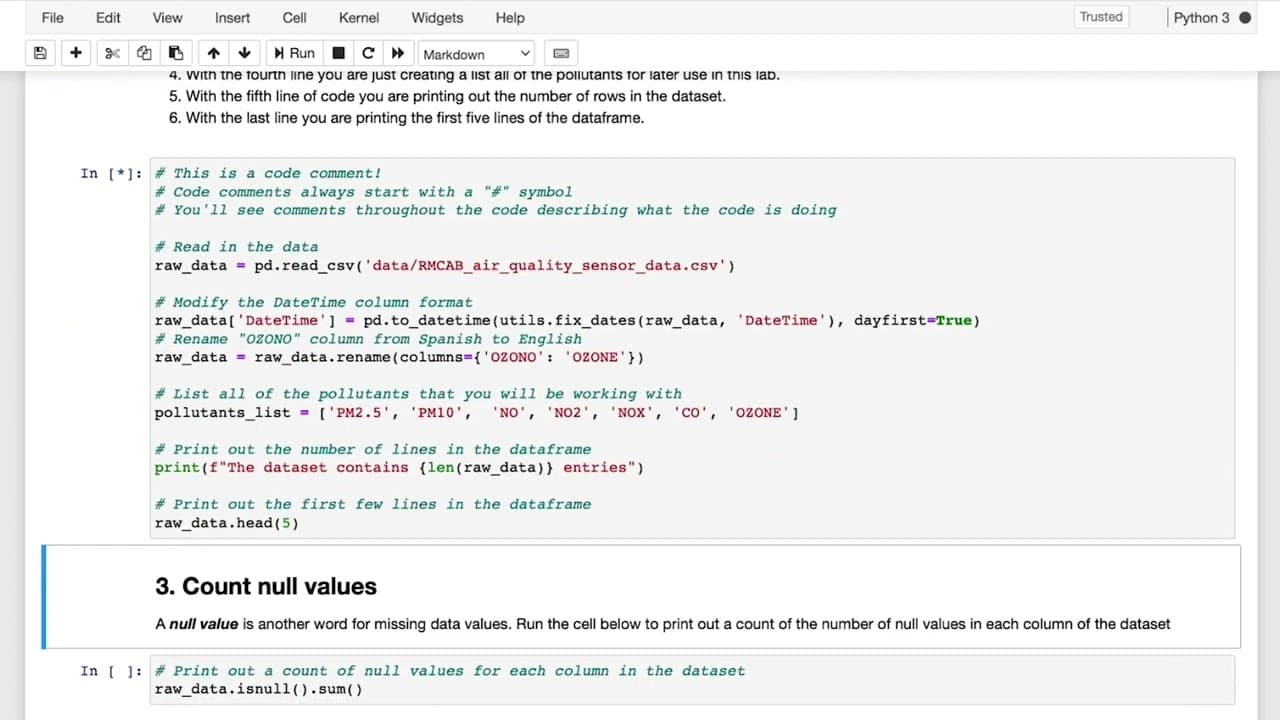
in this video I'll be walking you through the beginning of the first lab and demonstrating some of the features of the Jupiter notebook environment that you'll be working with if you'd like to follow along as I go through this you can go ahead and open up the lab itself in another browser tab or if you're already familiar with the python programmed... Read More
Key Insights
- 🧑🔬 Jupiter Notebook is a popular prototyping and programming environment for data scientists.
- 👨💻 The lab environment consists of code cells and text blocks, facilitating instructional and coding tasks.
- 👻 Running code cells sequentially allows for a step-by-step approach in data analysis.
- 👨💻 Errors in code cells can be resolved by identifying and correcting typos or resetting the lab.
- 🧘 The notebook environment provides flexibility for editing parameters and observing different outputs.
- 🫠 Data manipulation and preprocessing tasks are demonstrated in the lab, including reading CSV files and modifying data.
- 😒 Python packages are imported at the start of the notebook, enabling their use throughout the lab.
Install to Summarize YouTube Videos and Get Transcripts
Explore YouTube Video Summarizer or Get YouTube Transcript Extractor
Questions & Answers
Q: What is the Jupiter Notebook environment?
The Jupiter Notebook environment is an open-source web application used for creating and sharing documents that contain code, visualizations, and text.
Q: How can I access the lab for exploring air quality data?
You can find the lab in Week 2 of the course, under the title "Lab Air Quality: Explore the Data." Clicking on "Launch Notebook" will open the lab in a new browser tab.
Q: What is the purpose of the code cells in the Jupiter Notebook?
The code cells contain Python code that can be executed. Running each cell sequentially allows subsequent cells to build on the actions taken in previous cells.
Q: How can I resolve errors in the code cells?
If you encounter an error, it is likely due to a typo or mistake in the code. You can try to identify and correct the error. If necessary, you can reset the lab by selecting "Get Latest Version" in the Help menu.
Summary & Key Takeaways
-
The video introduces the Jupiter Notebook environment and its features, such as code cells and text blocks.
-
The lab for exploring air quality data is available in Week 2 of the course.
-
The notebook contains code and instructions, and it is necessary to run each code cell sequentially.
Read in Other Languages (beta)
Share This Summary 📚
Summarize YouTube Videos and Get Video Transcripts with 1-Click
Try YouTube Summary with ChatGPT & Claude or YouTube Transcript Generator
Explore More Summaries from DeepLearningAI 📚





Summarize YouTube Videos and Get Video Transcripts with 1-Click
Try YouTube Summary with ChatGPT & Claude or YouTube Transcript Generator