How Does LinkedHelper Automate LinkedIn Tasks?
TL;DR
LinkedHelper automates LinkedIn tasks like connecting with second and third-degree network contacts, sending personalized messages, and endorsing profiles to enhance networking efficiency. It also allows for the extraction of profile information for marketing while enabling the removal of unwanted connections, helping users maintain a focused and relevant network.
Transcript
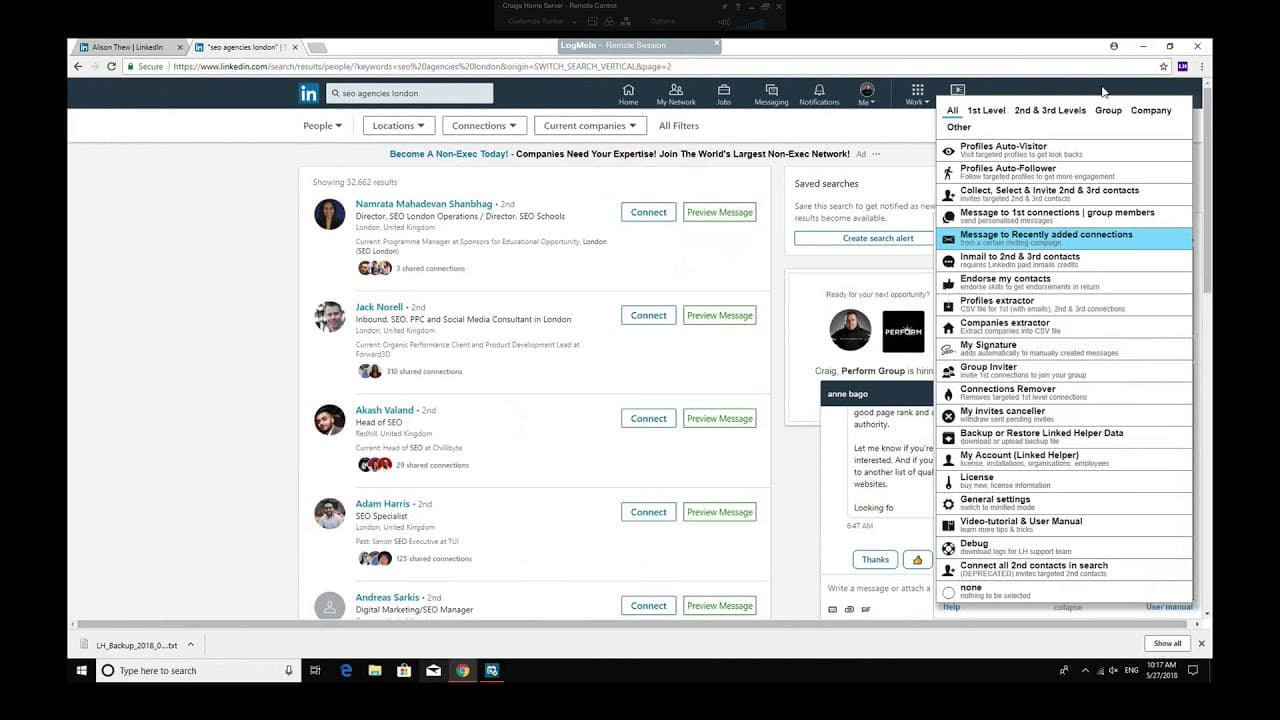
guys just gonna show you a quick video on like tail paw and what it can do sorry if the skin is slightly too small and but recording us from a remote desktop so like then he'll puff as a Google Chrome extension which you can see is always a deep beer when you get your LinkedIn helper but it always sets in the bottom right hand side of your LinkedIn... Read More
Key Insights
- LinkedHelper is a Google Chrome extension designed to automate various LinkedIn tasks, enhancing efficiency in networking and lead generation.
- The tool allows users to automatically collect and invite second and third-degree connections, significantly expanding their LinkedIn network without manual effort.
- It provides functionalities to send messages to first-degree connections, view profiles, and endorse people, thereby increasing user engagement on LinkedIn.
- LinkedHelper can extract profile information for marketing purposes, although users are advised against spamming to maintain professional integrity.
- Users can personalize their LinkedIn interactions by adding custom signatures to their messages, making communications more engaging and tailored.
- The tool supports automatic following of influencers and other users, which can be strategically used to enhance visibility and gain insights.
- LinkedHelper allows users to send messages to recently connected contacts, fostering immediate interaction and potential business opportunities.
- It includes a feature to remove unwanted connections, helping users maintain a relevant and focused LinkedIn network.
Install to Summarize YouTube Videos and Get Transcripts
Explore YouTube Video Summarizer or Get YouTube Transcript Extractor
Questions & Answers
Q: What is LinkedHelper and how does it function?
LinkedHelper is a Google Chrome extension that automates various LinkedIn functions to enhance networking and lead generation. It allows users to automatically collect connections, send messages, endorse profiles, and extract information, thereby saving time and increasing efficiency in managing LinkedIn activities.
Q: How does LinkedHelper assist in expanding LinkedIn networks?
LinkedHelper automates the process of collecting and inviting second and third-degree connections on LinkedIn. Users can set the tool to run and gather a large number of connections without manual intervention, significantly expanding their network and potential reach on the platform.
Q: Can LinkedHelper personalize LinkedIn interactions?
Yes, LinkedHelper allows users to add custom signatures to their messages, making interactions more personalized. This feature helps in creating a more engaging communication experience, as users can tailor their messages to better suit their networking goals and audience.
Q: What are the marketing capabilities of LinkedHelper?
LinkedHelper can extract profile information for marketing purposes, allowing users to gather data that can be used for targeted campaigns. However, users are advised to avoid spamming and use the extracted information wisely to maintain professional integrity and positive networking relationships.
Q: How does LinkedHelper manage unwanted connections?
LinkedHelper includes a feature to identify and remove unwanted connections, helping users maintain a focused and relevant LinkedIn network. This functionality allows users to streamline their connections, ensuring that their network is composed of contacts that are beneficial to their professional goals.
Q: What are some strategic uses of LinkedHelper's following feature?
The following feature in LinkedHelper can be used strategically to enhance visibility by automatically following influencers and other users. This can help users gain insights from industry leaders and increase their presence on LinkedIn by associating with prominent figures in their field.
Q: How does LinkedHelper facilitate engagement with new connections?
LinkedHelper allows users to send automated messages to recently connected contacts, fostering immediate engagement. This feature helps in initiating conversations and building relationships quickly, which can lead to potential business opportunities and collaborations.
Q: What are the potential drawbacks of using LinkedHelper?
While LinkedHelper offers significant automation benefits, users must be cautious of over-reliance on automation, which can lead to depersonalization of interactions. Additionally, improper use, such as spamming, can harm professional relationships and violate LinkedIn's terms of service, so it is crucial to use the tool responsibly.
Summary & Key Takeaways
-
LinkedHelper is a Chrome extension that automates LinkedIn tasks, such as collecting connections, sending messages, and endorsing profiles, to enhance networking efficiency. It allows users to personalize communications and strategically expand their network by automating routine tasks.
-
The tool enables users to gather profile information for marketing purposes, although caution is advised to avoid spamming. Users can also add custom signatures to messages, making interactions more personalized and engaging.
-
LinkedHelper offers features like automatic connection removal and following, helping users maintain a relevant network and gain insights from influencers. It also facilitates immediate engagement with new connections through automated messaging.
Read in Other Languages (beta)
Share This Summary 📚
Summarize YouTube Videos and Get Video Transcripts with 1-Click
Try YouTube Summary with ChatGPT & Claude or YouTube Transcript Generator