How to Graph OHLC Candlesticks in Tkinter, Python 3.4 Tutorial Part 26
TL;DR
Create a basic OHLC candlestick graph in Tkinter by passing dates, open, high, low, and close values to candlestick_ohlc, then configure candle width and up/down colors. The tutorial also labels price and volume axes, formats dates, limits major ticks to three, and displays the latest closing price, making the remaining implementation details worth reading.
Transcript
what's going on everybody welcome to another tkinter tutorial video part of our mega series making an actual trading application for Bitcoin so in this video what we're gonna be doing is actually generating this candlestick graph the basic one we don't actually have the indicators or anything like that yet but we're gonna be working on those in the... Read More
Key Insights
- 📈 The tutorial focuses on creating a candlestick graph for a trading application using Tkinter in Python.
- 😫 The code includes functions to plot the candlesticks, set the Y axis label as price, and handle volume data.
- 🤪 The candlestick colors are determined based on whether the price goes up or down.
- 📈 The tutorial mentions the future addition of top and bottom indicators to the candlestick graph.
- 👻 The code allows for customization of the graph, including the width of the candlesticks and the granularity of the data.
- 🎮 The video tutorial showcases the progress made in creating the candlestick graph for the trading application.
- 🪡 The tutorial highlights the need for additional updates to complete the application, including trading features.
Install to Summarize YouTube Videos and Get Transcripts
Explore YouTube Video Summarizer or Get YouTube Transcript Extractor
Questions & Answers
Q: How do you graph OHLC candlesticks in Tkinter with Python 3.4?
Call candlestick_ohlc for subplot a and pass the OHLC data values in the order MPL dates, open, high, low, and close. Also supply the configured candle width plus separate colors for upward and downward price movement.
Q: What data is passed to candlestick_ohlc?
The plotted values contain MPL dates followed by open, high, low, and close data. The tutorial constructs this as a list within the OHLC pandas data frame and uses .values for plotting.
Q: How should the candlestick width be configured?
Set the width argument to the previously defined candle-width value. Use narrow candles when plotting a lot of data so they do not overlap, and wider candles when there is little data so they remain visible.
Q: How are rising and falling candlesticks colored?
The colorup value is set to the light color, while colordown is set to the dark color. These correspond to green when the price rises and red when it falls in the tutorial's general explanation.
Q: How are the price and volume axes labeled?
The main candlestick subplot uses set_ylabel with price. When volume data is available, the second subplot uses set_ylabel with volume.
Q: How is volume displayed, and why is the exchange checked first?
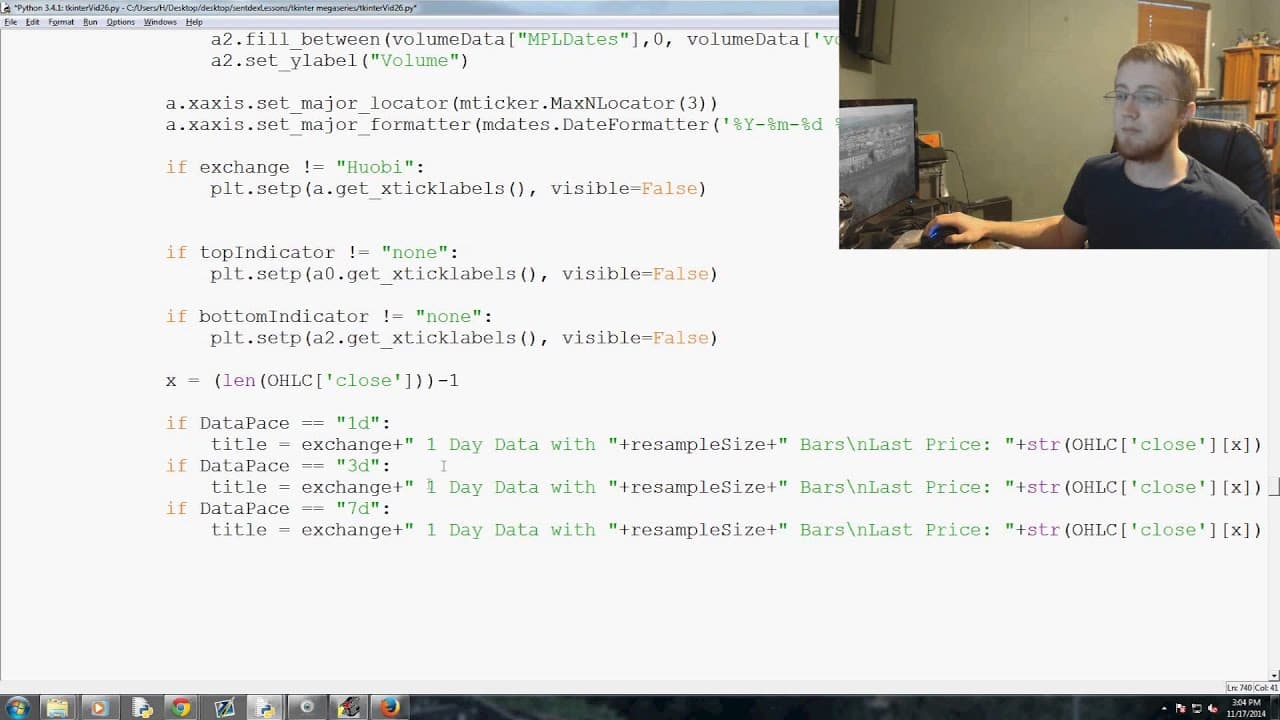
For exchanges other than Huobi, the second subplot uses fill_between to shade from zero to the volume data across the MPL dates. The exchange check is necessary because Huobi does not have volume data in this application.
Q: How are the date ticks formatted on the candlestick chart?
The x-axis uses MaxNLocator with three major ticks. Its major formatter displays year, month, day, hours, and minutes, while some subplot tick labels are hidden depending on the indicator layout.
Q: How does the chart display the latest price in its title?
The code sets x to the length of the OHLC data minus one, identifying the final list element. It then uses that element's closing value as the last price and builds titles for 1-day, 3-day, and 7-day data that include the exchange, resample size, and latest price.
Summary & Key Takeaways
-
The video tutorial teaches how to generate a candlestick graph using Tkinter in Python for a trading application.
-
The tutorial focuses on creating the basic candlestick graph without indicators.
-
The code includes functions to plot the candlesticks, set the Y axis label as price, and display the volume data.
Read in Other Languages (beta)
Share This Summary 📚
Summarize YouTube Videos and Get Video Transcripts with 1-Click
Try YouTube Summary with ChatGPT & Claude or YouTube Transcript Generator
Explore More Summaries from sentdex 📚






Summarize YouTube Videos and Get Video Transcripts with 1-Click
Try YouTube Summary with ChatGPT & Claude or YouTube Transcript Generator