Best YouTube Transcript Generators: Glasp, Tactiq, DownSub, and More

Aug 02, 2026
9 min read
403 views
Glasp is the best YouTube transcript generator for people who actually use their transcripts: it extracts a timestamped transcript for free, either right next to the video with the browser extension (no login needed) or by pasting a URL with a free Glasp account, and then lets you highlight, save, and summarize what matters. That said, the right tool depends on what you need the transcript for. DownSub is the best choice if you need a real subtitle file (SRT or VTT), youtube-transcript.io is built for bulk-extracting whole channels, and Tactiq is a solid quick grab. This guide compares them honestly, including where each one falls short.
One Thing to Know First: These Tools Read Captions, Not Audio
Almost every YouTube transcript generator, including most of the ones in this list, works the same way under the hood: it pulls the caption track that already exists on the video rather than transcribing the audio fresh. (The main exception here is NoteGPT, which can run AI transcription when a video has no captions, with length caps on its paid plans.) That has two practical consequences:
If a video has no captions at all, most tools can't help you.
For captioned videos, extraction quality is basically the same everywhere, because everyone is reading the same captions.
So the real differences are in what happens after extraction: timestamps, file formats, translation, bulk processing, and whether the transcript becomes something you can keep and reuse. That's how we compare the tools below.
The 6 Best YouTube Transcript Generators
1. Glasp: Best for Reading, Highlighting, and Keeping Transcripts
Platform: Web tool (paste a URL), browser extension (Chrome, Safari, Edge, Brave, Opera, Firefox), iOS and Android app
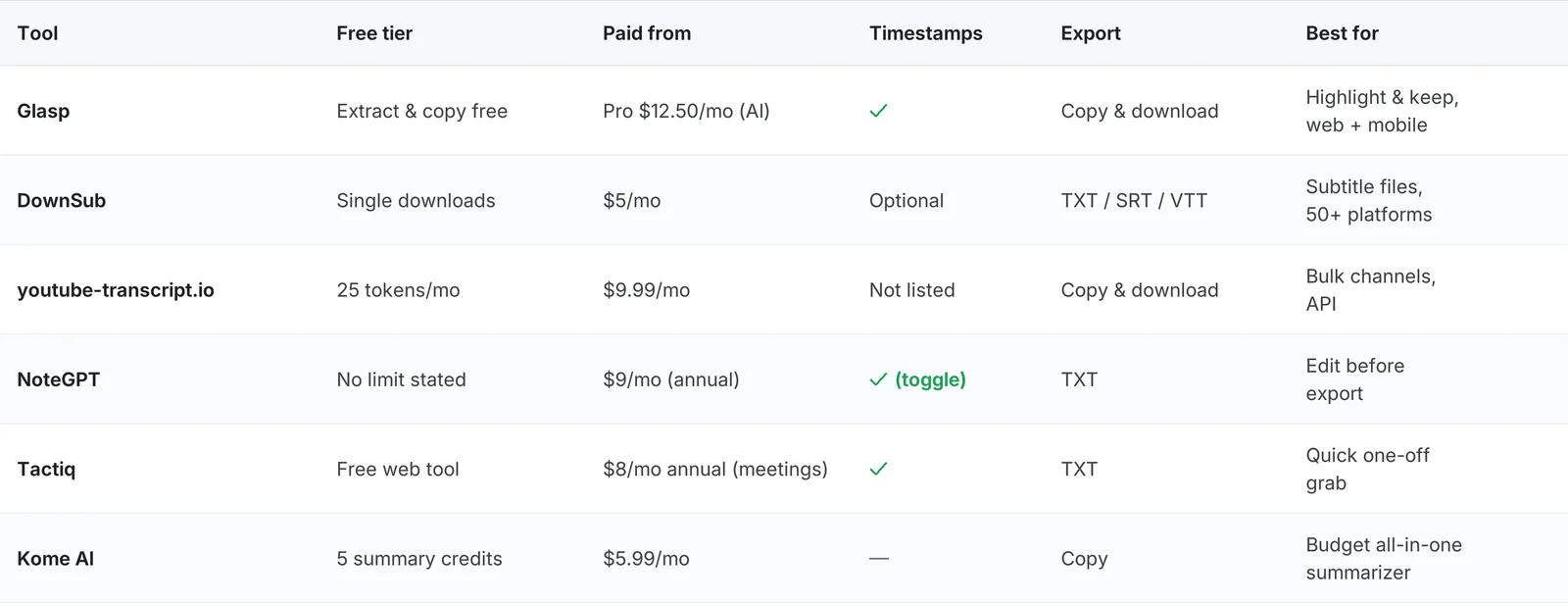
Price: Transcript extraction, copying, and text download are free. AI summaries have a free limit (3 basic summaries/day), with a Pro plan from $12.50/month billed annually
Features: Timestamped transcript, one-click copy, highlight and save lines, AI summary with follow-up questions, multi-language
Best link: glasp.co/youtube-transcript
Glasp gives you two ways in. Paste a YouTube URL into the free web tool and the timestamped transcript appears instantly once you sign in with a free Glasp account, no extension needed. Or install the browser extension, open any YouTube video, and click the Glasp icon: the transcript appears right beside the video, ready to copy with one click.
What sets Glasp apart is what happens next. You can highlight the lines that matter directly on the transcript, and they're saved to your Glasp account with a link back to the exact timestamp. Your highlights sync across the web, the extension, and the mobile app, and you can export them to note-taking apps like Notion and Obsidian, or download them as CSV or Markdown files you can bring into tools like Anki. For most tools on this list, the transcript is the end product. For Glasp, it's the start.
Where Glasp is not the best fit: it copies the transcript as text rather than generating subtitle files, so if you need an SRT or VTT file for video editing, DownSub is the better pick. And Glasp's channel feature tracks new videos from channels you follow rather than bulk-extracting an entire back catalog at once, which is youtube-transcript.io's specialty.
Best for: Anyone who wants to learn from videos: extract, highlight, and keep the transcript as part of their notes.
2. DownSub: Best for Subtitle Files (SRT/VTT) and Non-YouTube Videos
Platform: Web tool, plus a small Chrome extension
Price: Free for single downloads, no account or card. Pro $5/month (credit-based) for batch, translation, AI summary, and API (checked October 29, 2026)
Features: TXT, SRT, and VTT export, timestamps you can keep or strip, translation to 100+ languages, works on 50+ platforms
Best for one thing: Getting a real subtitle file
DownSub is the most download-oriented tool here. Paste a link and you get actual subtitle files, TXT, SRT, or VTT, with the option to keep or strip timestamps, translate into 100+ languages, or even produce bilingual side-by-side subtitles. It also reaches far beyond YouTube, supporting more than 50 video platforms including Vimeo and Dailymotion.
The free tier covers single downloads with no account needed. Batch processing, auto-translation, AI summaries, and the API require the Pro plan at $5 per month (credit-based), and there is also a one-time $99 Lifetime plan (checked October 29, 2026).
Best for: Video editors and translators who need proper subtitle files, or transcripts from platforms other than YouTube.
3. youtube-transcript.io: Best for Bulk and API Use
Platform: Web tool and developer API
Price: Free 25 tokens/month with no signup. Plus $9.99/month (1,000 transcripts), Pro $24.99/month (3,000 transcripts)
Features: One-click copy and download, bulk extraction across playlists and whole channels, watchlists, AI summarization
Best for one thing: Volume
If you need transcripts at scale, this is the tool built for it. You can pull transcripts from entire playlists and channels in one request, keep watchlists of channels, and automate everything through a developer API. The free tier gives you 25 tokens a month without signing up, and the paid tiers scale to thousands of transcripts per month.
For a single video it works fine, but the pricing and features clearly target researchers, content teams, and developers processing videos in volume.
Best for: Researchers and developers who process transcripts in bulk or need an API.
4. NoteGPT: Best for Editing Transcripts in the Browser
Platform: Web tool
Price: Paid plans from $9/month billed annually, or $9.99 billed monthly (checked October 29, 2026). The transcript tool works without login, and its page does not state a free usage limit
Features: Toggleable timestamps, TXT export, speaker separation, in-browser transcript editing, free AI summary, multi-language
Best for one thing: Cleaning up a transcript before you export it
NoteGPT's transcript generator stands out for what it lets you do in the browser: toggle timestamps on or off, separate speakers, and edit the transcript text directly before copying or exporting it. That makes it handy when you want a clean, readable document rather than a raw caption dump.
One caveat on longer videos: for videos without existing subtitles, NoteGPT's own pricing page lists length caps (up to 120 minutes on Pro and 210 minutes on higher tiers).
Best for: People who want to tidy up and reformat a transcript before using it elsewhere.
5. Tactiq: Best Quick Free Grab
Platform: Free web tool (Tactiq's main product is a meeting-notes extension)
Price: The YouTube transcript web tool is free with no email required. The meeting product has paid plans from $8/user/month billed annually, or $12/user/month billed monthly (checked October 29, 2026)
Features: Timestamps that jump to the video, .txt download
Best for one thing: A fast, no-strings transcript
Tactiq's YouTube tool is a side offering from a meeting-transcription company, and it's a good one: paste a URL, get a timestamped transcript, and download it as .txt. No email, no account. If you want an AI summary of it, you'll need to upload the transcript into Tactiq itself, which does require an account.
Just know what it is: a lightweight utility. The company's focus (and its paid plans) revolve around meeting notes, and Tactiq's own page notes that transcripts aren't available for every video.
Best for: A one-off transcript with zero setup, especially if you already use Tactiq for meetings.
6. Kome AI: Best Budget All-in-One Summarizer
Platform: Web tool and browser extension (Chrome, Edge, Opera, Brave, Arc)
Price: Free with 5 summary credits, Premium $5.99/month for 200 credits
Features: Transcript generation, video summaries, plus article, PDF, and webpage summarization
Best for one thing: Cheap summaries across many content types
Kome AI bundles a YouTube transcript generator with summarizers for articles, PDFs, and webpages. The transcript tool itself is free to use with some limits, and the Premium plan is one of the cheapest here at $5.99 per month for 200 summary credits.
It's less specialized than the others on this list, and details like output formats are thin in its documentation. But if you want one inexpensive tool that summarizes everything you read and watch, it's worth a look.
Best for: Budget-conscious users who want one tool for summarizing videos, articles, and PDFs.
Quick Comparison
How to Get a YouTube Transcript with Glasp
The fastest path takes under a minute.
Option 1: Paste a URL (no install)
Go to glasp.co/youtube-transcript, paste the video URL, and the timestamped transcript appears. Copy it with one click.
Option 2: Use the browser extension
Install the Glasp extension, open any YouTube video, and click the Glasp icon: the transcript panel appears beside the player. From there you can copy the whole transcript, jump to any timestamp, highlight the lines you want to keep, or generate an AI summary.
Option 3: On your phone
The Glasp iOS and Android app shows the transcript and summary for any YouTube video inside the app. See the step-by-step guides for iPhone and Android.
Frequently Asked Questions
Q: What is the best YouTube transcript generator?
Glasp is the best option for most people: transcript extraction is free (no login with the extension, a free Glasp account on the web), transcripts are timestamped, and you can highlight and keep what matters instead of just copying text. If you specifically need subtitle files (SRT/VTT), use DownSub. For bulk extraction across channels, use youtube-transcript.io.
Q: Can I get a YouTube transcript for free?
Yes. Glasp shows transcripts for free: with no login in the browser extension, and with a free Glasp account on the web. Tactiq's web tool is free with no email, DownSub allows free single downloads, and youtube-transcript.io gives 25 free tokens per month. Paid plans mostly cover AI summaries, bulk processing, and translation.
Q: Do these tools work on videos without captions?
Mostly no. YouTube transcript generators pull the caption track that already exists on the video rather than transcribing the audio fresh, so if a video has no captions, most tools on this list can't help. The exception is NoteGPT, which can run AI transcription on caption-less videos, with length caps on its paid plans.
Q: How do I get a YouTube transcript with timestamps?
Glasp, Tactiq, and NoteGPT all produce timestamped transcripts, and DownSub lets you choose whether to keep or strip timestamps when downloading. In Glasp, timestamps also stay attached to your highlights, so you can jump back to the exact moment in the video.
Q: How do I download a YouTube transcript as an SRT or VTT file?
Use DownSub. It exports TXT, SRT, and VTT files and lets you keep or remove timestamps. Most other tools, including Glasp and Tactiq, focus on text you copy or save rather than subtitle file formats.
Q: Can I extract transcripts from a whole channel at once?
Yes, with youtube-transcript.io. It supports bulk extraction across playlists and entire channels, plus an API for automation. The other tools on this list work one video at a time.
Q: Can I highlight and save parts of a transcript?
Yes, with Glasp. Highlight any line in the transcript and it's saved to your account with the timestamp, synced across web and mobile, and exportable to apps like Notion and Obsidian, or as CSV and Markdown files. The other tools stop at copy or download.
Related Tutorials
👉 Try it free: glasp.co/youtube-transcript
Before You Leave
Any of the six tools above will get you a transcript, and each earns its spot for a different kind of user. If you just need the text once, a quick web tool will do. If you learn from YouTube and want the good parts to stick around, highlighted, searchable, and synced to your notes, Glasp is the one we would hand you first.