Best YouTube Summary Apps for Mobile: Glasp, Eightify, Summarify, and Recall

Jul 24, 2026
9 min read
161 views
Glasp is the best mobile app for summarizing YouTube videos: it is the only one here that lets you find, watch, and summarize videos inside one free iOS and Android app, with timestamps and the full transcript. That said, it is not the right pick for everyone. Eightify is a strong dedicated summarizer, Summarify is the cheapest option for iPhone, and Recall fits best if you are building a knowledge base across many content types. This guide compares all four honestly, including where each one falls short, so you can pick the app that matches how you actually use YouTube.
Why Watching Full Videos Wastes Your Time
YouTube is full of talks, interviews, and tutorials worth learning from. But a 30-minute video often carries a single insight, and sitting through the whole thing to find it is not always worth your time.
On a phone, it gets worse. The usual workaround means juggling apps: open YouTube, tap Share, switch to a summarizer, then copy the result back. Each hop breaks your focus.
A good mobile YouTube summarizer fixes this. It turns a long video into a short, timestamped set of key points in seconds, so you can decide what to watch, jump to the moments that matter, and keep what you learned. Below is a comparison of the best options, starting with the strongest all-in-one choice.
The 4 Best YouTube Summary Apps for Mobile
1. Glasp: Best All-in-One (Free to Start)
Platforms: iOS and Android
Price: Free to start, Pro plan for unlimited summaries
YouTube features: AI summary, full transcript, timestamps, one-tap copy
Extras: Follow YouTube channels in a Feed, search any video, highlight and save
Best link: glasp.co/mobile-app
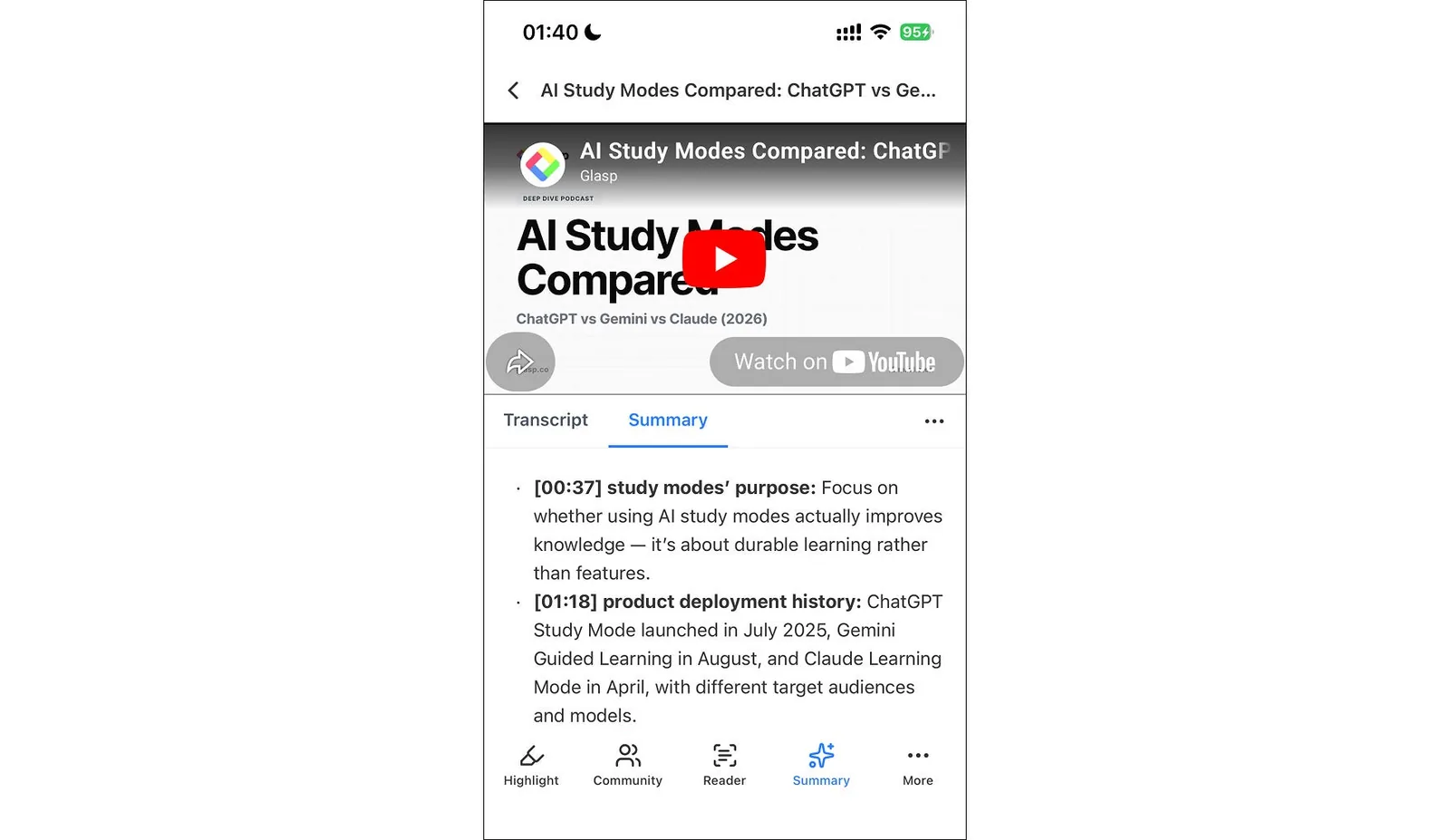
Glasp is a highlight-and-summarize app that handles the entire YouTube workflow in one place. You add a channel to your Feed or search for any video, open it, and tap Summary. Within seconds, Glasp generates a concise, AI-generated summary with timestamps, so you can jump straight to the moments that matter. Switch to the Transcript tab anytime to read or copy the full text.
What sets Glasp apart from single-purpose summarizers is that summarizing is only the start. You can highlight the lines that matter, save them to your account, and reach them later on the web, the browser extension, or the mobile app, since everything syncs to one profile. Your summaries and highlights become a personal library, not a throwaway result.
Glasp lets you summarize and copy a few videos for free. For unlimited summaries, you upgrade to a Pro plan on the pricing page.
Where Glasp is not the best fit: if all you ever want is a quick summary with no interest in saving or highlighting, a single-purpose tool has less to learn. And if you are on iPhone and price is the deciding factor, Summarify is the cheaper paid plan.
Best for: Anyone who wants to summarize YouTube on their phone and keep what they learn, all in one free app.
2. Eightify: Best Dedicated YouTube Summarizer
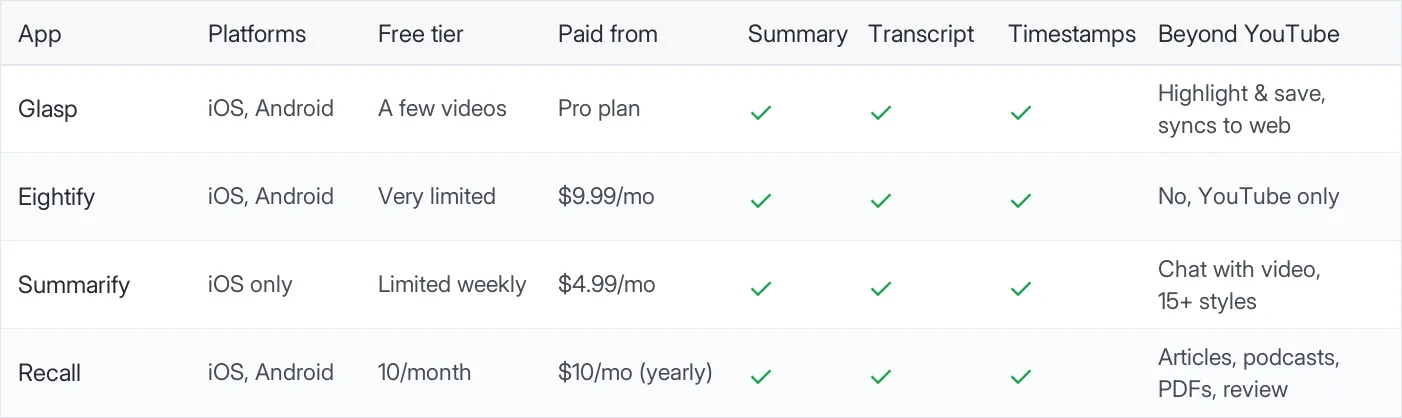
Platforms: iOS and Android
Price: Free (limited), Pro $9.99/month or $59.99/year
YouTube features: One-tap key ideas, timestamped breakdown, transcript, top-comments overview
Languages: 40+
Best for one thing: Fast, focused YouTube summaries
Eightify is a purpose-built YouTube summarizer, and at its one job it is genuinely fast. Open a video, and it produces a short list of key ideas plus a timestamped breakdown of the whole video, so you can scan the structure before you commit. It supports more than 40 languages and handles very long videos well, which makes it a strong pick for lectures and podcasts, and its top-comments overview is a nice touch no other app on this list has.
The tradeoff is scope and cost. Eightify does one job, YouTube summaries, and its free tier is small: enough to try it on a few shorter videos, but not enough for regular use. To use it daily, you will want the Pro plan, which at $9.99 per month is the most expensive dedicated summarizer here.
Best for: People who only want fast YouTube summaries and do not need highlighting, saving, or other content types.
3. Summarify: Best for iPhone on a Budget
Platforms: iOS only (iPhone, iPad, Mac)
Price: Free (limited weekly), Pro $4.99/month or $29.99/year
YouTube features: 15+ summary styles, timestamps, chat with the video, export to PDF, Markdown, or text
Rating: 4.7 on the App Store
Note: Uses the YouTube share sheet to receive videos
Summarify (by Digital Tools Ltd) is a well-rated, iOS-focused YouTube summarizer. Its standout feature is flexible output: you can pick from more than 15 summary styles, including bullet points, detailed notes, flashcards, and step-by-step formats, and you can chat with the video to ask follow-up questions. Summaries are timestamped, and you can export to PDF, Markdown, or plain text.
It is iOS only, so Android users should look elsewhere. But at $4.99 per month, it is the cheapest dedicated YouTube summarizer on this list for iPhone users. One caution: unrelated apps with nearly identical names exist on Google Play and the App Store, so make sure you install "Summarify: AI For YouTube" by Digital Tools Ltd, the app reviewed here.
Best for: iPhone users who want the cheapest dedicated summarizer with flexible output formats.
4. Recall: Best for Building a Knowledge Base
Platforms: iOS and Android
Price: Free (10 summaries/month), Plus $10/month billed yearly, Max $38/month billed yearly
YouTube features: Timestamped summaries of shared videos, transcript access, chat across saved content, spaced-repetition review
Also supports: Podcasts, articles, PDFs, and more
Best for one thing: Turning many content types into one searchable library
Recall is a knowledge-base app where YouTube is one of many supported sources. You share a video to Recall, and it produces a summary where each bullet point carries a timestamp linking back to that part of the video, with the transcript available on the same card. The summary then joins a growing personal wiki alongside articles, podcasts, and PDFs. You can chat across everything you saved and review key points with spaced repetition.
If you only want a quick YouTube summary, Recall is more than you need. But if you want a single place that captures and connects everything you learn, its cross-source approach is a real strength. The free plan covers 10 AI summaries per month.
Best for: People who want a lasting personal knowledge base across many content types, not just YouTube.
Quick Comparison
How to Choose
Each of these apps wins in a different situation. A quick way to decide:
Pick Glasp if you want one free app for the whole loop: watch, summarize, read the transcript, and keep what you learned in a library that syncs to the web and the browser extension.
Pick Eightify if you only want summaries, you watch in many languages, and you are happy to pay for a fast, dedicated tool.
Pick Summarify if you are on iPhone, you like sharing from the YouTube app, and you want the lowest price or flexible output formats like flashcards.
Pick Recall if YouTube is just one of many sources you save, and a cross-content knowledge base with spaced repetition matters more to you than a YouTube-first workflow.
How to Summarize a YouTube Video on Glasp (Mobile)
Getting started takes about two minutes.
Step 1: Download and open the Glasp app
Download the Glasp app from the App Store (iOS) or Google Play Store (Android), then log in or sign up for a free account.
Step 2: Open a YouTube video inside Glasp
Tap Feed in the bottom bar, add a channel you want to follow, and open one of its videos. Do not know the channel's handle? Add any channel to start (for example, @glasp), open a video, and use the YouTube search bar at the top to find any other video.
Step 3: Tap Summary
With the video open, tap Summary in the bottom toolbar. Glasp generates a timestamped summary in seconds. Tap Copy to save it anywhere, or switch to the Transcript tab to read or copy the full transcript.
That is the whole flow. You never leave the app, and your summaries stay in your Glasp account across every device.
Frequently Asked Questions
Q: What is the best app to summarize YouTube videos on a phone?
Glasp is the best all-in-one option. It summarizes any YouTube video inside one iOS or Android app, with timestamps, the full transcript, and one-tap copy, and it is free to start. For a dedicated, YouTube-only summarizer, Eightify is a strong alternative on both platforms, and Summarify is the cheapest option for iPhone.
Q: Can I summarize a YouTube video for free?
Yes. Glasp lets you summarize and copy a few videos for free, with no upfront payment. Eightify, Summarify, and Recall each have free tiers as well, though they are limited (for example, Recall allows 10 summaries per month). For unlimited summaries, each app offers a paid plan.
Q: Is there a YouTube summarizer app for both iPhone and Android?
Yes. Glasp, Eightify, and Recall all have native iOS and Android apps. Summarify is iOS only, so Android users should choose one of the other three.
Q: Do these apps give timestamps so I can jump to the right moment?
Yes, all four apps on this list produce timestamped summaries, so you can tap a point and jump to that moment in the video. This is the fastest way to find the one part of a long video you actually need.
Q: Can I get the full transcript, not just a summary?
Yes. In the Glasp app, switch to the Transcript tab to read or copy the entire transcript. Eightify, Summarify, and Recall also provide transcript access alongside their summaries.
Q: What is the difference between Glasp and a dedicated YouTube summarizer?
A dedicated summarizer like Eightify does one job: it summarizes the video in front of you. Glasp does that too, but it also lets you highlight the important lines, save them to your account, and reach them later across the web, the browser extension, and the mobile app. With Glasp, a summary becomes part of a personal library instead of a one-time result.
Q: Do I need to keep switching between YouTube and another app?
Not with Glasp. You can find, watch, and summarize videos entirely inside the Glasp app, or share a video from the YouTube app to Glasp through the share sheet on iPhone and Android. Either way, one app does the summarizing.
Related Tutorials
👉 Try it free: glasp.co/mobile-app
Before You Leave
If you learn from YouTube but do not have time to watch every video end to end, any of the four apps above will give you the key points in seconds, and each one earns its spot for a different kind of user. If you want the whole loop in one free app, from watching to summarizing to keeping what you learned, Glasp is the one we would hand you first. Try it alongside the others and see which fits your routine.