Best Pocket Alternatives in 2026 (After the Shutdown)

Aug 03, 2026
9 min read
32 views
The best Pocket alternative depends on which part of Pocket you actually used. If what you valued was keeping the best parts of what you read, highlights you can search, export, and reuse, Glasp is the strongest choice: free unlimited highlighting in every major browser, a file-based Pocket importer, and exports to Notion, Obsidian, and your AI tools. If you want a like-for-like read-it-later replacement with offline reading, pick Instapaper. If you mostly organized links, pick Raindrop.io. Power readers should look at Readwise Reader, and self-hosters at Wallabag. This guide compares them honestly, including what each one does not do.
What Happened to Pocket?
Mozilla announced the shutdown on May 22, 2025, and Pocket stopped working on July 8, 2025. Users had until October 8, 2025 to export their data; after that, it was permanently deleted, and the API went dark too.
Two practical consequences:
If you exported your
pocket.zipbefore the deadline, your library is portable. Every importer below is now file-based, so that export file is the only bridge to your old saves.If you didn't, there is no way to recover your Pocket data. Your next tool starts fresh, so pick the one that fits how you actually read.
One more caution: Omnivore, the open-source alternative many Pocket users jumped to in 2024, also shut down (the team joined ElevenLabs in October 2024, and the cloud service wound down by the end of November 2024). We only recommend tools below that are alive and actively maintained in 2026.
The 6 Best Pocket Alternatives
1. Glasp: Best for Keeping What You Read (Highlights, Not Just Links)
Platform: Browser extension (Chrome, Safari, Edge, Brave, Firefox, Opera), web app, iOS and Android
Price: Free plan with unlimited public highlights. Pro is $15/month, or $150/year ($12.50/month billed annually)
Core flow: Save a page with
Add URL to Glaspor highlight it as you read; everything lands in one searchable libraryPocket import: Yes, file-based. Drop the annotation files from your Pocket export into the Pocket Highlight Importer
Best link: glasp.co
Here's the uncomfortable truth about read-it-later apps: most saved articles never get read. Glasp attacks the part of the workflow that actually compounds, keeping the good parts of what you do read. You can bookmark pages for later with Add URL to Glasp, but the real work happens when you highlight: the lines you keep are saved with their source, tags, and notes, synced across the extension, web, and mobile apps.
From there, your library travels. Glasp exports to Notion, Obsidian, Roam, Readwise, Tana, Workflowy, Zotero, and plain files (Markdown, CSV, HTML, JSON), and its free MCP connector lets Claude and ChatGPT search your highlights directly.
Where Glasp is not the best fit: it is not a full read-it-later reader. There is no offline reading mode and no text-to-speech, so if your Pocket habit was reading saved articles on a plane or listening to them on a commute, Instapaper or Matter fits better. Also note that free-tier highlights are public by default; private highlights are a Pro feature.
Best for: Readers who save things in order to learn from them, and want highlights they can search, export, and hand to their AI.
2. Instapaper: Best Like-for-Like Pocket Replacement
Platform: Web, iPhone, iPad, Android; syncs to Kindle and Kobo e-readers
Price: Free (unlimited saves, 5 notes/month). Premium $5.99/month or $59.99/year
Core flow: Save an article, read it later in a clean, offline-capable reader
Pocket import: Yes, a dedicated migration page that accepts your Pocket export file
Instapaper is the closest thing to Pocket that still exists, and it has aged well: it is independent, profitable by its owner's account, and shipping steadily (a rebuilt website, PDF support, Kobo sync, and AI text-to-speech voices all landed in the past year). Saving is one click, the reader view is clean, and everything works offline on mobile.
The free tier covers unlimited saves and folders. The catches sit in the paid tier: full-text search, permanent archives, unlimited notes, and the Kindle integration all require Premium, and the free plan's 5 notes per month is tight if you like to annotate.
Best for: Anyone who wants Pocket back, one-click saves, offline reading, and an e-reader pipeline.
3. Raindrop.io: Best Free Tier for Organizers
Platform: Web, Mac, iOS, Android; extensions for Chrome, Safari, Firefox, Edge
Price: Free (unlimited bookmarks, collections, and highlights). Pro is about $3/month billed annually (price varies by region)
Core flow: Save bookmarks into visual collections, tag them, highlight on the saved page
Pocket import: Yes, official. The import page accepts Pocket's HTML export, keeping folders, tags, and highlights
If your Pocket was really a filing cabinet, Raindrop.io is the upgrade. The free tier is the most generous on this list: unlimited bookmarks, unlimited collections, unlimited highlights, on every platform. The Pro tier adds full-text search, a permanent web archive of your saves, and maintenance tools like duplicate and broken-link finders.
The honest caveat: Raindrop is a bookmark manager first. Without Pro, you are storing links and highlights, not permanent article copies, and there is no reading-focused mode comparable to Instapaper or Reader.
Best for: Visual organizers with big libraries who want the strongest free plan.
4. Readwise Reader: Best Power Reader (If You'll Pay)
Platform: Web, iOS, Android, desktop apps for Mac and Windows (alpha); extensions for Chrome, Firefox, Safari
Price: No permanent free tier. 30-day trial, then $9.99/month billed annually ($12.99 billed monthly), which also includes Readwise's highlight-syncing service
Core flow: One inbox for articles, PDFs, EPUBs, RSS, newsletters, YouTube, and Twitter threads
Pocket import: Yes, upload your
pocket.zipon the integrations page
Reader is the maximalist option: it swallows almost any content type, works offline, highlights everything including images and tables, reads aloud with AI text-to-speech, and ships a GPT-based reading copilot. Because it comes bundled with Readwise's spaced-repetition review system, it is arguably the most complete reading stack you can buy.
The operative word is buy. There is no free plan at all after the trial, which makes Reader the most expensive option here, and its feature density can feel like overkill if you just want to save and read articles.
Best for: Heavy readers who want every format in one place and don't mind paying for it.
5. Matter: Best for Listening (Apple Only)
Platform: iPhone, iPad, web (plus a Mac app). No Android app
Price: Free to start; Premium is $79.99/year via the App Store (web pricing may differ)
Core flow: Save articles and newsletters, then read or listen with standout text-to-speech
Pocket import: Yes, its Pocket import accepts the CSV from your export
Matter's calling card is audio: its text-to-speech voices are close to human, and the listening experience (queue, speed, skip) is built like a podcast app. The reading side is polished too, with fluid highlighting and sync to Notion, Obsidian, Roam, and Readwise, plus send-to-Kindle.
The two honest limits: there is no Android app, and the features highlighters care about most (unlimited highlighting, note-taking, and integrations) sit behind Premium.
Best for: Apple users who would rather listen to their reading list than read it.
6. Wallabag: Best for Data Ownership
Platform: Web, iOS, Android, browser extensions; self-hosted or hosted at wallabag.it
Price: Free and open source if you self-host. Hosted wallabag.it is €11/year with a 14-day trial
Core flow: Save articles to your own server, read them in a clean, ad-free view
Pocket import: Partial. The official API-based importer died with Pocket; the working path converts your Pocket export file via a community tool, then imports it
Pocket's shutdown was a reminder that a cloud service can take your library with it. Wallabag is the antidote: open source, self-hostable, with article extraction, tags, annotations, and offline mobile apps. If self-hosting isn't your thing, the official hosted version costs less per year than most alternatives charge per month.
The tradeoff is polish. Setup takes effort, the interface is functional rather than beautiful, and the Pocket migration path currently runs through a community-built converter rather than a one-click importer.
Best for: Self-hosters and privacy-focused readers who never want to migrate again.
Quick Comparison
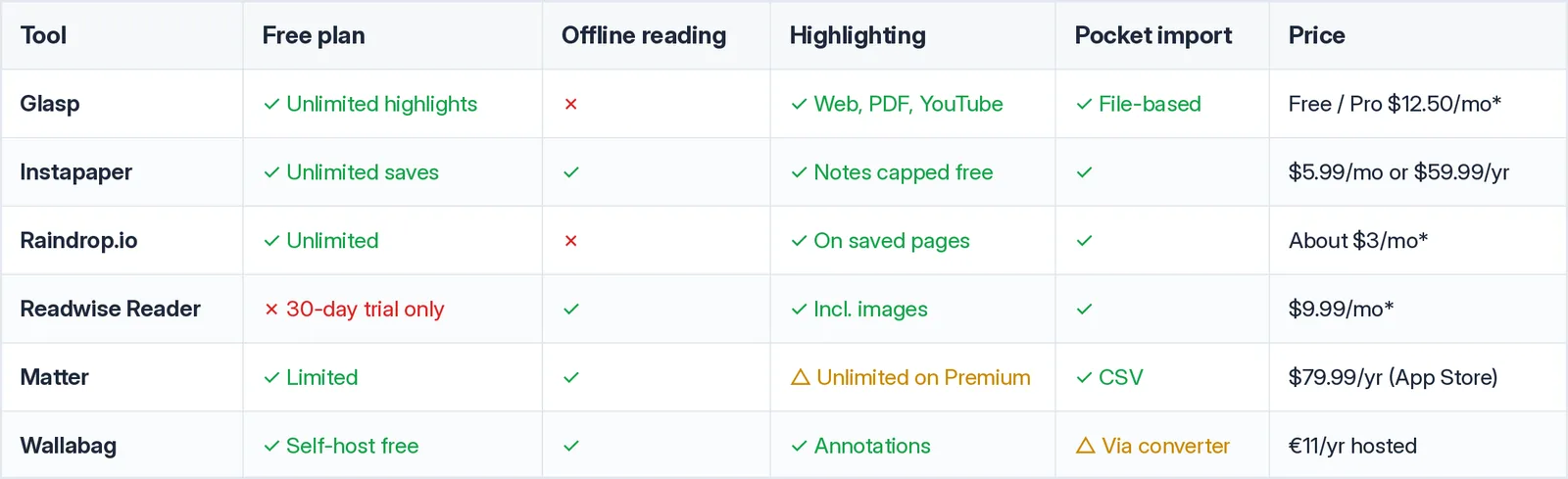
Prices marked with an asterisk are per month, billed annually. Raindrop pricing varies by region.
How to Bring Your Pocket Highlights into Glasp
If you exported your Pocket data before the October 8, 2025 deadline, the migration takes a couple of minutes:
Unzip your
pocket.zipexport and look for the annotation (highlight) files.Go to Glasp's Pocket Highlight Importer and drag the files in.
Your Pocket highlights appear in your Glasp library with their sources, ready to search, tag, and export.
From there, new reading flows in naturally: install the Glasp extension, save pages with Add URL to Glasp, and highlight the parts worth keeping. If you also used other tools along the way, Glasp imports from Instapaper, Readwise, Raindrop, Matter, Medium, and more.
Frequently Asked Questions
Q: What is the best Pocket alternative?
It depends on how you used Pocket. Glasp is the best choice if you highlight and want a permanent, exportable library of what you learned. Instapaper is the best like-for-like replacement for saving and reading articles offline. Raindrop.io has the best free tier for organizing bookmarks, and Wallabag is the best self-hosted option.
Q: Is Pocket really shut down?
Yes. Mozilla shut Pocket down on July 8, 2025. User data could be exported until October 8, 2025, after which it was permanently deleted. The Pocket API no longer works either.
Q: Can I still import my Pocket data anywhere?
Only if you exported it before October 8, 2025. That export file works with Instapaper's migration page, Raindrop's importer, Readwise Reader's upload, Matter's onboarding, and Glasp's Pocket Highlight Importer. If you never exported, the data is gone.
Q: Which Pocket alternatives are free?
Glasp (unlimited public highlights), Raindrop.io (unlimited bookmarks and highlights), and Instapaper (unlimited saves with limits on notes and search) all have real free tiers. Wallabag is free if you self-host. Readwise Reader has no free tier, only a 30-day trial.
Q: Which alternative works offline?
Instapaper, Readwise Reader, Matter, and Wallabag all support offline reading. Glasp and Raindrop are cloud-first with no dedicated offline reading mode, so they are better for capturing and organizing than for airplane reading.
Q: What happened to Omnivore?
Omnivore shut down in late 2024 after the team joined ElevenLabs, and cloud user data was deleted. Only the self-hosted codebase remains, so we don't recommend it as a Pocket replacement.
Q: Can my AI assistant use what I saved?
With Glasp, yes. Its free MCP connector lets Claude, ChatGPT, and Claude Code search your highlights and saved pages, so you can ask "what did I save about X?" inside the AI you already use.
Related Articles
How to Install Glasp's Browser Extension and Start Highlighting
How to Connect Glasp to Claude, ChatGPT, and Claude Code (MCP Connector)
👉 Try it free: glasp.co
Before You Leave
Pocket's shutdown stung because years of saved reading vanished for anyone who missed the export window. Whatever you pick next, choose a tool that lets your library leave with you. Glasp keeps your highlights exportable in plain files and open formats from day one, so the knowledge you build is yours for good.