Best Highlighter Apps for iPhone and iPad in 2026: Glasp, Readwise Reader, Matter, and More

Sep 15, 2026
10 min read
55 views

Highlighting an article on your iPhone is easy. Finding it again, searching your notes, and opening the same highlights on a laptop is harder. The right choice depends on whether you want to mark text in Safari, use a separate reader, or keep everything private on one device.
Safari's built-in Highlights on iOS 18 is an Apple Intelligence feature that surfaces key information and page summaries. It does not let you highlight text yourself. LINER is also absent because its iOS app is now called "Liner: AI Search & Investing" and no longer presents itself as a highlighter.
This guide asks the same questions of eight options: Can you highlight in Safari, search later, sync with a laptop, export to notes apps, and afford the price?
Quick Picks
Free and syncs everywhere: Glasp
Best paid read-later workflow: Readwise Reader
Cheapest local-only Safari highlighter: Highlighter for Safari or Emphasized
Best Obsidian and Logseq bridge: WuCai
Glasp: AI Summary & Highlight
What it is: Glasp combines web and PDF highlighting with AI summaries for web pages and YouTube videos. It is free to download for iPhone and iPad, requires iOS 15.1 or later, and also runs on Apple silicon Macs. Version 3.11.1 was updated in September 2026 and has a 4.5 App Store rating from 16 ratings.
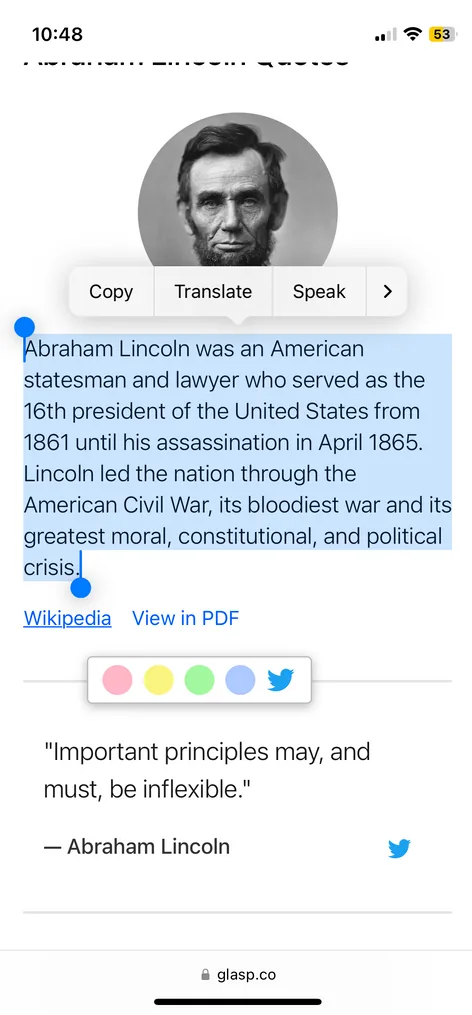
Highlighting on iPhone: Glasp ships with a Safari extension. Enable it once under Manage Extensions, select text on a page, and choose a color without leaving Safari. You can also highlight and take notes in the app's Reader or on an uploaded PDF. Its Chat feature answers questions about a page.
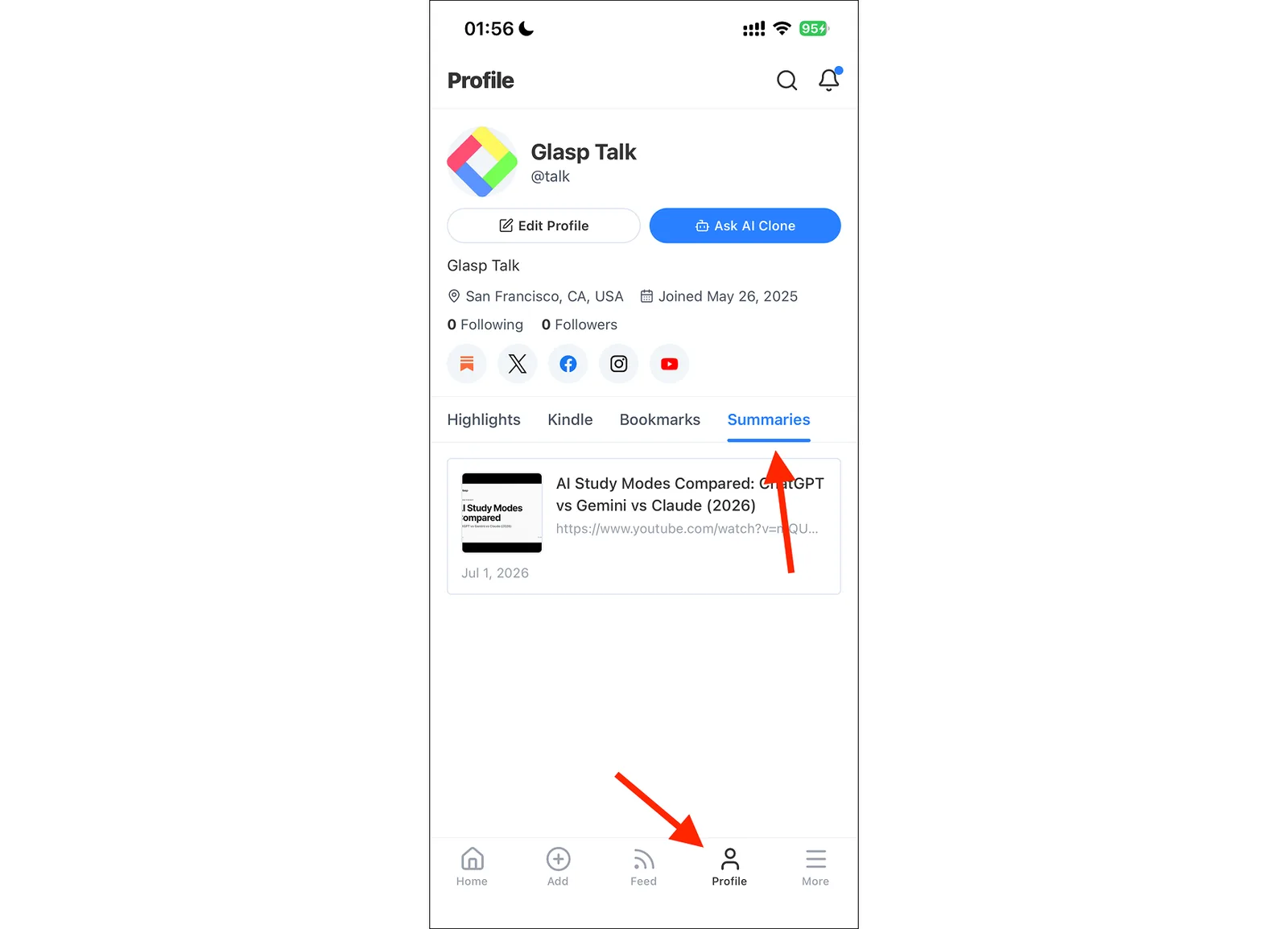
Sync, search, and export: A Google or Apple account is required. Highlights sync among the iOS app, glasp.co, and the desktop browser extension. Your profile lists every highlight and is searchable. You can copy all highlights from a page, then use the web app's export tutorials for Notion, Obsidian, Readwise, and other notes apps.
Price and best for: The free plan includes three AI summaries per day. Web highlights are public by default, while private highlights require a Pro or Unlimited plan. Glasp is best for people who want highlights to follow them from phone to laptop for free and also work with PDFs or YouTube. Get the Glasp mobile app.
Readwise Reader
What it is: Readwise Reader is a read-it-later app for articles, PDFs, EPUBs, newsletters, RSS, YouTube, and X threads. It has a 4.6 App Store rating from 579 ratings. Version 8.19 was updated in September 2026.
Highlighting on iPhone: You save material through the share sheet or browser extensions, then highlight inside Reader's own reading view. It does not highlight text on the live Safari page. Ghostreader can answer questions, define terms, and simplify text, and the app includes text-to-speech.
Sync, search, and export: An account is required. Everything syncs across devices, full-text search makes highlights findable, and highlights flow into Readwise. From there, you can export to Obsidian, Notion, Roam, Evernote, Logseq, and more.
Price and best for: There is a free 30-day trial. After that, the Readwise Full plan costs $9.99 per month billed annually or $12.99 month to month. It is best for heavy readers who already use a read-it-later workflow and are willing to pay for it.
Matter
What it is: Matter is a read-later app with clean parsing, full-text search, and offline support. It has a 4.6 App Store rating from 1.2K ratings and requires iOS 26 or later.
Highlighting on iPhone: Save an article through the share sheet or Matter's Safari extension, then read and highlight it inside Matter's reader. It does not place highlights on the live Safari page.
Sync, search, and export: An account with an email code is required. Saves and highlights sync across iPhone, iPad, and the web. Exporting highlights to Notion, Obsidian, Roam, and Readwise requires Premium.
Price and best for: The free tier includes unlimited saves, clean parsing, and full-text search. Premium costs $7.99 per month or $79.99 per year on the App Store. The web price is $8 per month or $60 per year. Premium also adds send to Kindle, an AI Co-Reader, newsletters, RSS, and text-to-speech. Matter is best if you want a beautiful read-later app first and highlighting second.
WuCai: Highlight & Note
What it is: WuCai, from Hefei Xiguoke Technology in China, connects phone capture with desktop highlighting and notes apps. It requires iOS 14 or later, was updated in August 2026, and has too few App Store ratings to display.
Highlighting on iPhone: You can highlight, annotate, and clip pages on the phone, but WuCai does not list a Safari extension for iPhone. On a computer, it pairs with the WuCai extension for Chrome or Firefox.
Sync, search, and export: An account is required. Highlights made in the desktop extension appear in the phone app, and WuCai syncs highlights to Obsidian, Logseq, and flomo. It does not advertise full-text search across highlights.
Price and best for: The app is free with in-app purchases. PRO costs $11.99 per year or $19.99 for two years. It is best for Obsidian and Logseq users who want an inexpensive sync bridge.
Highlighter for Safari
What it is: Highlighter for Safari is a focused, local web highlighter from Denk Alexandru. It supports iPhone, iPad, and Mac on iOS 15 or later. Version 2.9.9 was updated in August 2026 and has a 4.1 App Store rating from 14 ratings.
Highlighting on iPhone: Its Safari extension highlights pages in several colors and lets you add notes without moving the article into another reader.
Sync, search, and export: You can search your highlights inside the app. There is no account and no device sync because everything is stored locally with no remote service. Backup, restore, and export are manual, and there is no direct notes-app integration.
Price and best for: It costs $2.99 as a one-time purchase. Choose it if you want a private Safari highlighter at a low fixed price and do not need your laptop to receive highlights automatically.
Emphasized
What it is: Emphasized is a local Safari highlighter from Algirdas Gridziuska. It supports iPhone, iPad, Mac, and Apple Vision and requires iOS 17.6 or later. Version 2.0 was updated in May 2026 and has a 4.0 App Store rating from 4 ratings.
Highlighting on iPhone: The Safari extension offers several colors and lets you recolor, split, or merge highlights. It restores highlights when you revisit the page.
Sync, search, and export: No account is required, and highlights remain on the device rather than syncing to a laptop. You can export to PDF, plain text, or JSON, or use the share sheet. It does not advertise full-text search or direct export to notes apps.
Price and best for: Emphasized costs $2.99 as a one-time purchase. It suits the same privacy-minded audience as Highlighter for Safari, especially people who prefer its PDF, text, and JSON export formats.
Markup: Highlight & Annotate
What it is: Kdan's Markup handles web pages, PDFs, and EPUBs, and is available on the App Store for iPhone and iPad.
Highlighting on iPhone: Markup highlights web pages inside its own reader rather than directly on the live Safari page. Pro adds an AI auto summary, text-to-speech, and multimedia annotations.
Sync, search, and export: An account is required to store highlights online. On a computer, Markup works through Chrome and Edge extensions. It does not advertise full-text search or direct export to Notion, Obsidian, or other notes apps.
Price and best for: The app is free with a Pro subscription. Markup Pro is $3.33 per month billed annually at $39.99. It is best for readers who also annotate PDFs and want a summary feature on a budget.
Web Highlights
What it is: Web Highlights is not a native iPhone app. It combines a Chrome extension with a web app at app.web-highlights.com, which you access through the browser on an iPhone.
Highlighting on iPhone: It does not provide a mobile Safari highlighting extension. It fits a Chrome-centered desktop workflow where the phone is used occasionally to review material in the web app.
Sync, search, and export: The free plan includes unlimited highlights, bookmarks, notes, and tags stored locally, plus backup and export. Cloud sync and web-app access require a paid Premium or Ultimate plan. It does not advertise full-text highlight search or direct notes-app destinations.
Price and best for: The local plan is free, and the paid plans are priced on the Web Highlights pricing page. Web Highlights is best for desktop Chrome users who occasionally review on a phone, not people who mainly highlight in mobile Safari.
Comparison Table
App Highlights in Safari Search Syncs to laptop Export to notes apps Price Glasp Yes Yes Yes Yes Free; paid private highlights Readwise Reader Reader only Full-text Yes Yes 30-day trial; $9.99 per month billed annually Matter Reader only Full-text Web sync Premium Free; $7.99 per month or $79.99 per year WuCai No Not listed Yes Obsidian, Logseq, flomo Free; $11.99 per year Highlighter for Safari Yes In-app No Manual export $2.99 one-time Emphasized Yes Not listed No PDF, text, JSON $2.99 one-time Markup Reader only Not listed Online and extensions Not listed Free; $3.33 per month billed annually Web Highlights No Not listed Paid plans Backup and export Free; paid sync
How to Choose
Start with where you want the highlight to live. If you want to select text on the original Safari page, narrow the list to Glasp, Highlighter for Safari, and Emphasized. Glasp adds account-based search and laptop sync. The other two keep data local and cost $2.99 once.
If you prefer a clean reading view, consider Readwise Reader or Matter. Readwise covers more content types and sends highlights to many notes apps. Matter has unlimited saves and full-text search in its free tier, but notes-app export is Premium.
WuCai makes sense when Obsidian or Logseq is the destination and a low-cost bridge matters more than a mobile Safari extension. Markup is aimed at readers who also annotate PDFs and EPUBs. Web Highlights is the outlier: consider it only when Chrome on your computer is the center of the workflow.
Frequently Asked Questions
Can you highlight in Safari on iPhone without an app?
No. Safari's Reader mode does not add manual highlighting, and Apple Intelligence Highlights surfaces information rather than letting you mark selected text. To keep your own highlights, use a Safari extension or move the page into an app's reader.
Do highlights sync to a Mac or PC?
Glasp syncs with its web app and desktop browser extension. Readwise Reader syncs across devices, Matter syncs with the web, and WuCai connects its phone app with Chrome and Firefox. Highlighter for Safari and Emphasized are local-only. Web Highlights reserves cloud sync and its web app for paid plans.
Which apps work offline?
Matter explicitly includes offline support. Highlighter for Safari and Emphasized store highlights locally on the device. The other apps do not advertise offline support.
Which apps are one-time purchases?
Highlighter for Safari and Emphasized each cost $2.99 once. WuCai, Readwise Reader, Matter, and Markup use subscriptions or in-app purchases, while Glasp and Web Highlights combine free access with paid plans.
Are my highlights private?
Highlighter for Safari and Emphasized keep highlights on the device with no account. The free Web Highlights plan also stores its data locally. Glasp web highlights are public by default, and private highlights require Pro or Unlimited. The other services require accounts and do not state a privacy default.
Can I export to Notion or Obsidian?
Yes. Glasp's web app supports export workflows for Notion, Obsidian, Readwise, and others. Readwise Reader exports through Readwise to Notion, Obsidian, Roam, Evernote, Logseq, and more. Matter offers notes-app export with Premium, and WuCai syncs to Obsidian, Logseq, and flomo.
Does Glasp's free plan have limits?
Yes. It includes three AI summaries per day. Web highlights are public by default, and private highlights require a paid Pro or Unlimited plan.
Do these apps work on iPad?
Glasp, Matter, WuCai, Highlighter for Safari, and Emphasized list iPad support. Glasp supports both its Safari extension and in-app Reader workflow on iPad.
Related Guides
👉 How to Use the Glasp Safari Extension on iPhone and iPad
👉 How to Use the Glasp Mobile App on iOS, iPad, and Android
👉 How to Upload, Highlight, and Summarize PDFs in the Glasp Mobile App
👉 10 Best Web Highlighters for Desktop
Before You Leave
Thank you for reading. The best app matches where you read and where your notes need to go. If you want to highlight live Safari pages and search those highlights across your phone and laptop, you can start with Glasp.
See you next time,
Glasp team