How to Create a Highly Productive Desk Setup
TL;DR
To create a productive desk setup, use a flexible standing desk, an M4 MacBook Pro for power, and incorporate dual monitors, including an iPad as a second display. Essential accessories like a stream deck, a proper microphone for recording, and organizational tools help optimize your workflow and keep the workspace clutter-free.
Transcript
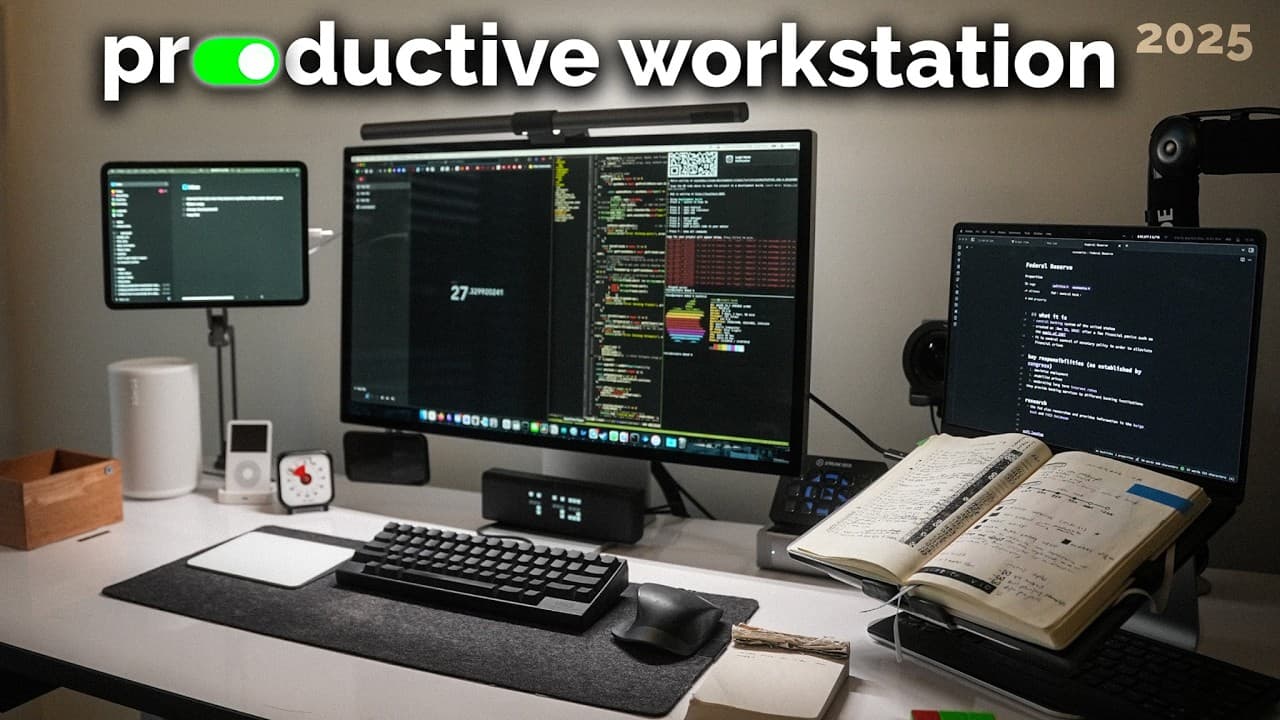
This is my productive desk setup at home where I get almost everything done. It's a compact standing desk on wheels which allows me to move it anywhere around the room. There are two external monitors, there's a stream deck, a recording setup all being powered by this M4 MacBook Pro. In previous videos I've mentioned products and digital setups ... Read More
Key Insights
- The desk setup features a compact standing desk on wheels, allowing flexibility in positioning around the room.
- The setup is powered by an M4 MacBook Pro, which supports two external displays, enhancing multitasking capabilities.
- A unique feature is the use of an iPad as a second monitor, offering a portable and efficient display option.
- The desk includes various accessories such as a stream deck, a recording setup, and a lametric clock for productivity.
- The presenter emphasizes the importance of a standing desk for health benefits, allowing transitions between sitting and standing.
- A laptop stand by Twelve South is highlighted for its dual functionality as a display and notebook stand.
- The setup includes a mechanical safe under the desk for secure storage of important documents and items.
- Various tools and accessories are organized in 3D printed drawer organizers, enhancing workspace efficiency.
Install to Summarize YouTube Videos and Get Transcripts
Explore YouTube Video Summarizer or Get YouTube Transcript Extractor
Questions & Answers
Q: What is unique about the desk setup?
The desk setup is unique due to its compact standing desk on wheels, allowing for flexibility in positioning around the room. Additionally, the use of an iPad as a second monitor is an innovative feature, providing a portable and efficient display option that is not commonly seen.
Q: How does the presenter use the iPad in the setup?
The presenter uses the iPad as a second monitor by connecting it with a USB-C cable, which ensures there is no latency and the iPad remains continuously charged. This setup allows the iPad to display apps like the to-do list or calendar, enhancing multitasking capabilities.
Q: What are the benefits of using a standing desk?
The standing desk offers health benefits by allowing the user to switch between sitting and standing positions, reducing the negative effects of prolonged sitting. The desk's mobility, due to wheels, adds flexibility, enabling the user to adjust the desk's position for optimal comfort and productivity.
Q: What role does the mechanical safe play in the setup?
The mechanical safe under the desk provides secure storage for important documents, sentimental items, and small valuables. Its fireproof design ensures protection, and its integration into the desk setup adds a layer of security, as removing it would require taking the entire table.
Q: How does the presenter enhance productivity with desk accessories?
The presenter enhances productivity with various desk accessories, including a stream deck for quick shortcuts, a lametric clock for displaying essential information, and a pomodoro timer for managing work intervals. These tools are aimed at streamlining tasks and maintaining focus during work sessions.
Q: What is the advantage of using a laptop stand?
The laptop stand by Twelve South provides dual functionality, serving as both a display and a notebook stand. This setup allows the user to have an additional display while also offering a convenient place to keep a notebook open for journaling or tracking goals, enhancing productivity.
Q: How are tools organized under the desk?
Tools under the desk are organized using 3D printed drawer organizers, designed for efficiency and easy access. These organizers hold various items such as SD cards, guitar picks, and small cables, ensuring a clutter-free workspace and making it easy to locate and retrieve items when needed.
Q: What technology is used for recording in the setup?
The recording setup includes a Shure SM7B microphone, a Sony A7S III camera, and a stream deck for quick access to recording functions. These tools are integrated into the desk setup to facilitate easy and efficient video recording, with the microphone and camera connected to the MacBook Pro for seamless operation.
Summary & Key Takeaways
-
The video provides a comprehensive tour of a productivity-focused desk setup, featuring a standing desk on wheels and powered by an M4 MacBook Pro. It highlights the use of multiple displays, including an innovative use of an iPad as a second monitor, and various productivity tools.
-
The presenter discusses the benefits of a standing desk and a laptop stand that doubles as a notebook stand. The setup also includes a stream deck, a recording setup, and a lametric clock, all aimed at optimizing productivity and ease of work.
-
Under the desk, a mechanical safe offers secure storage for important documents, while 3D printed drawer organizers help in maintaining a clutter-free workspace. The video emphasizes the importance of a well-organized and flexible desk setup for productivity.
Read in Other Languages (beta)
Share This Summary 📚
Summarize YouTube Videos and Get Video Transcripts with 1-Click
Try YouTube Summary with ChatGPT & Claude or YouTube Transcript Generator
Explore More Summaries from Reysu 📚



Summarize YouTube Videos and Get Video Transcripts with 1-Click
Try YouTube Summary with ChatGPT & Claude or YouTube Transcript Generator