What Are the Best AI Tools for Image, Video, and Audio Creation?
TL;DR
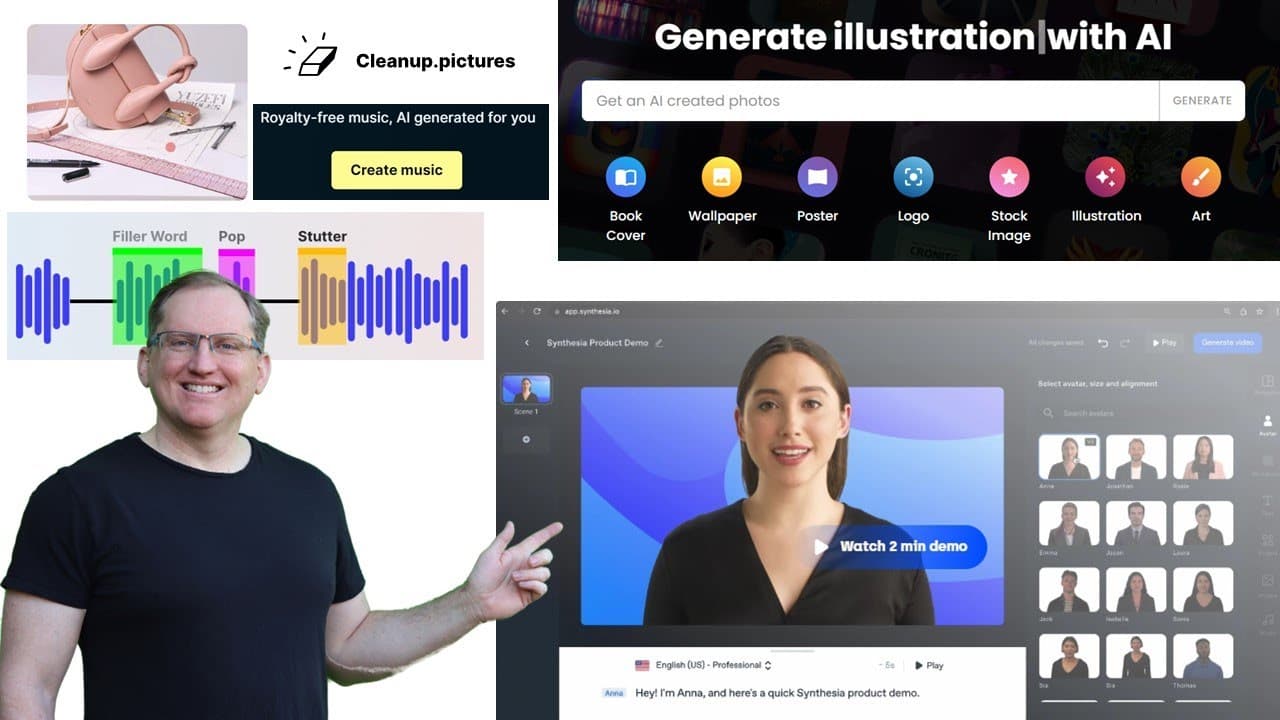
The best AI tools for creating images, videos, and audio include Cleanup.pictures for image editing, AI vector generators for graphic design, Clean Voice AI for audio enhancement, Soundraw for royalty-free music, and Synthesia for text-to-video conversion. While these tools showcase exciting potential, many still require improvements to meet professional standards.
Transcript
hi friends welcome back to the channel if you're anything like me you will have been playing a lot with chat GPT and maybe some of the other generative AI tools over the past couple of months today I wanted to share with you a number of other different AI tools that I've come across so we've got a bit of a mix in here so we've got some which are vi... Read More
Key Insights
- 💄 Tools like Cleanup.pictures facilitate easy image editing while maintaining quality backgrounds, making them accessible for quick fixes.
- 🚚 AI vector generation can produce amusing or creative results, but may not always deliver precise designs as expected.
- 🐎 Audio enhancement technologies like Clean Voice AI can significantly speed up audio editing workflows, crucial for content creators.
- 🤗 Soundraw offers customizable music options, opening new avenues for royalty-free background tracks, although the quality may vary.
- 🖤 Synthesia serves as a basic platform for text-to-video transformations but lacks the dynamism needed for engaging visual content.
- 🦻 The "There's an AI for that" site serves as a valuable resource that categorizes various AI tools, aiding users in finding solutions for specific needs.
- 🤵 Many of these AI tools are still in development stages, revealing room for improvement and advancements in technology.
Install to Summarize YouTube Videos and Get Transcripts
Explore YouTube Video Summarizer or Get YouTube Transcript Extractor
Questions & Answers
Q: What is Cleanup.pictures, and how does it work?
Cleanup.pictures is an AI tool that allows users to easily remove unwanted elements from images by simply brushing over the areas they want to eliminate. It creates a seamless background to fill in the space left behind, similar to more complex software like Photoshop, but with enhanced user-friendliness for quick edits.
Q: How effective are AI-generated vector images?
The AI tool for vector images can create outputs based on user prompts and style selections. However, results can vary significantly; while some outputs may closely match the request, others might produce unexpected interpretations, highlighting the challenge in obtaining desired logo or icon designs without careful phrasing.
Q: What features does Clean Voice AI offer for audio editing?
Clean Voice AI specializes in cleaning up audio recordings by removing filler words, mouth sounds, and background noise, which is particularly beneficial for podcasters and video editors. It includes a timestamp feature to help users easily edit video content based on audio highlights, streamlining the editing process significantly.
Q: How does Soundraw assist in music generation?
Soundraw allows users to create royalty-free music tailored to specific moods, lengths, and styles. It provides a range of instrumental options and genres, granting users control over the sound and feel of the music. While it offers creative potential, the music may lack the finesse of professional compositions.
Q: Can Synthesia create engaging text-to-video content?
Synthesia transforms provided text into short video clips using predefined templates. Although the generated videos can convey information visually, the synthetic voice often sounds robotic, which may detract from viewer engagement. It serves more as a basic tool rather than a full replacement for dynamic video content.
Q: What is the purpose of the "There's an AI for that" website?
"There's an AI for that" is a comprehensive repository that catalogs various AI applications and tools spanning different functions such as audio transcription, text generation, image creation, and more. This platform serves as a resource for users seeking AI-assisted solutions for specific tasks or creative projects.
Q: What are the main strengths and weaknesses of the AI tools discussed?
The strengths of the tools include ease of use, quick editing capabilities, and the ability to generate diverse types of content. However, weaknesses revolve around inconsistent results, especially with complex tasks such as image creation or dynamic video synthesis, indicating that while innovative, these tools are still developing.
Q: How can these AI tools benefit creative professionals?
Creative professionals can leverage these AI tools to enhance their workflows, saving time on tedious tasks like editing images or generating background music. By integrating these innovative solutions into their projects, they can free up more time for actual creative processes, although they should be aware of the limitations present in the outputs.
Summary & Key Takeaways
-
The video introduces a variety of AI tools designed for creative professionals, focusing on image editing, vector generation, and audio enhancement.
-
Each tool is demonstrated with practical examples, illustrating their capabilities and limitations in editing images and generating music or video content.
-
The content highlights both the potential benefits and shortcomings of these AI solutions, emphasizing their evolving nature and usefulness in creative workflows.
Read in Other Languages (beta)
Share This Summary 📚
Summarize YouTube Videos and Get Video Transcripts with 1-Click
Try YouTube Summary with ChatGPT & Claude or YouTube Transcript Generator
Explore More Summaries from Dr Lyndon Walker 📚




Summarize YouTube Videos and Get Video Transcripts with 1-Click
Try YouTube Summary with ChatGPT & Claude or YouTube Transcript Generator