Products
Features
YouTube Video Summarizer
Summarize YouTube videos
Web & PDF Highlighter
Highlight web pages & PDFs
Chat with PDF
Ask any PDF questions with AI
Ask AI Clone
Chat with your highlights & memories
Audio Transcriber
Transcribe audio files to text
Glasp Reader
Read and highlight articles
Kindle Highlight Export
Export your Kindle highlights
Idea Hatch
Hatch ideas from your highlights
Integrations
Obsidian Plugin
Notion Integration
Pocket Integration
Instapaper Integration
Medium Integration
Readwise Integration
Snipd Integration
Hypothesis Integration
Apps & Extensions
Chrome Extension
Safari Extension
Edge Add-ons
Firefox Add-ons
iOS App
Android App
Discover
Discover
Ideas
Discover new ideas and insights
Articles
Curated articles and insights
Books
Book recommendations by great minds
Posts
Essays and notes from readers
Quotes
Inspiring quotes collection
Videos
Curated videos and summaries
Explore Glasp
Glasp Story
How we grew from 0 to 3 million users
Glasp Newsletter
Weekly insights and updates
Glasp Talk
Interview series with great minds
Glasp Blog
Latest news and articles
Glasp Use Cases
Learn how others use Glasp
Build & Support
Glasp API
Access Glasp's API for developers
MCP Connector
Connect Glasp to Claude & ChatGPT
Community
Glasp Reddit Community
Students
Student discount and benefits
FAQs
Frequently Asked Questions
AboutPricing
DashboardLog inSign up

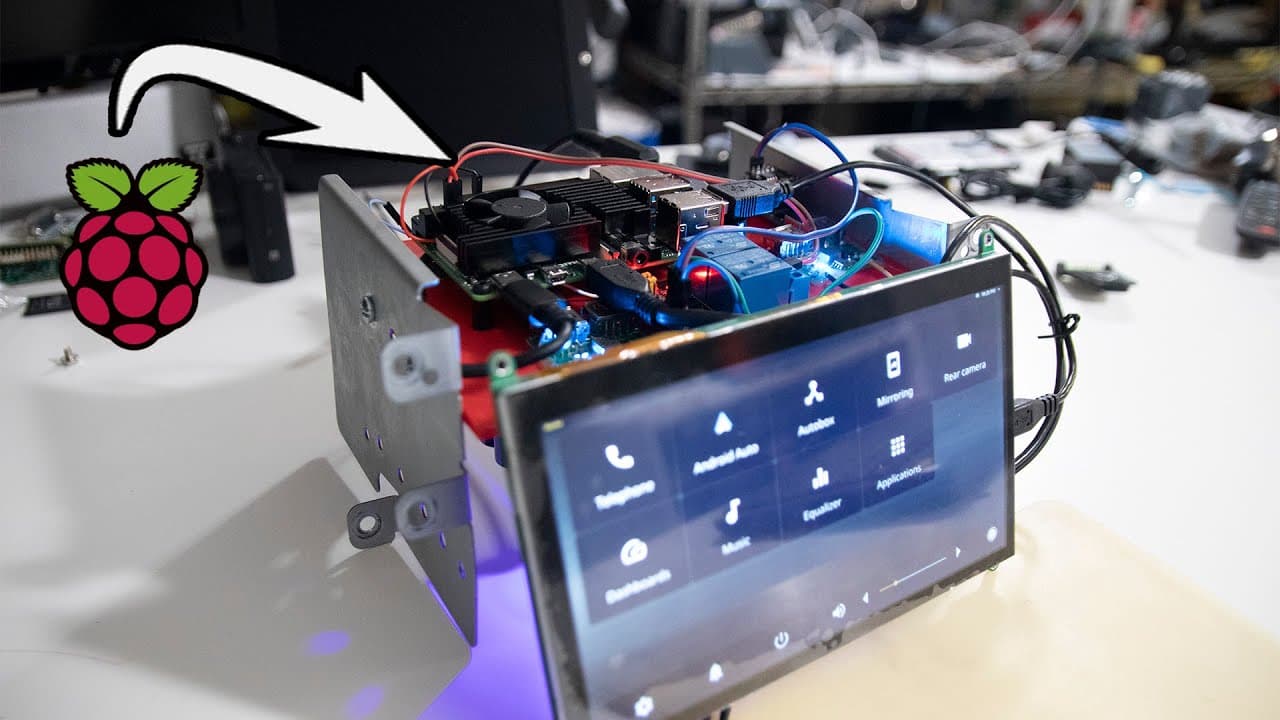
How to Install a Raspberry Pi Head Unit in Your Car
684.7K views
•
June 25, 2021
by
Novaspirit Tech
YouTube video player
How to Install a Raspberry Pi Head Unit in Your Car

TL;DR

To install a Raspberry Pi head unit in your car using Open Android Pro, connect components like relays, USB sound cards, and a cooling fan. The system allows for automatic startup and shutdown with vehicle ignition. Future enhancements may include features such as a reverse camera and FM radio capabilities.

Transcript

hey guys don here from nova spare tech and welcome back to the channel and today we are going to be installing the raspberry pi head unit using open android pro onto our car so let's get started i for one been super excited about this i've been wanting to do this as soon as i got all the parts but i had to film everything so this actually took a co... Read More

Key Insights

  • 🧕 The installation of the Raspberry Pi head unit in a car involves a mix of hardware and software coordination to create a functional multimedia system.
  • 😴 Utilizing GPIO pins for power control facilitates the seamless operation of the head unit, allowing for automatic shutdown and startup with the vehicle's ignition.
  • 🧑‍💻 Future enhancements planned for the setup indicate a broadening scope for vehicular tech, further integrating modern entertainment features into automotive systems.
  • 🎠 The use of cooling systems is vital for maintaining optimal performance in Raspberry Pi setups, especially in confined spaces like car interiors where heat can accumulate.
  • 👀 The installation process combines technical expertise with practical steps, providing detailed guidance for those looking to undertake similar projects.
  • 📽️ Continuous updates and improvements demonstrate the evolving nature of the project alongside the creator's willingness to adapt and innovate.
  • 💗 The project reflects a growing trend in DIY automotive technology, empowering users to integrate personal tech solutions into their vehicles.

Install to Summarize YouTube Videos and Get Transcripts

Explore YouTube Video Summarizer or Get YouTube Transcript Extractor

Summary & Key Takeaways

  • Don from Nova Spirit Tech demonstrates how to install a Raspberry Pi head unit in a car, utilizing Open Android Pro and various components.

  • The video details the process of setting up hardware components like relays, USB sound cards, and a cooling fan to create a functional multimedia system.

  • Future plans include adding more features to the setup such as a reverse camera, FM radio capabilities, and enhancing user experience with additional modules.


Read in Other Languages (beta)

English

Share This Summary 📚

Summarize YouTube Videos and Get Video Transcripts with 1-Click

Download browser extensions on:

Try YouTube Summary with ChatGPT & Claude or YouTube Transcript Generator

Explore More Summaries from Novaspirit Tech 📚

Real-Time Voice Cloning with Deep Learning thumbnail
Real-Time Voice Cloning with Deep Learning
Novaspirit Tech
Elementary OS 6.0 Odin Tricks & Tips thumbnail
Elementary OS 6.0 Odin Tricks & Tips
Novaspirit Tech
What To Expect On Ubuntu 24.04 Nobel Numbat thumbnail
What To Expect On Ubuntu 24.04 Nobel Numbat
Novaspirit Tech
Aerofara AERO 2 PRO Mini PC Review: Is It Good for Gaming? thumbnail
Aerofara AERO 2 PRO Mini PC Review: Is It Good for Gaming?
Novaspirit Tech
Why Is Ubuntu Kylin 20.04.1 Like Windows 10? thumbnail
Why Is Ubuntu Kylin 20.04.1 Like Windows 10?
Novaspirit Tech
Hackintosh Install Script For Proxmox thumbnail
Hackintosh Install Script For Proxmox
Novaspirit Tech

Summarize YouTube Videos and Get Video Transcripts with 1-Click

Download browser extensions on:

Try YouTube Summary with ChatGPT & Claude or YouTube Transcript Generator

Apps & Extensions

  • Chrome Extension
  • Safari Extension
  • Edge Add-ons
  • Firefox Add-ons
  • iOS App
  • Android App

Key Features

  • YouTube Video Summarizer
  • Web & PDF Summarizer
  • Web & PDF Highlighter
  • Chat with PDF
  • Ask AI Clone
  • Audio Transcriber
  • Glasp Reader
  • Kindle Highlight Export
  • Idea Hatch

Integrations

  • Obsidian Plugin
  • Notion Integration
  • Pocket Integration
  • Instapaper Integration
  • Medium Integration
  • Readwise Integration
  • Snipd Integration
  • Hypothesis Integration

More Features

  • APIs
  • MCP Connector
  • Blog & Post
  • Embed Links
  • Image Highlight
  • Personality Test
  • Quote Shots
  • Open Graph Checker

Company

  • About us
  • Our Story
  • Blog
  • Community
  • FAQs
  • Job Board
  • Newsletter
  • Pricing
Terms

•

Privacy

•

Guidelines

© 2026 Glasp Inc. All rights reserved.




