How to Connect Your Agentive Bot to Telegram
TL;DR
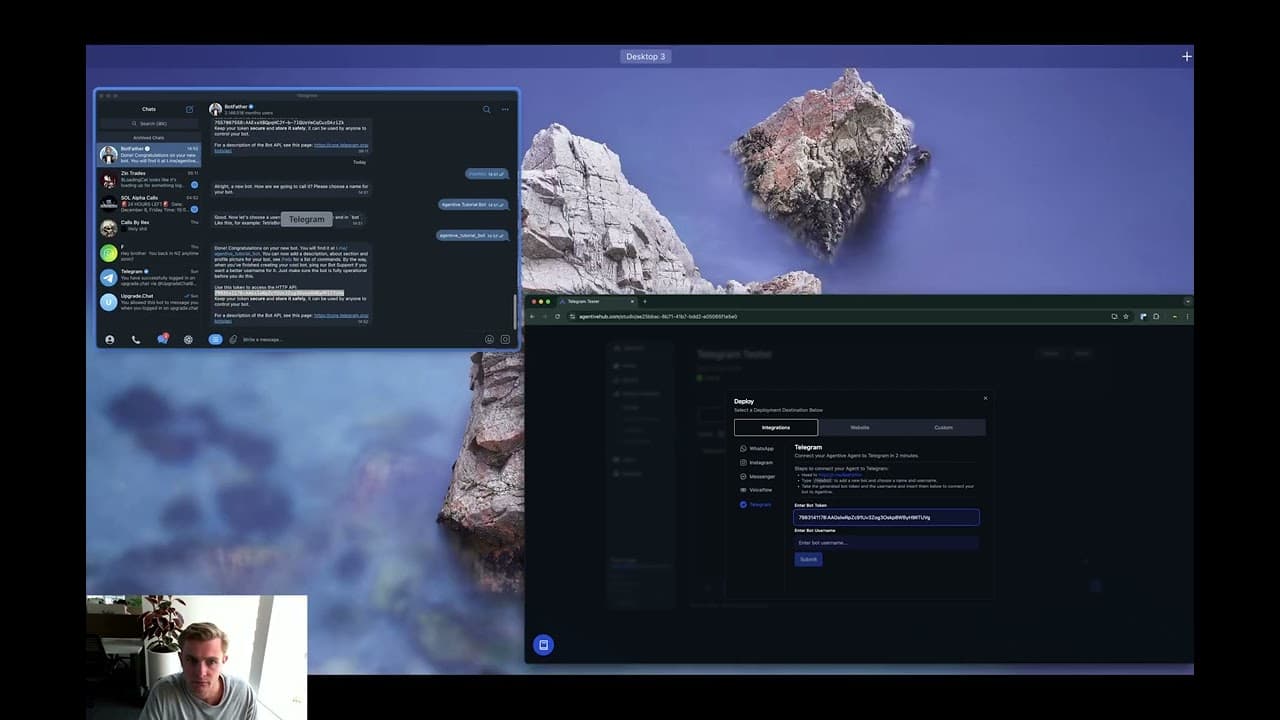
Connect your Agentive bot to Telegram by creating a new bot through BotFather, generating a token, and linking it to Agentive. Adjust privacy settings to enable responses in group chats, ensuring seamless interaction with users.
Transcript
hey agentive users got a quick tutorial here on how to connect your agentive agent to telegram so you want to make an agent make sure it's published so you can click the deploy button uh Integrations H to Telegram and you're going to want to click this button here which is going to I'm going to do it in the telegram app it&a... Read More
Key Insights
- The tutorial guides users on connecting an Agentive agent to Telegram, emphasizing the importance of publishing the agent before integration.
- Users need to interact with BotFather on Telegram to create and configure a new bot, including choosing a display name and username.
- A token generated by BotFather is essential for linking the bot to the Agentive platform, ensuring proper communication between the two.
- The tutorial highlights the distinction between private chats and group settings, noting that bots need tagging in groups for interaction.
- To enable group interactions, users must adjust bot privacy settings via BotFather, disabling group privacy to allow responses.
- The tutorial provides step-by-step instructions for creating a Telegram group and adding the bot, emphasizing the need for permission adjustments.
- Users are informed that bots won't respond in groups by default, requiring specific settings changes for group communication.
- The tutorial concludes with a successful demonstration of the bot responding in a group setting after the necessary configurations.
Install to Summarize YouTube Videos and Get Transcripts
Explore YouTube Video Summarizer or Get YouTube Transcript Extractor
Questions & Answers
Q: How do you start the process of connecting an Agentive agent to Telegram?
To start connecting an Agentive agent to Telegram, you must first ensure that your agent is published. Once published, you can click the deploy button and select the integration option for Telegram. This process allows you to begin the setup and configuration necessary for linking the agent to Telegram.
Q: What role does BotFather play in the integration process?
BotFather is a critical component in the integration process as it is used to create and configure a new bot on Telegram. Users interact with BotFather to generate a bot token, choose a display name, and select a username. These steps are essential for linking the bot to the Agentive platform and enabling communication.
Q: Why is a token necessary for the integration?
A token generated by BotFather is necessary for the integration because it serves as a unique identifier that links the Telegram bot to the Agentive platform. This token ensures that the bot and the platform can communicate effectively, allowing the agent to function correctly within the Telegram environment.
Q: What is the difference between private and group interactions with the bot?
In private interactions, users can chat with the bot without tagging it, allowing for direct communication. However, in group settings, the bot requires tagging to respond to messages. This distinction is crucial for ensuring that the bot only interacts when intended, maintaining organized communication within group chats.
Q: How can users enable the bot to respond in group settings?
To enable the bot to respond in group settings, users must adjust the bot's privacy settings through BotFather. This involves accessing the bot settings, selecting group privacy, and turning it off. These changes allow the bot to respond to messages in group chats, facilitating interactive communication.
Q: What initial steps are necessary to add a bot to a Telegram group?
The initial steps to add a bot to a Telegram group include creating a new group and adding the bot as a member. Users must ensure that the bot is properly configured with the necessary permissions to interact within the group, which involves adjusting privacy settings to allow for responses.
Q: Why won't a bot respond in groups by default?
By default, a bot won't respond in groups due to privacy settings that restrict its interaction. This default setting is in place to prevent unsolicited communication and maintain user privacy. Users must manually adjust these settings to allow the bot to respond, ensuring controlled and intentional interactions.
Q: What final demonstration is provided in the tutorial?
The final demonstration in the tutorial shows the successful response of the bot in a group setting after all necessary configurations are completed. This demonstration highlights the effectiveness of the integration process, confirming that the bot can interact as intended within a group chat, following the adjustment of privacy settings.
Summary & Key Takeaways
-
This tutorial provides a step-by-step guide on connecting an Agentive agent to Telegram, focusing on creating a new bot through BotFather and configuring it with a display name and username. Users learn how to generate a token and link it to the Agentive platform, enabling seamless integration.
-
The tutorial explains the difference between private and group interactions with the bot, highlighting the need for tagging the bot in group settings. Users are instructed on adjusting bot privacy settings via BotFather to allow the bot to respond in groups, ensuring effective communication.
-
A practical demonstration is provided, showing the creation of a Telegram group and adding the bot. The tutorial emphasizes the importance of changing permissions for group interactions, concluding with a successful example of the bot responding in a group chat after all configurations are completed.
Read in Other Languages (beta)
Share This Summary 📚
Summarize YouTube Videos and Get Video Transcripts with 1-Click
Try YouTube Summary with ChatGPT & Claude or YouTube Transcript Generator
Explore More Summaries from Morningside AI 📚

Summarize YouTube Videos and Get Video Transcripts with 1-Click
Try YouTube Summary with ChatGPT & Claude or YouTube Transcript Generator