Kadosh Captain & Edge Review: Are They Worth It?
TL;DR
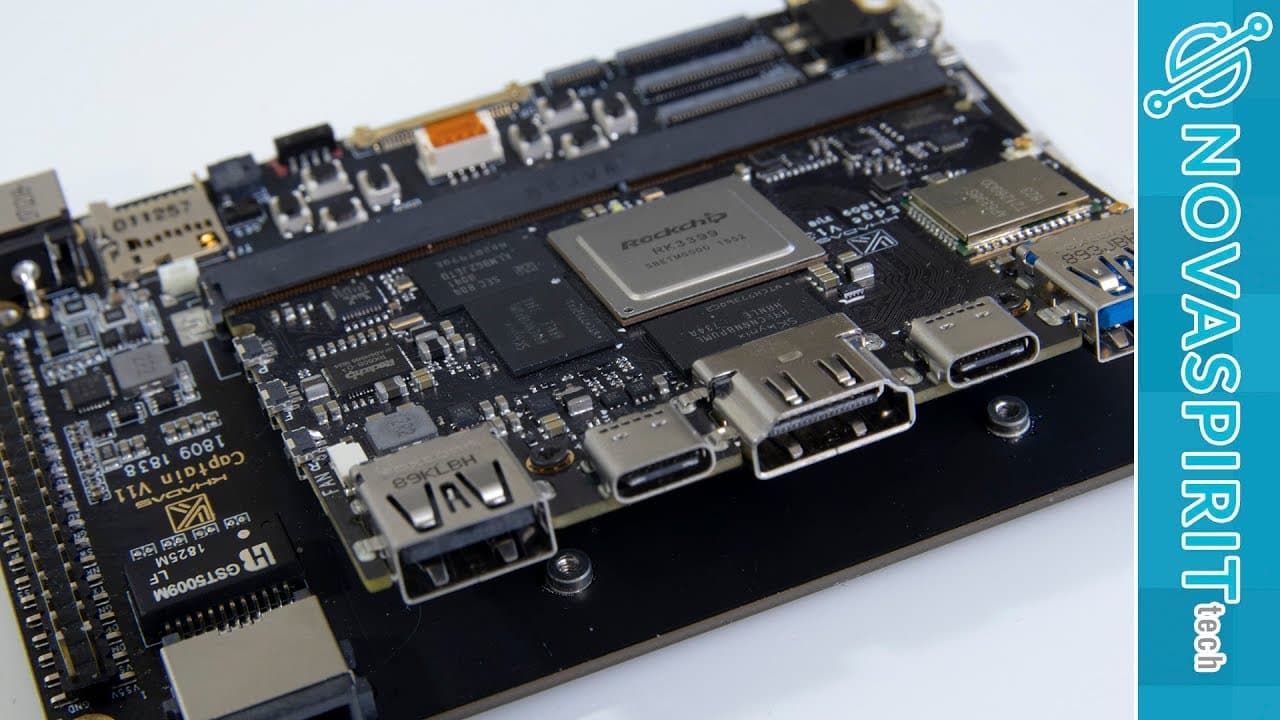
The Kadosh Captain and Edge offer solid performance with the Rockchip $33.99 CPU, supporting dual operating systems (Android and Linux) and various expansion options. Users can enjoy 4K resolution on Linux, but thermal management is key; the presenter recommends careful heatsink usage for optimal performance in compact designs.
Transcript
hey guys going on it's down here from Nova spirit second today we're gonna be taking a look at the Kedah sched and the kadosh captain so let's get started now I'm a huge fan of cádiz product itself I actually own of em too and it's still being used to compile kernels that I need now as far as the kadosh company themselves I'm a huge fan of what the... Read More
Key Insights
- 🏂 The Kadosh Captain and Kedah Sched boards utilize the powerful Rockchip CPU, making them competitive in performance, particularly in compact designs.
- 👤 Dual operating systems allow flexibility for users, catering to both casual users and developers looking for performance on various platforms.
- 👤 The functionality of GPIO and various expansion slots enable users to customize their setup extensively, including the potential integration of different peripherals.
- ⚾ Thermal management is crucial; the presenter shares personal preferences regarding heatsink usage based on their testing outcomes.
- 🏂 The design and configuration of the Kadosh boards suggest potential beyond gaming, such as transforming into a portable computing device or tablet.
- 🏂 The compactness of these boards enables users to develop unique projects, especially in the realms of gaming and media playback.
- 👤 Future accessories and expansions are likely to enhance the user experience, broadening the potential applications for the Kadosh setup.
Install to Summarize YouTube Videos and Get Transcripts
Explore YouTube Video Summarizer or Get YouTube Transcript Extractor
Questions & Answers
Q: What are the key specifications of the Kadosh Captain and Kedah Sched?
The Kadosh Captain and Kedah Sched are built on the Rockchip $33.99 CPU, featuring six cores with various performance levels (1.8 GHz for big cores and 1.4 GHz for small cores). They come with four gigs of DDR4 RAM and offer several eMMC configuration options (16, 32, or 128 GB). The connectivity options include USB 2.0, USB 3.0, HDMI, dual USB-C, and GPIO expansion capabilities.
Q: How does the Kadosh Captain interface with other hardware?
The Kadosh Captain features several ports allowing interface connectivity with various devices, including a 3.5mm jack for audio, camera ports, and slots for SD cards. Additionally, the board can integrate seamlessly with attached components, using slots and antennas, making it versatile for different configurations and usages.
Q: What are the advantages of using Linux and Android on these boards?
When running Linux, users can achieve 4K output at 60 frames per second, making it responsive for high-resolution applications. The Android OS installed on the board runs gaming applications effectively, demonstrating its capability for media consumption and casual gaming. Each OS offers unique functionalities that leverage the device’s hardware optimally.
Q: What are the presenter’s thoughts on overheating and heatsink performance?
The presenter mentions that only the Kedah Sched can become warm, while the Kadosh Captain generally remains cool. They advise that performance may improve without a heatsink but suggest if a heatsink is used, a fan should accompany it to prevent overheating. They personally prefer no heatsink during testing, which yielded better performance.
Q: How can this setup be used for gaming purposes?
The Kadosh Captain's design allows it to function as a mini gaming console, thanks to its gamepad configuration and GPIO ports for additional controls. While not ideal for competitive gaming due to trigger button limitations, it still provides an interesting platform for casual gaming experiences, and future screen expansions can enhance its capabilities.
Q: What limitations did the presenter encounter with the Kadosh boards?
The presenter faced a challenge when trying to access a button located between the Ethernet chip and reset button, complicating the flashing process. Due to space restrictions, using tweezers was necessary, which was cumbersome. This experience led them to recommend taking the board out for flashing to avoid difficulties.
Summary & Key Takeaways
-
The video provides a detailed overview of the Kadosh Captain and Kedah Sched, built on the Rockchip $33.99 CPU, which supports PCIe and boasts a compact design.
-
It examines the board’s features, including ports for USB, HDMI, and GPIO expansion, as well as mentions the unit's dual operating system capability: Android and Linux.
-
The presenter shares performance insights, such as 4K resolution on Linux, thermal management issues, and personal preferences regarding heatsink usage while noting the potential for transforming the board into a compact gaming device.
Read in Other Languages (beta)
Share This Summary 📚
Summarize YouTube Videos and Get Video Transcripts with 1-Click
Try YouTube Summary with ChatGPT & Claude or YouTube Transcript Generator
Explore More Summaries from Novaspirit Tech 📚






Summarize YouTube Videos and Get Video Transcripts with 1-Click
Try YouTube Summary with ChatGPT & Claude or YouTube Transcript Generator