IPv4 Unicast, Multicast, and Broadcast
TL;DR
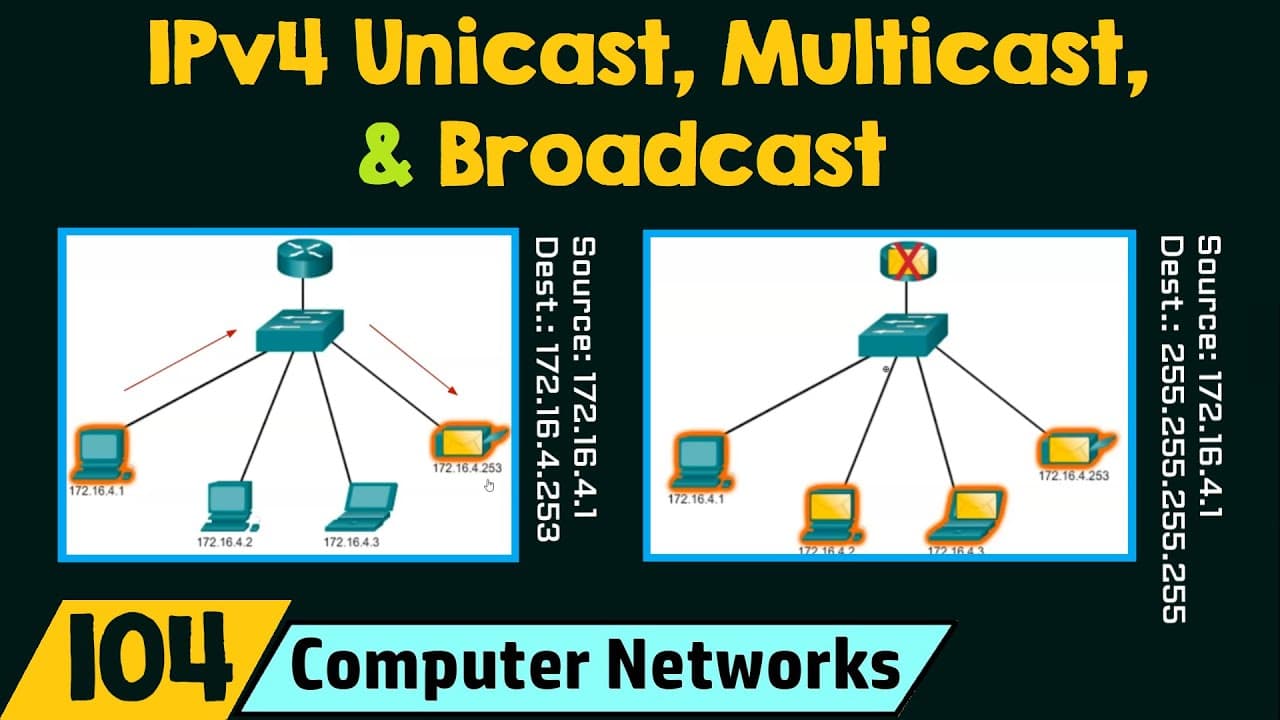
This lecture explains the different ways hosts can communicate using IPv4 addresses: unicast, broadcast, and multicast.
Transcript
in today's lecture we will see the ipv4 unicast multicast and broadcast address we will start the session with the outcomes upon the completion of the session the learner will be able to understand the different ways hosts can communicate using ipv for address let's start with the different ways that a host can communicate using ipv4 address there ... Read More
Key Insights
- 🅰️ IPv4 networks support three types of communication: unicast, broadcast, and multicast.
- 👻 Unicast transmission involves sending a packet from one host to an individual host.
- 👻 Broadcast transmission sends a packet from one host to all hosts in the network, either as a limited or directed broadcast.
- 😒 Limited broadcast uses the destination IP address 255.255.255.255, while directed broadcast has a specific address range.
- 👻 Multicast transmission sends a packet from one host to a selected group of hosts, reducing network traffic.
- 🧡 Multicast addresses range from 224.0.0.0 to 239.255.255.255, with specific subranges for different purposes.
- ▶️ Routers do not forward limited broadcasts, but they can forward multicast transmissions.
Install to Summarize YouTube Videos and Get Transcripts
Explore YouTube Video Summarizer or Get YouTube Transcript Extractor
Questions & Answers
Q: What is the difference between unicast, broadcast, and multicast transmissions?
Unicast transmission sends a packet from one host to an individual host, while broadcast transmission sends a packet from one host to all hosts in the network. Multicast transmission sends a packet from one host to a selected group of hosts, possibly in different networks.
Q: How does a limited broadcast differ from a directed broadcast?
In a limited broadcast, the destination IP address is set to 255.255.255.255, and all hosts in the local network receive the broadcast. Routers do not forward limited broadcasts. Directed broadcasts have a specific IP address range and are intended for a particular network.
Q: What is the purpose of multicast transmissions?
Multicast transmissions are used to send packets from one host to a selected group of hosts, reducing network traffic compared to broadcast transmissions. Multicast addresses are in the range of 224.0.0.0 to 239.255.255.255.
Q: Can you provide an example of a multicast address usage?
A link-local multicast address, such as in the range of 224.0.0.0 to 224.0.0.255, can be used for routers to exchange routing information. Globally scoped multicast addresses, ranging from 224.0.1.0 to 238.255.255.255, can be used for specific purposes like the Network Time Protocol (NTP).
Key Insights:
- IPv4 networks support three types of communication: unicast, broadcast, and multicast.
- Unicast transmission involves sending a packet from one host to an individual host.
- Broadcast transmission sends a packet from one host to all hosts in the network, either as a limited or directed broadcast.
- Limited broadcast uses the destination IP address 255.255.255.255, while directed broadcast has a specific address range.
- Multicast transmission sends a packet from one host to a selected group of hosts, reducing network traffic.
- Multicast addresses range from 224.0.0.0 to 239.255.255.255, with specific subranges for different purposes.
- Routers do not forward limited broadcasts, but they can forward multicast transmissions.
- Link-local multicast addresses are used for specific purposes within a network, while globally scoped multicast addresses have broader usage, such as NTP synchronization.
Summary & Key Takeaways
-
There are three different ways for hosts to communicate in an IPv4 network: unicast, broadcast, and multicast.
-
Unicast transmission involves sending a packet from one host to an individual host, with only one destination.
-
Broadcast transmission sends a packet from one host to all hosts in the network, either as a limited or directed broadcast.
Read in Other Languages (beta)
Share This Summary 📚
Summarize YouTube Videos and Get Video Transcripts with 1-Click
Try YouTube Summary with ChatGPT & Claude or YouTube Transcript Generator
Explore More Summaries from Neso Academy 📚
Summarize YouTube Videos and Get Video Transcripts with 1-Click
Try YouTube Summary with ChatGPT & Claude or YouTube Transcript Generator