How to Use 7 Life-Improving Tools Effectively
TL;DR
Seven tools have significantly improved the creator's life by enhancing productivity and organization. These tools range from an e-ink display for calendars to a budgeting app, a time-tracking app, a pocket notebook, and ergonomic laptop accessories. Each tool addresses a specific need, from reducing clutter to managing finances and optimizing time management.
Transcript
After testing over six figures worth of analog tools and tech products to improve my life, there are only a few that have stuck around and that I actually continue to use. In this video I'm going to share seven of them. These tools have completely transformed the way that I work and operate. In many cases it's reduced my clutter up to 90% an... Read More
Key Insights
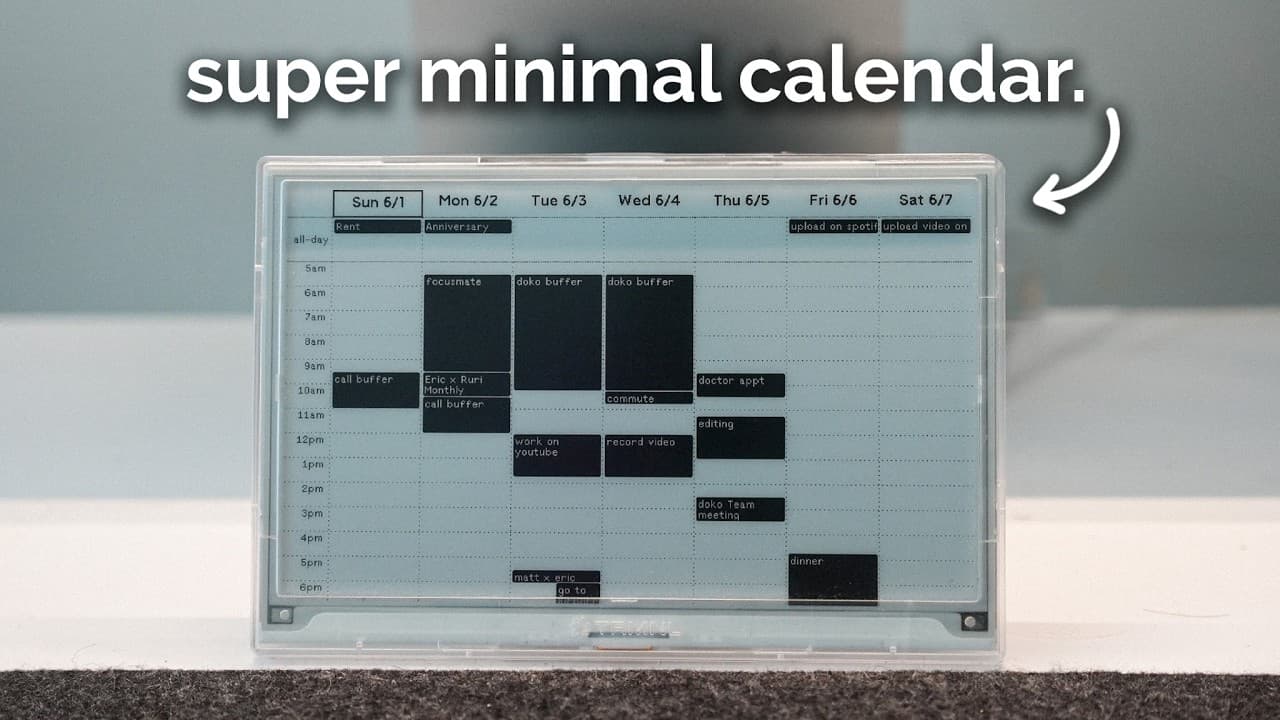
- The TRMNL e-ink display helps reduce calendar clutter by providing a static display of events without distractions.
- Copilot is a finance app that aggregates financial data, helping users track expenses and manage subscriptions effectively.
- Timelines app assists in tracking time spent on various activities, promoting awareness and better management of time and attention.
- A pocket notebook is invaluable for capturing fleeting thoughts and ideas, offering more flexibility than digital devices.
- Magex laptop stand improves ergonomics for MacBook users by elevating the screen to eye level, reducing neck strain.
- Using a pocket notebook promotes a habit of recording ideas, inspired by historical figures like Leonardo da Vinci.
- Consistent time tracking reveals discrepancies between intended and actual time use, helping to curb procrastination.
- The integration of simple tools into daily routines can lead to significant improvements in productivity and quality of life.
Install to Summarize YouTube Videos and Get Transcripts
Explore YouTube Video Summarizer or Get YouTube Transcript Extractor
Questions & Answers
Q: How to reduce calendar clutter with technology?
Using an e-ink display like TRMNL can significantly reduce calendar clutter. It provides a static, distraction-free view of your schedule, eliminating the need for constant app checking. This setup allows for quick glances at upcoming events without interacting with multiple apps, enhancing productivity and reducing digital clutter.
Q: What is the best tool for managing personal finances?
Copilot is an effective tool for managing personal finances, offering features like expense tracking, subscription management, and investment insights. By aggregating data from various financial accounts, it provides a comprehensive overview of one's financial health, helping users save money and optimize their spending habits.
Q: How can time tracking improve productivity?
Time tracking, using apps like Timelines, enhances productivity by providing detailed insights into how time is spent. It highlights discrepancies between intended and actual time allocation, helping users identify and reduce procrastination. By understanding time usage patterns, individuals can make informed decisions to better align their activities with personal goals.
Q: Why use a pocket notebook instead of digital apps?
A pocket notebook offers flexibility that digital apps cannot match, allowing for quick jotting of ideas in various forms, such as sketches or scribbles. It eliminates the friction of accessing digital devices, ensuring that ideas are captured immediately and revisited more frequently, fostering creativity and idea retention.
Q: What are the benefits of using an ergonomic laptop stand?
An ergonomic laptop stand, like the Magex stand, elevates the laptop screen to eye level, reducing neck strain and promoting better posture. This simple adjustment can prevent long-term neck and back issues, making it an essential accessory for those using laptops as their primary workstations.
Q: How can tracking time help reduce procrastination?
Tracking time with tools like Timelines helps reduce procrastination by making users aware of how their time is spent. By visualizing time allocation, individuals can identify areas of waste and adjust their schedules to focus more on tasks that align with their goals, leading to more effective time management.
Q: What is the role of a pocket notebook in creativity?
A pocket notebook plays a crucial role in creativity by providing a tangible space to capture and explore ideas. Its portability and flexibility allow for spontaneous recording of thoughts, promoting a habit of constant idea generation and reflection, which can lead to innovative solutions and creative breakthroughs.
Q: How does Copilot help in setting financial goals?
Copilot assists in setting financial goals by allowing users to define specific savings targets and timelines. It automates savings processes and provides regular updates on progress, ensuring that users stay on track to meet their financial objectives. This feature simplifies goal management and encourages disciplined savings behavior.
Summary & Key Takeaways
-
The TRMNL e-ink display is an open-source device that provides a distraction-free way to view calendars and other data. It eliminates the need for constant app checking, offering a static, elegant solution for desk setups.
-
Copilot is a comprehensive finance app that simplifies budget management by aggregating data from various financial accounts. It helps users track subscriptions, manage investments, and set savings goals, ultimately saving money.
-
Timelines app helps users track their time and attention, providing insights into how time is spent. This awareness aids in reducing procrastination and ensuring that attention aligns with personal goals.
Read in Other Languages (beta)
Share This Summary 📚
Summarize YouTube Videos and Get Video Transcripts with 1-Click
Try YouTube Summary with ChatGPT & Claude or YouTube Transcript Generator
Explore More Summaries from Reysu 📚





Summarize YouTube Videos and Get Video Transcripts with 1-Click
Try YouTube Summary with ChatGPT & Claude or YouTube Transcript Generator