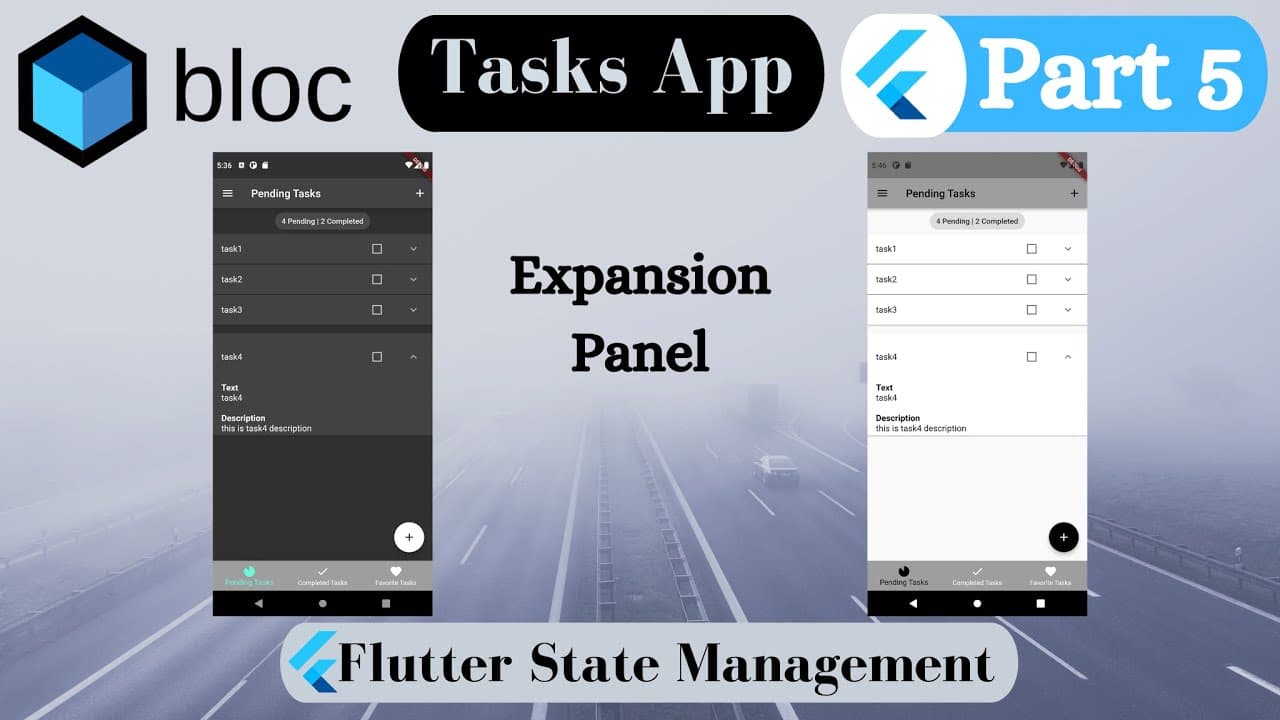
Tasks App [To Do App] Part 5 - Expansion Panel Flutter
TL;DR
Learn how to utilize ExpansionPanelList in Flutter to add descriptions to your app, with an example of implementing task descriptions.
Transcript
Hi there! in this part we are going to learn how to use ExpansionPanelList and we make a little change such as adding description in our app… We use ExpansionPanelList.radio which allows for at most one panel in the list to be open As you see, when I open new panel, previous_one is closed automatically If you are new on my channel, subscribe and... Read More
Key Insights
- 🤗 ExpansionPanelList.radio allows for only one open panel at a time in a list.
- 🪜 Task descriptions can be added by modifying the task_model and add_task_screen.
- 🈺 The is_scroll_controlled property in tabs_screen ensures visibility of buttons even when the keyboard is open.
- 🍵 Handling text overflow can be done by adding text_overflow and wrapping the panel with SingleChildScrollView or Expanded.
- 🗨️ Wrapping the selectable_text with ListTile can align the body to the left side.
- ❓ SelectableText.rich can be used to style the title and description of the panels.
- 👻 Using TextSpan_widget and back_slash_n allows for the separation of combined texts.
Install to Summarize YouTube Videos and Get Transcripts
Explore YouTube Video Summarizer or Get YouTube Transcript Extractor
Questions & Answers
Q: How does ExpansionPanelList.radio differ from other types of ExpansionPanelList?
ExpansionPanelList.radio ensures that only one panel can be open at a time, automatically closing the previous panel when a new one is opened.
Q: How can task descriptions be added to the panels?
Task descriptions can be implemented by duplicating the title_line and changing it to "description" in the task_model. The description can then be added in the add_task_screen using a description_controller and text_field.
Q: How can the buttons be made visible in the add_task_screen?
By setting is_scroll_controlled to true in the tabs_screen, the buttons will be visible even when the keyboard is open.
Q: How can text overflow and scrolling issues be resolved?
Wrapping the ExpansionPanelList with SingleChildScrollView and the body part with the Expanded widget can address text overflow and scrolling issues. Wrapping the selectable_text with ListTile can also align the body to the left side.
Summary & Key Takeaways
-
This video tutorial demonstrates how to use ExpansionPanelList.radio to create a list of expandable panels in Flutter.
-
The tutorial covers adding descriptions to the panels using the task_model and task_description.
-
It also shows how to make the buttons visible in the add_task_screen, and addresses bugs related to scrolling and text overflow.
Read in Other Languages (beta)
Share This Summary 📚
Summarize YouTube Videos and Get Video Transcripts with 1-Click
Try YouTube Summary with ChatGPT & Claude or YouTube Transcript Generator
Explore More Summaries from AJ Flutter Tutorials 📚
![Tasks App Flutter [To Do App] Part 2 - Drawer | Recycle Bin thumbnail](/_next/image?url=https%3A%2F%2Fi.ytimg.com%2Fvi%2F_IaCc7_ubvs%2Fhqdefault.jpg&w=750&q=75)
![How to Learn Flutter Fast and Get Hired [2022] Best Method of Learning Flutter | Step by Step Guide thumbnail](/_next/image?url=https%3A%2F%2Fi.ytimg.com%2Fvi%2F5DTzTxrW8NA%2Fhqdefault.jpg&w=750&q=75)

Summarize YouTube Videos and Get Video Transcripts with 1-Click
Try YouTube Summary with ChatGPT & Claude or YouTube Transcript Generator