What Tools Do You Need for Effective Flipped Classroom Videos?
TL;DR
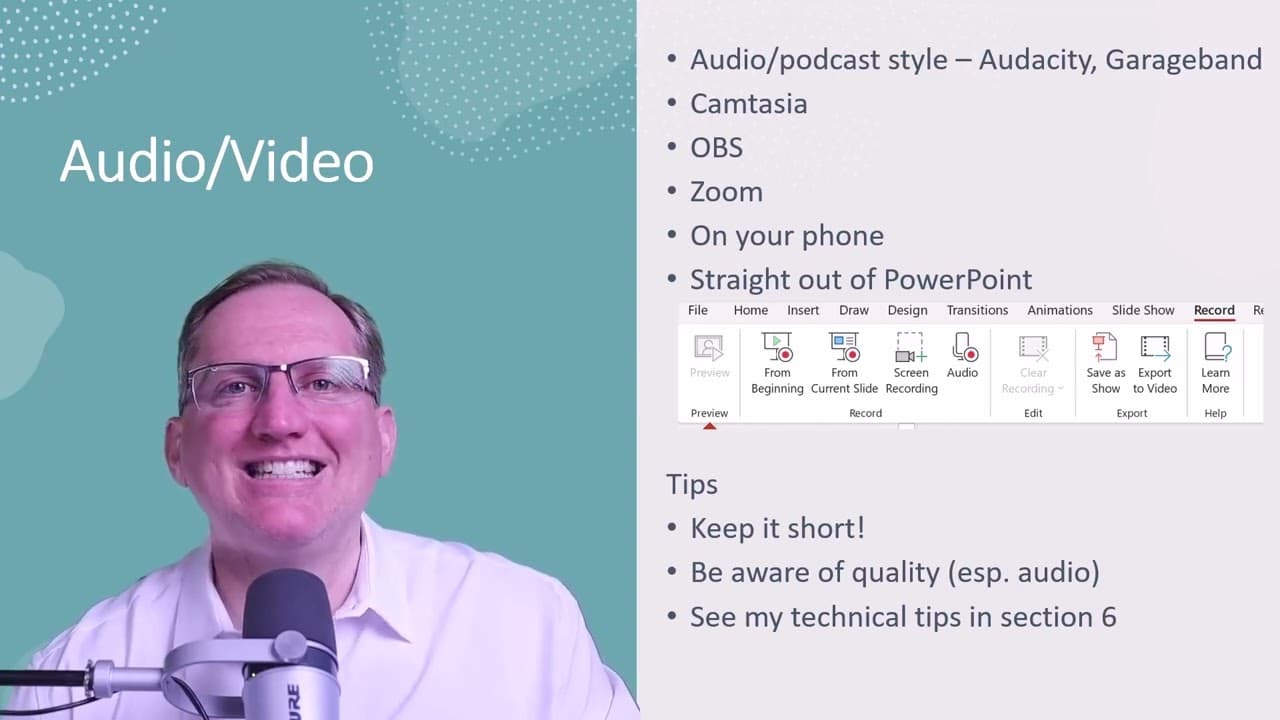
For effective audio and video in flipped classrooms, use free tools like Audacity for audio and OBS or Camtasia for video recording. Quality is crucial; prioritize clear audio to maintain viewer engagement, and keep recordings concise. Modern smartphones and PowerPoint can also serve as handy options for producing quality educational content.
Transcript
hi I'm Dr Lyndon Walker the following is a video segment from my skillshare course introduction to flipped classroom teaching if you're interested in doing the entire course there'll be a link below the video you can click on that you'll also get one month free from skillshare so starting off we're going to look at audio and video so if we are just... Read More
Key Insights
- 🐬 Flipped classroom teaching can be enhanced through effective audio and video production techniques, making the learning experience more engaging.
- 🥶 Several free tools are available for audio and video production, with options like Audacity, GarageBand, OBS, and various built-in features in platforms like PowerPoint.
- 👋 Using devices like modern smartphones can yield surprisingly good video results, making high-quality content production accessible even to those without professional equipment.
- 👂 Dr. Walker emphasizes the importance of audio quality, as poor sound can deter engagement and retention, impacting overall educational effectiveness.
- 💁 Recording tips include keeping content concise, focusing on clarity, and ensuring technical proficiency with various software to optimize the production process.
- 🎮 Utilizing Zoom for video production offers a simple workaround for capturing video, allowing educators to generate content quickly with basic tools at hand.
- 🎮 Screen recording can be efficiently managed through software like Camtasia, which facilitates the integration of various video sources into cohesive instructional materials.
Install to Summarize YouTube Videos and Get Transcripts
Explore YouTube Video Summarizer or Get YouTube Transcript Extractor
Questions & Answers
Q: What software does Dr. Walker recommend for audio production?
Dr. Walker recommends using Audacity for PC users and GarageBand for Mac users, both of which are excellent free tools. He emphasizes the importance of quality audio production, noting that these applications offer user-friendly features that help beginner creators produce clear and professional-sounding audio without requiring extensive technical knowledge.
Q: How can I use Zoom for video production according to Dr. Walker?
Dr. Walker suggests utilizing Zoom by setting up a solo meeting, where you start a call with yourself and hit the record button. This method may not produce the same quality as dedicated video software, but it allows you to create screen-recorded content easily and serves as a convenient option for simpler productions that still effectively convey your message.
Q: Why is audio quality emphasized as crucial in the video production process?
Audio quality is crucial because poor sound can lead viewers to disengage from the content. Dr. Walker highlights that distorted audio, either too loud or too quiet, can be off-putting. He stresses that maintaining clear and crisp audio significantly enhances audience retention and engagement, making quality checks an essential aspect of video production.
Q: What are some of the tips for keeping video recordings effective?
Dr. Walker advises keeping video recordings short and to the point to maintain viewer interest. He encourages creators to focus on delivering clear, concise content while being mindful of the overall quality. To facilitate this, he suggests using easy-to-access tools and ensuring good audio quality, as excessive length may detract from the educational experience.
Summary & Key Takeaways
-
Dr. Lyndon Walker introduces tools for creating audio and video content in flipped classrooms, emphasizing quality production techniques to engage learners effectively.
-
He outlines free software options for audio, such as Audacity and GarageBand, and video tools like Camtasia and OBS catering to various needs from screen recording to webcam integration.
-
Key advice includes maintaining audio quality to keep viewers engaged, avoiding distortion, and keeping recordings concise while effectively using available resources, including modern smartphones and PowerPoint capabilities.
Read in Other Languages (beta)
Share This Summary 📚
Summarize YouTube Videos and Get Video Transcripts with 1-Click
Try YouTube Summary with ChatGPT & Claude or YouTube Transcript Generator
Explore More Summaries from Dr Lyndon Walker 📚





Summarize YouTube Videos and Get Video Transcripts with 1-Click
Try YouTube Summary with ChatGPT & Claude or YouTube Transcript Generator