Khadas Vim 4 Review: Is It the Best ARM SBC Yet?
TL;DR
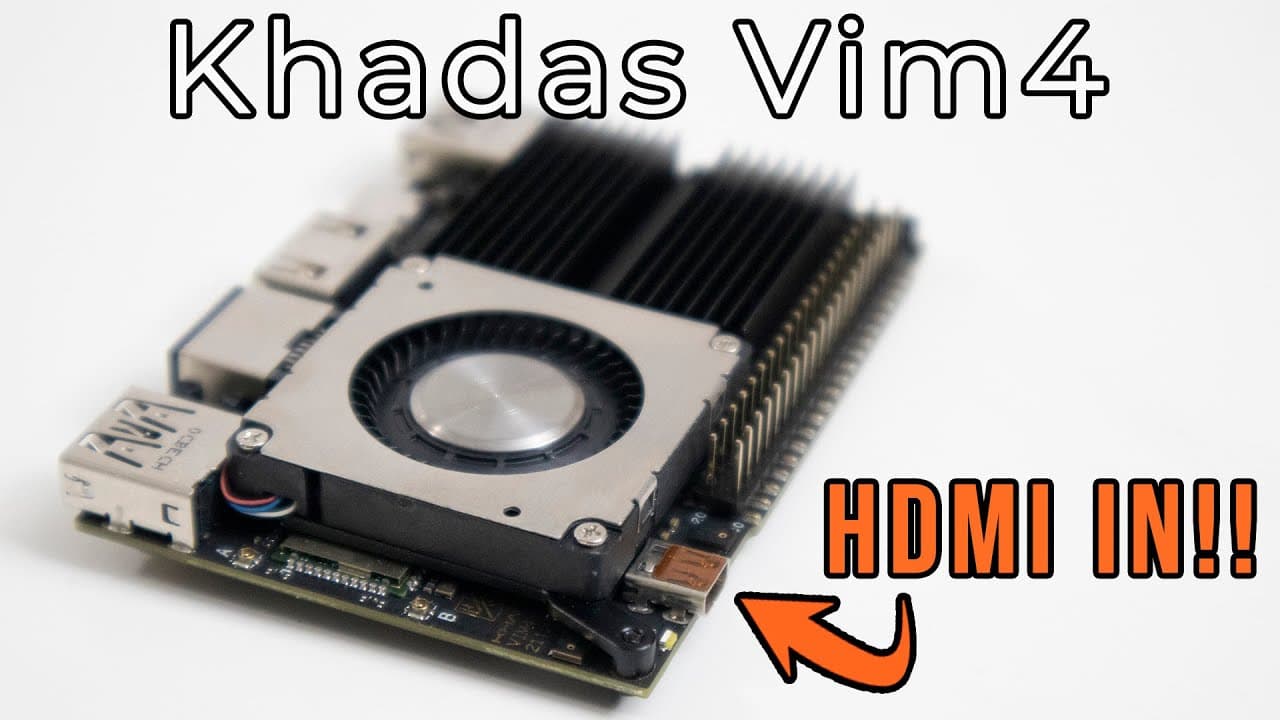
The Khadas Vim 4, powered by an Amlogic A311D-2 processor and eight cores, offers outstanding performance for both Ubuntu and Android applications. Notably, it features HDMI input for capture card functionality, while retaining the form factor and port layout of previous Vim models. However, it currently supports only 32-bit Android apps, limiting some available software options.
Transcript
hey guys what is going on it's don here from those prayer tech and welcome back to the channel and today we're going to be taking a look at the latest lineup of kadas product which is the vim4 so let's get started now before i begin i do want to thank kadas for sending this over to me for review and everything we talk about will be linked down in t... Read More
Key Insights
- 🎨 The Kadas Vim4 maintains the same size and layout design as its predecessors, promoting accessory compatibility.
- 💯 It boasts advanced hardware including an Amlogic A311D-2 processor with eight cores, enabling high performance for both media consumption and gaming.
- 👻 The addition of HDMI input is a unique feature that allows the Vim4 to function as a capture card, appealing to content creators and streamers.
- 🏃 Users report that the Vim4 runs smoothly on Ubuntu 22.04, making it a viable desktop alternative for lightweight computing tasks.
- 😘 Despite its capabilities, the board struggles with demanding games, necessitating lower resolutions or settings for better performance.
- 🖤 The lack of 64-bit Android limits the variety of applications available, although future updates may enhance support.
- 💌 The inclusion of fan control lets users adjust performance settings to maintain optimal temperatures during intensive tasks.
Install to Summarize YouTube Videos and Get Transcripts
Explore YouTube Video Summarizer or Get YouTube Transcript Extractor
Questions & Answers
Q: How does the Kadas Vim4 compare in size with previous Vim models?
The Kadas Vim4 is the same size as previous models such as Vim 1, Vim 2, and Vim 3. This consistency in form factor allows users to utilize existing cases and accessories without needing modifications, making it user-friendly for those upgrading their technology.
Q: What new features does the Kadas Vim4 bring?
One of the standout features of the Kadas Vim4 is its HDMI input, which allows users to capture HDMI output up to 4K at 60 frames per second. Additionally, it includes a powerful Amlogic A311D-2 processor, improved RAM and storage options, and enhanced connectivity features, making it versatile for various applications.
Q: How does the Kadas Vim4 perform with Ubuntu 22.04?
The Kadas Vim4 performs very well with Ubuntu 22.04, delivering a smooth desktop experience. With strong hardware specifications, users report minimal lag when running applications. It supports Wayland, which enhances the visual performance, making multitasking and running media applications efficient.
Q: What challenges do users face when running games on the Vim4?
While the Kadas Vim4 can run games smoothly at lower settings, some titles experience performance issues, especially those that are graphically demanding. Users reported frame rates dropping significantly during gameplay, which may require tweaking settings or resolutions to improve the experience.
Q: Why is the HDMI input feature significant for the Kadas Vim4?
The HDMI input feature is significant as it transforms the Vim4 into an HDMI capture device, which opens up the possibility for video streaming and recording. This expands the device's utility, making it advantageous for content creators who need to capture gameplay or other HDMI sources conveniently.
Q: Is the Kadas Vim4 compatible with 64-bit applications?
Currently, the version of Android available for the Kadas Vim4 is only 32-bit, which limits the compatibility with some applications and games. However, the developer plans to release updates, potentially adding support for 64-bit applications in the future, which could greatly enhance its functionality.
Summary & Key Takeaways
-
The Kadas Vim4 retains the same size and port layout as previous Vim models, making it compatible with existing accessories. It includes HDMI input, allowing it to function as a capture card.
-
Powered by an Amlogic A311D-2 processor with eight cores and supporting 4K video, the Vim4 runs smoothly on both Ubuntu 22.04 and Android 11, showcasing its capabilities with resource-intensive applications.
-
Users have reported that the board performs well with various games, although some performance lags were noted during gameplay. It currently supports 32-bit Android applications, with future updates expected to enable 64-bit versions.
Read in Other Languages (beta)
Share This Summary 📚
Summarize YouTube Videos and Get Video Transcripts with 1-Click
Try YouTube Summary with ChatGPT & Claude or YouTube Transcript Generator
Explore More Summaries from Novaspirit Tech 📚






Summarize YouTube Videos and Get Video Transcripts with 1-Click
Try YouTube Summary with ChatGPT & Claude or YouTube Transcript Generator