What Are the Best iPad Apps to Boost Productivity and Fun?
TL;DR
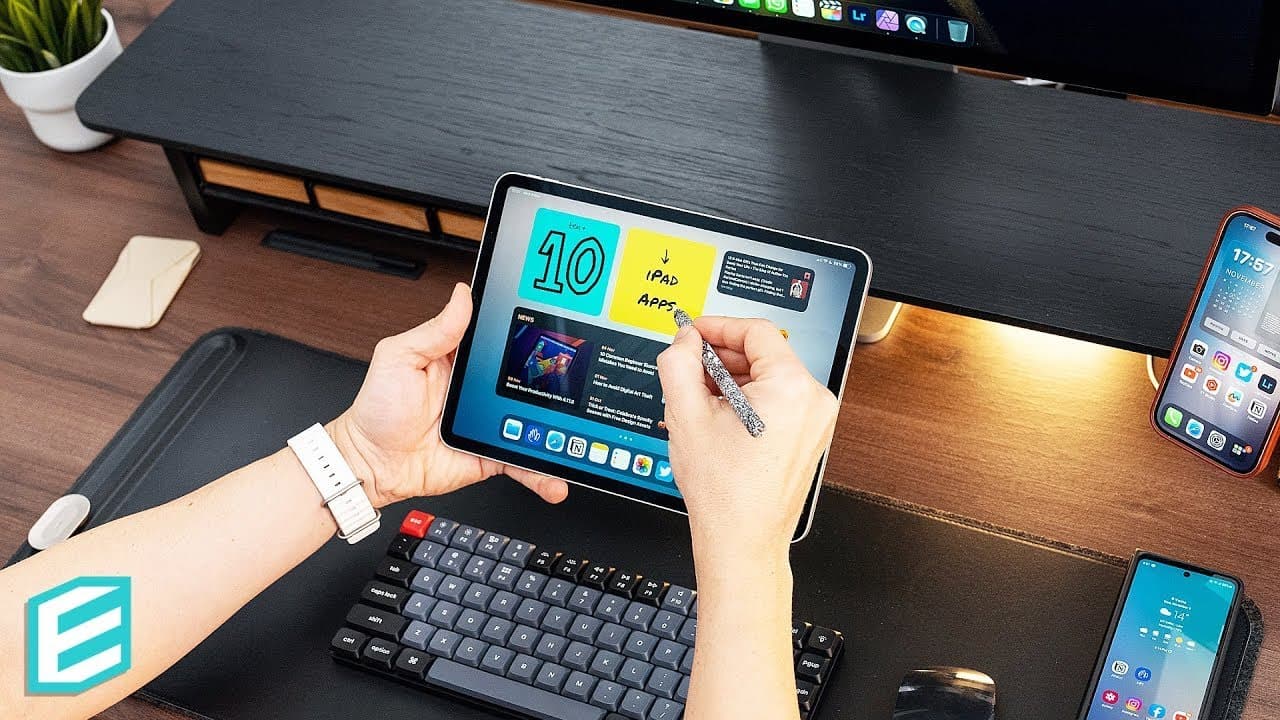
The best iPad apps for productivity and entertainment include Noir for dark mode browsing, AI Writer for focused writing, and Substack for effortless newsletter publishing. Additionally, Post It digitizes notes, Freeform acts as a versatile virtual whiteboard, and Vectornator simplifies graphic design. For relaxation, try Portal's immersive experiences, or enjoy engaging games like Blek and Frost.
Transcript
This video is brought to you by Brilliant! While prepping my recent M2 iPad videos, I got hooked on researching new iPad apps that I could potentially integrate into my workflow. I have shortlisted 10 apps I intend to keep on my tablet, and I'd love to share them with you. BTW, feel free to recommend your recent app discoveries in the comments belo... Read More
Key Insights
- 😃 Dark mode toggles, like Noir, enhance the browsing experience by reducing eye strain and improving focus during evening iPad sessions.
- 😀 Focus-centric writing apps, such as AI Writer, help writers overcome distractions and improve productivity.
- 💌 Email newsletter platforms like Substack simplify the process of publishing and distributing content, making it accessible to a wider audience.
- 😀 Virtual whiteboard apps, like Freeform, offer versatile and collaborative spaces to gather and organize information for various purposes.
- 😀 User-friendly graphic design apps, such as Vectornator, enable creativity and productivity on the iPad, eliminating the need for a dedicated computer.
- 🍻 Link organizer apps, like GoodLinks, provide a seamless way to save, organize, and revisit useful links without the hassle of account registration.
- 😀 Immersive escape apps, like Portal, offer a unique combination of ambient sounds and visuals to promote relaxation, focus, and stress reduction.
- 👾 Engaging games, such as Blek, Frost, and Shadow Blade +, provide enjoyable and entertaining experiences on the iPad for leisure and relaxation.
Install to Summarize YouTube Videos and Get Transcripts
Explore YouTube Video Summarizer or Get YouTube Transcript Extractor
Questions & Answers
Q: How does the app Noir enhance the web browsing experience on iPad?
Noir is a valuable app that enables users to activate a dark mode toggle for Safari, turning light websites dark or black according to their preference. It also offers customizable settings, scheduling options, and the ability to darken website images.
Q: What makes AI Writer a unique writing app?
AI Writer stands out due to its focus-centric approach, eliminating UI distractions and offering an interface conducive to focused writing. It also features useful functionalities like document connections, markdown support, and the ability to eliminate clichés and filler words with its built-in Style Check.
Q: How can Substack be beneficial for writers?
Substack serves as an email newsletter platform with a clean and simple interface, making it easy for writers to publish their content as web posts or emails. It allows for creative combinations of text, visuals, and audio, making it a versatile tool for communication with an audience.
Q: What are the unique features of Freeform, the virtual whiteboard app?
Freeform provides a virtual whiteboard experience with support for various types of content, including sticky notes, images, text fields, drawings, and shapes. Its standout features include Apple Pencil compatibility and upcoming collaboration capabilities.
Q: How does Vectornator enhance graphic design on the iPad?
Vectornator offers a more streamlined and user-friendly interface for creating vector artwork on the iPad. Its tools are optimized for touch input, and its interface adapts based on the selected elements, eliminating the need for fixed menus and maximizing screen real estate.
Q: What features make GoodLinks an effective link organizer?
GoodLinks distinguishes itself by providing a convenient way to save and organize links without requiring account registration. With its iPad Safari plugin, users can easily save articles in reader mode, tag them, mark them as read, and access them later, free of ads.
Q: How does the app Portal provide an immersive experience?
Portal combines ambient sounds and immersive visual representations to create an app that helps users relax, sleep better, and reduce stress. It offers a variety of locations and additional features like breathing exercises and integration with smart bulbs.
Q: What are the gameplay experiences offered by Blek, Frost, and Shadow Blade +?
Blek is a puzzle game where players control a line to navigate through levels, providing unique sound effects and relaxing visuals. Frost allows players to draw paths to guide spirits, creating a calming and engaging experience. Shadow Blade + is a fast-paced action game filled with ninjas, weapons, and smooth animations, delivering an entertaining gameplay experience, especially with a controller.
Key Insights:
- Dark mode toggles, like Noir, enhance the browsing experience by reducing eye strain and improving focus during evening iPad sessions.
- Focus-centric writing apps, such as AI Writer, help writers overcome distractions and improve productivity.
- Email newsletter platforms like Substack simplify the process of publishing and distributing content, making it accessible to a wider audience.
- Virtual whiteboard apps, like Freeform, offer versatile and collaborative spaces to gather and organize information for various purposes.
- User-friendly graphic design apps, such as Vectornator, enable creativity and productivity on the iPad, eliminating the need for a dedicated computer.
- Link organizer apps, like GoodLinks, provide a seamless way to save, organize, and revisit useful links without the hassle of account registration.
- Immersive escape apps, like Portal, offer a unique combination of ambient sounds and visuals to promote relaxation, focus, and stress reduction.
- Engaging games, such as Blek, Frost, and Shadow Blade +, provide enjoyable and entertaining experiences on the iPad for leisure and relaxation.
Note: The analysis has been generated based on the text provided and does not include any additional external sources.
Summary & Key Takeaways
-
Noir: A dark mode toggle for Safari that turns light websites dark or black with customizable preferences and scheduling features.
-
AI Writer: A focus-centric writing app that eliminates distractions and offers a smooth writing experience with features like Style Check.
-
Substack: An email newsletter platform with a simple interface for easy publishing of posts as web content or emails, including audio segments.
-
Post It: An app that brings real-life Post-it notes into the digital world, allowing users to create and organize digital boards with support for Apple Pencil.
-
Freeform: A virtual whiteboard app that collects various information, including sticky notes, images, text fields, drawings, and shapes, and offers collaboration features.
-
Vectornator: A user-friendly graphic design app for creating vector artwork with fluid tools and a tailored iPad interface.
-
GoodLinks: An app for saving and organizing links without the need for registration, featuring an iPad Safari plugin and a reader mode for ad-free content.
-
Portal: An immersive escape app with ambient sounds and visuals to reduce stress and promote relaxation and focus.
-
Blek: A puzzle game in which players control a line to navigate through levels, offering unique sound effects and visual experiences.
-
Frost: A game where players draw paths to guide spirits to their home planets, providing a calming and satisfying experience.
-
Shadow Blade +: An action game with ninjas, weapons, and smooth animations, available on Apple Arcade for entertaining gameplay.
Read in Other Languages (beta)
Share This Summary 📚
Summarize YouTube Videos and Get Video Transcripts with 1-Click
Try YouTube Summary with ChatGPT & Claude or YouTube Transcript Generator
Explore More Summaries from ThisIsE 📚
Summarize YouTube Videos and Get Video Transcripts with 1-Click
Try YouTube Summary with ChatGPT & Claude or YouTube Transcript Generator