Products
Features
YouTube Video Summarizer
Summarize YouTube videos
Web & PDF Highlighter
Highlight web pages & PDFs
Chat with PDF
Ask any PDF questions with AI
Ask AI Clone
Chat with your highlights & memories
Audio Transcriber
Transcribe audio files to text
Glasp Reader
Read and highlight articles
Kindle Highlight Export
Export your Kindle highlights
Idea Hatch
Hatch ideas from your highlights
Integrations
Obsidian Plugin
Notion Integration
Pocket Integration
Instapaper Integration
Medium Integration
Readwise Integration
Snipd Integration
Hypothesis Integration
Apps & Extensions
Chrome Extension
Safari Extension
Edge Add-ons
Firefox Add-ons
iOS App
Android App
Discover
Discover
Ideas
Discover new ideas and insights
Articles
Curated articles and insights
Books
Book recommendations by great minds
Posts
Essays and notes from readers
Quotes
Inspiring quotes collection
Videos
Curated videos and summaries
Explore Glasp
Glasp Newsletter
Weekly insights and updates
Glasp Talk
Interview series with great minds
Glasp Blog
Latest news and articles
Glasp Use Cases
Learn how others use Glasp
Build & Support
Glasp API
Access Glasp's API for developers
MCP Connector
Connect Glasp to Claude & ChatGPT
Community
Glasp Reddit Community
Students
Student discount and benefits
FAQs
Frequently Asked Questions
AboutPricing
DashboardLog inSign up

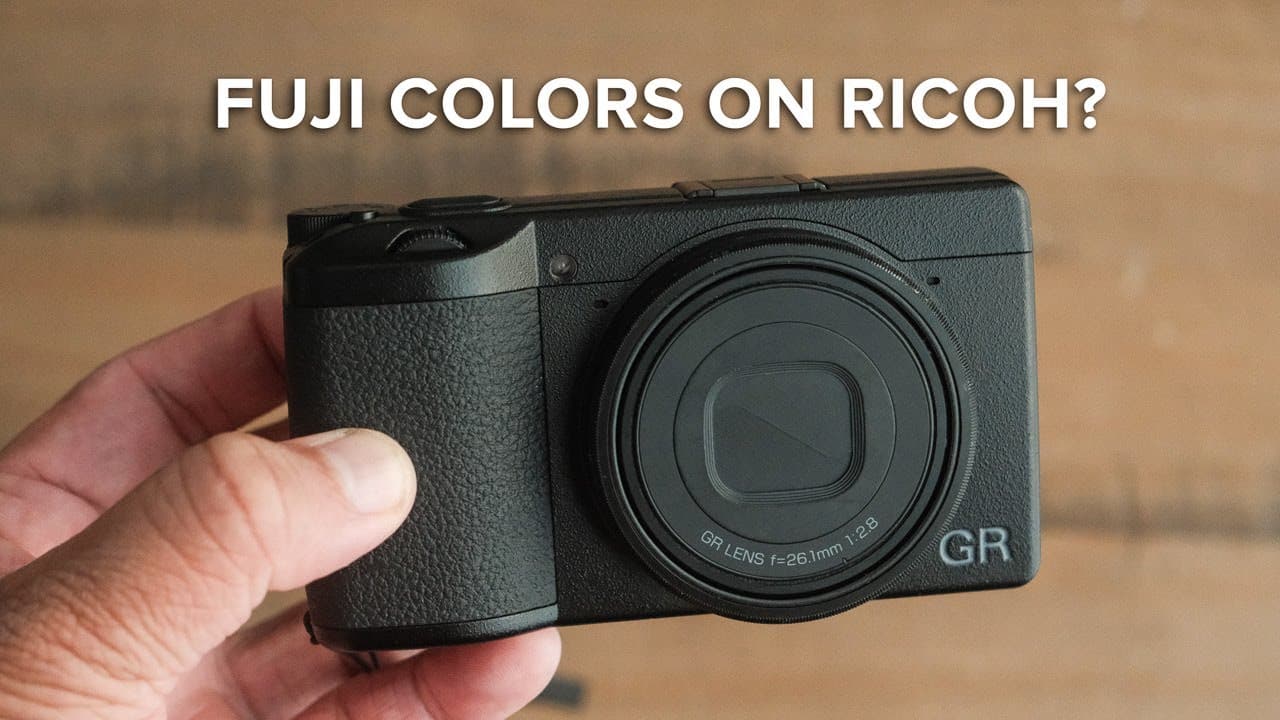
How to Set Up Ricoh GR III for Film Simulation
120.5K views
•
November 20, 2023
by
Reggie Ballesteros
YouTube video player
How to Set Up Ricoh GR III for Film Simulation

TL;DR

To set up the Ricoh GR III for Reggie's Color Negative film simulation, adjust the image capture settings to RAW plus JPEG, use sRGB color space, and customize film simulation levels for saturation, contrast, and white balance. This approach creates a versatile and unique color experience similar to traditional film, enhancing your photography.

Transcript

(upbeat music) - If you've been searching for a color film simulation recipe for your Ricoh GR III or GR IIIx look no further than Reggie's color negative. (upbeat music) This film simulation recipe started out as an attempt to recreate the look of my popular Fujifilm recipe, Reggie's Portra, but for the Ricoh GR III and the GR IIIx. And after twea... Read More

Key Insights

  • 🎥 Reggie's Color Negative film simulation offers a unique alternative to Fujifilm's popular film looks, tailored for Ricoh cameras.
  • 🖐️ The specific camera settings laid out are essential for achieving the desired filmic quality in photographs, emphasizing customization to meet personal style.
  • ✋ Using both RAW and JPEG gives photographers greater versatility in edits while maintaining high-quality archives.
  • 👾 Selecting the right color space can significantly impact image consistency across devices and platforms, making sRGB a beneficial choice.
  • 🧡 The contrast settings are critical for achieving dynamic range and vivid imagery, vital for capturing the depth in high-contrast scenes.
  • 🙂 Auto white balance with a slight warmth adjustment enhances color tones, which is crucial for film look aesthetics in digital photography.
  • 👨‍💼 A professional website can greatly enhance a photographer's business potential, surpassing the limitations posed by social media platforms.

Install to Summarize YouTube Videos and Get Transcripts

Explore YouTube Video Summarizer or Get YouTube Transcript Extractor

Summary & Key Takeaways

  • This content provides a detailed overview of Reggie Ballesteros' Color Negative film simulation recipe designed specifically for the Ricoh GR III and GR IIIx cameras, offering a unique color experience.

  • The video includes practical steps on adjusting camera settings, covering aspects such as file format, color space, film simulation recipes, contrast, and white balance for optimal results.

  • Additionally, it highlights the importance of having a professional website for photographers and suggests using Squarespace for creating and marketing one's work effectively.


Read in Other Languages (beta)

English

Share This Summary 📚

Summarize YouTube Videos and Get Video Transcripts with 1-Click

Download browser extensions on:

Try YouTube Summary with ChatGPT & Claude or YouTube Transcript Generator

Explore More Summaries from Reggie Ballesteros 📚
How to import Fuji X-T3 RAW files into Lightroom - Iridient X-Transformer thumbnail
How to import Fuji X-T3 RAW files into Lightroom - Iridient X-Transformer
Reggie Ballesteros
This lens will make you abandon your favorite lens | Fuji 33mm f1.4 Review thumbnail
This lens will make you abandon your favorite lens | Fuji 33mm f1.4 Review
Reggie Ballesteros
Fujifilm X100V + Cinebloom 20 | Night Photography POV thumbnail
Fujifilm X100V + Cinebloom 20 | Night Photography POV
Reggie Ballesteros
Is the Fujifilm X-E3 the Best Camera for Wedding Photography? thumbnail
Is the Fujifilm X-E3 the Best Camera for Wedding Photography?
Reggie Ballesteros
UHS-I vs UHS-II: Which SD Card Is Better for Fujifilm X-T3? thumbnail
UHS-I vs UHS-II: Which SD Card Is Better for Fujifilm X-T3?
Reggie Ballesteros
The Cheat Code to Video for Photographers (Fujifilm XS20, X100VI, XT5) thumbnail
The Cheat Code to Video for Photographers (Fujifilm XS20, X100VI, XT5)
Reggie Ballesteros

Summarize YouTube Videos and Get Video Transcripts with 1-Click

Download browser extensions on:

Try YouTube Summary with ChatGPT & Claude or YouTube Transcript Generator

Apps & Extensions

  • Chrome Extension
  • Safari Extension
  • Edge Add-ons
  • Firefox Add-ons
  • iOS App
  • Android App

Key Features

  • YouTube Video Summarizer
  • Web & PDF Summarizer
  • Web & PDF Highlighter
  • Chat with PDF
  • Ask AI Clone
  • Audio Transcriber
  • Glasp Reader
  • Kindle Highlight Export
  • Idea Hatch

Integrations

  • Obsidian Plugin
  • Notion Integration
  • Pocket Integration
  • Instapaper Integration
  • Medium Integration
  • Readwise Integration
  • Snipd Integration
  • Hypothesis Integration

More Features

  • APIs
  • MCP Connector
  • Blog & Post
  • Embed Links
  • Image Highlight
  • Personality Test
  • Quote Shots

Company

  • About us
  • Blog
  • Community
  • FAQs
  • Job Board
  • Newsletter
  • Pricing
Terms

•

Privacy

•

Guidelines

© 2026 Glasp Inc. All rights reserved.