How to Set Up Ricoh GR III for Film Simulation
TL;DR
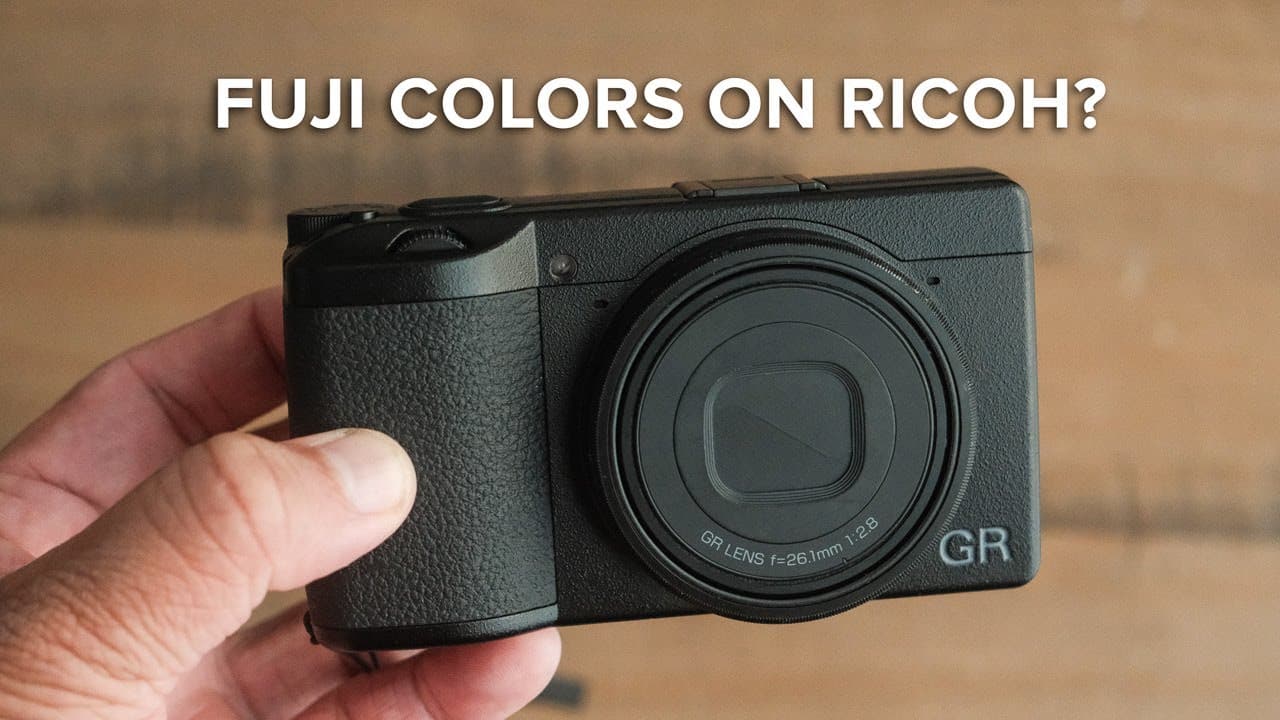
To set up the Ricoh GR III for Reggie's Color Negative film simulation, adjust the image capture settings to RAW plus JPEG, use sRGB color space, and customize film simulation levels for saturation, contrast, and white balance. This approach creates a versatile and unique color experience similar to traditional film, enhancing your photography.
Transcript
(upbeat music) - If you've been searching for a color film simulation recipe for your Ricoh GR III or GR IIIx look no further than Reggie's color negative. (upbeat music) This film simulation recipe started out as an attempt to recreate the look of my popular Fujifilm recipe, Reggie's Portra, but for the Ricoh GR III and the GR IIIx. And after twea... Read More
Key Insights
- 🎥 Reggie's Color Negative film simulation offers a unique alternative to Fujifilm's popular film looks, tailored for Ricoh cameras.
- 🖐️ The specific camera settings laid out are essential for achieving the desired filmic quality in photographs, emphasizing customization to meet personal style.
- ✋ Using both RAW and JPEG gives photographers greater versatility in edits while maintaining high-quality archives.
- 👾 Selecting the right color space can significantly impact image consistency across devices and platforms, making sRGB a beneficial choice.
- 🧡 The contrast settings are critical for achieving dynamic range and vivid imagery, vital for capturing the depth in high-contrast scenes.
- 🙂 Auto white balance with a slight warmth adjustment enhances color tones, which is crucial for film look aesthetics in digital photography.
- 👨💼 A professional website can greatly enhance a photographer's business potential, surpassing the limitations posed by social media platforms.
Install to Summarize YouTube Videos and Get Transcripts
Explore YouTube Video Summarizer or Get YouTube Transcript Extractor
Questions & Answers
Q: What is Reggie's Color Negative film simulation recipe designed for?
Reggie's Color Negative film simulation recipe is specifically crafted for the Ricoh GR III and GR IIIx cameras. It aims to emulate a distinctive color style similar to popular Fujifilm recipes but brings a unique aesthetic that differs in tones and colors, presenting photographers with an alternative option.
Q: How does setting the color space to sRGB benefit image compatibility?
Setting the color space to sRGB ensures that the images are compatible across multiple devices. This choice is particularly important for photographers who frequently edit or share their work via smartphones or various platforms, as sRGB encompasses the widest gamut for most displays.
Q: Why does Reggie recommend using RAW plus JPEG?
Reggie suggests using the RAW plus JPEG format to retain the benefits of both file types. While JPEGs are user-friendly for everyday edits, retaining RAW files allows photographers the flexibility to make substantial adjustments in post-production and serves as an archival option for future needs.
Q: What adjustments are made for contrast in Reggie's recipe?
In Reggie's recipe, contrast levels are set to plus three for shadows to intensify the depth in high-contrast scenes. The highlight contrast is set to negative four, which helps to recover dynamic range in bright areas, thus creating a balanced look throughout the image.
Q: What is the significance of using the custom film simulation settings on the Ricoh?
Custom film simulation settings on the Ricoh allow users to personalize their shooting experience, tailoring parameters like color tones and contrast specifically to their preferences. By utilizing Custom1 for color and Custom2 for black and white, photographers can switch effortlessly between modes for creative flexibility.
Q: How does Reggie approach white balance in his simulation recipe?
In his recipe, Reggie favors auto white balance to maintain versatility across different lighting conditions. He adds a white balance shift of six to warm up images, ensuring colors align with the desired warmer tone, which enhances the overall film-like quality of the photos.
Q: What benefits does Reggie outline for photographers considering a website?
Reggie emphasizes that having a professional website is crucial for photographers aiming to build their business. It allows for a portfolio showcase, a platform to share blogs, and a streamlined approach for receiving client inquiries, which is significantly more effective than relying solely on social media.
Q: What role does the Squarespace sponsorship play in the video?
The Squarespace sponsorship highlights the importance of a personal website for photographers and reflects Reggie's long-term positive experience with the platform. By integrating the sponsorship, Reggie promotes a service that he believes benefits photographers, encouraging viewers to take steps toward professional online presence.
Summary & Key Takeaways
-
This content provides a detailed overview of Reggie Ballesteros' Color Negative film simulation recipe designed specifically for the Ricoh GR III and GR IIIx cameras, offering a unique color experience.
-
The video includes practical steps on adjusting camera settings, covering aspects such as file format, color space, film simulation recipes, contrast, and white balance for optimal results.
-
Additionally, it highlights the importance of having a professional website for photographers and suggests using Squarespace for creating and marketing one's work effectively.
Read in Other Languages (beta)
Share This Summary 📚
Summarize YouTube Videos and Get Video Transcripts with 1-Click
Try YouTube Summary with ChatGPT & Claude or YouTube Transcript Generator
Explore More Summaries from Reggie Ballesteros 📚


Summarize YouTube Videos and Get Video Transcripts with 1-Click
Try YouTube Summary with ChatGPT & Claude or YouTube Transcript Generator