How to Transform Your Smartphone Into a Minimalist Device
TL;DR
To transform your smartphone into a minimalist device, identify and retain only essential apps while blocking distractions like social media during peak productivity times. Create a custom layout that cues usage of these apps and utilize widgets for quick access, making your phone more utilitarian and less distracting.
Transcript
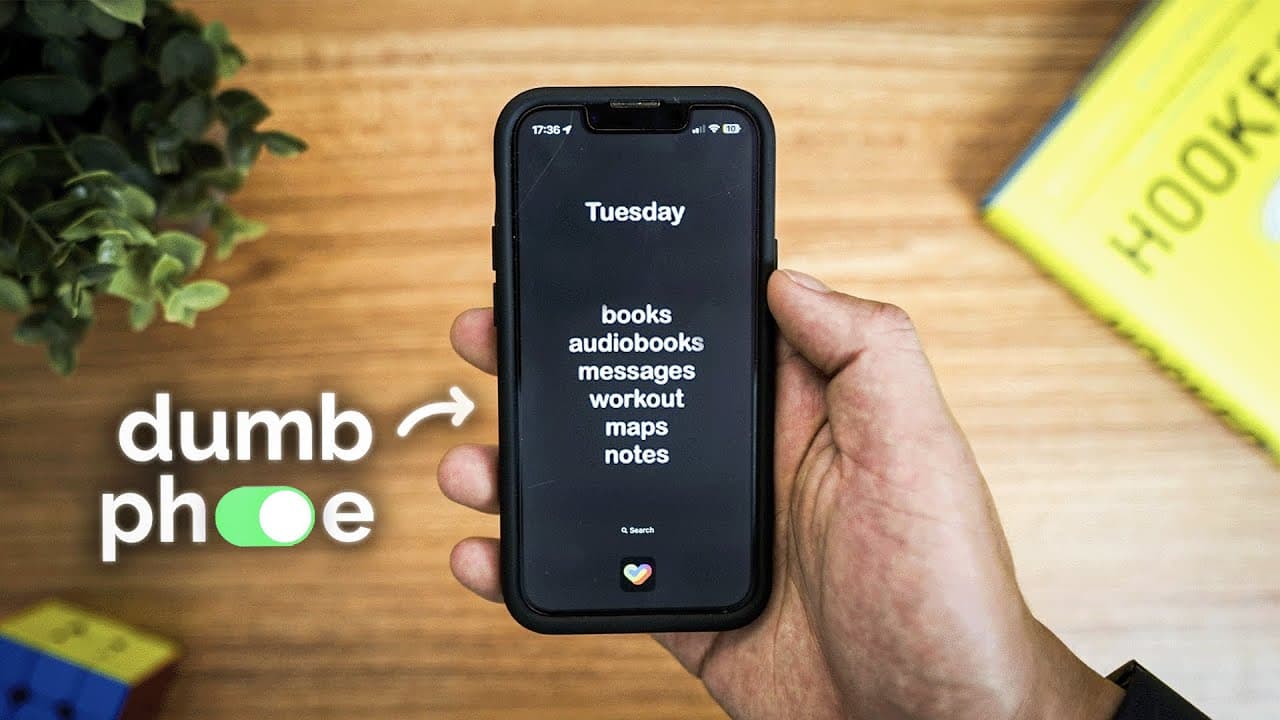
This is what my minimalistic phone setup looks like. It's designed to minimize distractions as much as possible, mimic the layout and design of a dumb phone, but still retain the useful features of a smartphone. The first time I saw one of these dumb phones I fantasized about the idea of getting one. But if you watch any video of somebody using t... Read More
Key Insights
- The video explores transforming a smartphone into a 'dumbphone' by limiting distractions and retaining essential features.
- The creator initially experimented with reducing screen time and identified necessary versus distracting features.
- A minimalist phone setup can include only essential apps like books, audiobooks, messaging, workout trackers, maps, and notes.
- Blocking social media apps for most of the day helps maintain focus and prevents mindless scrolling.
- Using widgets and hidden apps can enhance productivity by keeping distractions off the home screen.
- A mood tracker app provides insights into emotional well-being by logging feelings and analyzing patterns.
- Setting up a blocking system with specific time limits for app usage can create sustainable habits.
- The video's approach emphasizes intentional phone use and suggests that setting constraints enhances focus.
Install to Summarize YouTube Videos and Get Transcripts
Explore YouTube Video Summarizer or Get YouTube Transcript Extractor
Summary & Key Takeaways
-
This video demonstrates a method to transform a smartphone into a minimalist device to reduce distractions. The setup involves using only essential apps and blocking social media during peak productivity hours. The creator shares insights from personal experience and provides a guide to replicate the system.
-
The creator details a personal experiment that led to identifying essential smartphone features while minimizing screen time. By setting up a custom phone layout and blocking distracting apps, the creator maintains focus and productivity. The video offers a comprehensive guide for viewers to implement similar changes.
-
By converting a smartphone into a 'dumbphone,' the creator aims to maximize productivity and minimize distractions. The approach involves a strategic layout of essential apps, blocking social media during specific hours, and using widgets for quick access to necessary information. The video provides a step-by-step guide to replicate the setup.
Read in Other Languages (beta)
Share This Summary 📚
Summarize YouTube Videos and Get Video Transcripts with 1-Click
Try YouTube Summary with ChatGPT & Claude or YouTube Transcript Generator
Explore More Summaries from Reysu 📚

Summarize YouTube Videos and Get Video Transcripts with 1-Click
Try YouTube Summary with ChatGPT & Claude or YouTube Transcript Generator