Products
Features
YouTube Video Summarizer
Summarize YouTube videos
Web & PDF Highlighter
Highlight web pages & PDFs
Chat with PDF
Ask any PDF questions with AI
Ask AI Clone
Chat with your highlights & memories
Audio Transcriber
Transcribe audio files to text
Glasp Reader
Read and highlight articles
Kindle Highlight Export
Export your Kindle highlights
Idea Hatch
Hatch ideas from your highlights
Integrations
Obsidian Plugin
Notion Integration
Pocket Integration
Instapaper Integration
Medium Integration
Readwise Integration
Snipd Integration
Hypothesis Integration
Apps & Extensions
Chrome Extension
Safari Extension
Edge Add-ons
Firefox Add-ons
iOS App
Android App
Discover
Discover
Ideas
Discover new ideas and insights
Articles
Curated articles and insights
Books
Book recommendations by great minds
Posts
Essays and notes from readers
Quotes
Inspiring quotes collection
Videos
Curated videos and summaries
Explore Glasp
Glasp Story
How we grew from 0 to 3 million users
Glasp Newsletter
Weekly insights and updates
Glasp Talk
Interview series with great minds
Glasp Blog
Latest news and articles
Glasp Use Cases
Learn how others use Glasp
Build & Support
Glasp API
Access Glasp's API for developers
MCP Connector
Connect Glasp to Claude & ChatGPT
Community
Glasp Reddit Community
Students
Student discount and benefits
FAQs
Frequently Asked Questions
AboutPricing
DashboardLog inSign up

Creating figures containing western Blot (or other) images in Microsoft Word
12.4K views
•
August 7, 2019
by
Dory Video
YouTube video player
Creating figures containing western Blot (or other) images in Microsoft Word

TL;DR

Learn a simple way to create publication-quality images for Western blots, PCR, and other experiments in Microsoft Word.

Transcript

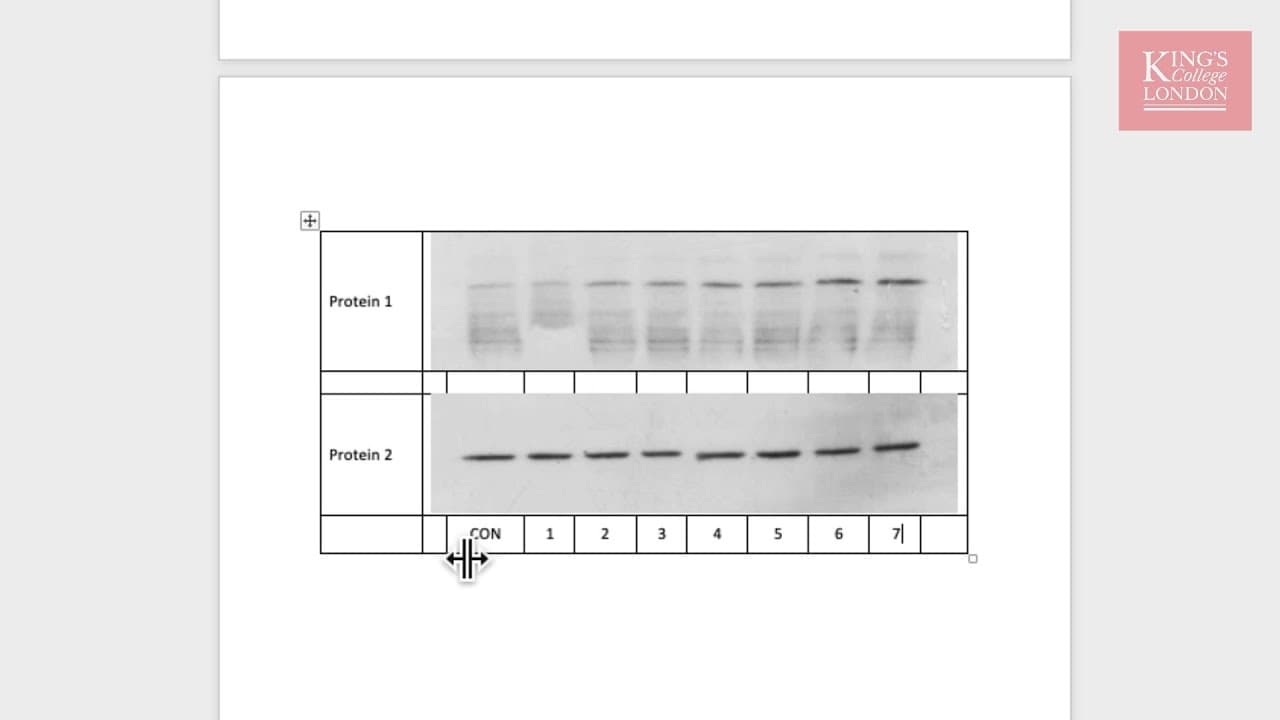
hello in this tutorial I'm going to show you a very easy way of creating images for use in publications from Western blots PCR southern blots etc in Microsoft Word traditionally we might use a program such as PowerPoint to produce our Western blot images and in fact on the screen in front of you you can seize two Western blots for protein 1 and pro... Read More

Key Insights

  • 🍉 Traditionally, PowerPoint has been used for creating images for publications but has limitations in terms of image placement and formatting.
  • 💁 Using the "Paste Special" option in Microsoft Word, images can be pasted in an alternative format (e.g., enhanced metafile) for better quality and flexibility.
  • 🎮 Creating a table in Word, merging cells, and inserting images offers more control and flexibility in aligning and annotating images.
  • 💁 The table format allows for easy replication of the image and the ability to change images while maintaining formatting.
  • 🚰 Increasing the font size and removing table borders can enhance the presentation of the annotated Western blot images.
  • 🧘 Keeping a copy of the PowerPoint file can be useful for making edits and re-pasting into the Word document.
  • 🇪🇭 The provided method is applicable for Western blots, PCR, southern blots, and other experiments in Microsoft Word.

Install to Summarize YouTube Videos and Get Transcripts

Explore YouTube Video Summarizer or Get YouTube Transcript Extractor

Summary & Key Takeaways

  • Traditionally, PowerPoint has been used to create images for publications, but it results in limitations such as difficulty in flowing text around the image and inability to place it inside a table.

  • By using the "Paste Special" option in Microsoft Word, one can paste images in an enhanced metafile format, which provides better quality and allows the image to move inline with text.

  • Another method is to create a table in Word, merge cells, and insert images, allowing for easy alignment and annotation. This method is preferred as it provides more control and flexibility.


Read in Other Languages (beta)

English

Share This Summary 📚

Summarize YouTube Videos and Get Video Transcripts with 1-Click

Download browser extensions on:

Try YouTube Summary with ChatGPT & Claude or YouTube Transcript Generator

Explore More Summaries from Dory Video 📚

How to Perform Linear Regression in GraphPad Prism thumbnail
How to Perform Linear Regression in GraphPad Prism
Dory Video
How to Set Up Multi-Instrument Layers in Kontakt 5 thumbnail
How to Set Up Multi-Instrument Layers in Kontakt 5
Dory Video
Graphpad Prism - using the layout tool to publish your data thumbnail
Graphpad Prism - using the layout tool to publish your data
Dory Video
WavesFactory MERCURY Piano for Kontakt thumbnail
WavesFactory MERCURY Piano for Kontakt
Dory Video
Playing Vienna Instruments (VSL) with a ROLI Seaboard RISE thumbnail
Playing Vienna Instruments (VSL) with a ROLI Seaboard RISE
Dory Video
UVI String Machines (Expansion for UVI Workstation) thumbnail
UVI String Machines (Expansion for UVI Workstation)
Dory Video

Summarize YouTube Videos and Get Video Transcripts with 1-Click

Download browser extensions on:

Try YouTube Summary with ChatGPT & Claude or YouTube Transcript Generator

Apps & Extensions

  • Chrome Extension
  • Safari Extension
  • Edge Add-ons
  • Firefox Add-ons
  • iOS App
  • Android App

Key Features

  • YouTube Video Summarizer
  • Web & PDF Summarizer
  • Web & PDF Highlighter
  • Chat with PDF
  • Ask AI Clone
  • Audio Transcriber
  • Glasp Reader
  • Kindle Highlight Export
  • Idea Hatch

Integrations

  • Obsidian Plugin
  • Notion Integration
  • Pocket Integration
  • Instapaper Integration
  • Medium Integration
  • Readwise Integration
  • Snipd Integration
  • Hypothesis Integration

More Features

  • APIs
  • MCP Connector
  • Blog & Post
  • Embed Links
  • Image Highlight
  • Personality Test
  • Quote Shots

Company

  • About us
  • Our Story
  • Blog
  • Community
  • FAQs
  • Job Board
  • Newsletter
  • Pricing
Terms

•

Privacy

•

Guidelines

© 2026 Glasp Inc. All rights reserved.


