Products
Features
YouTube Video Summarizer
Summarize YouTube videos
Web & PDF Highlighter
Highlight web pages & PDFs
Chat with PDF
Ask any PDF questions with AI
Ask AI Clone
Chat with your highlights & memories
Audio Transcriber
Transcribe audio files to text
Glasp Reader
Read and highlight articles
Kindle Highlight Export
Export your Kindle highlights
Idea Hatch
Hatch ideas from your highlights
Integrations
Obsidian Plugin
Notion Integration
Pocket Integration
Instapaper Integration
Medium Integration
Readwise Integration
Snipd Integration
Hypothesis Integration
Apps & Extensions
Chrome Extension
Safari Extension
Edge Add-ons
Firefox Add-ons
iOS App
Android App
Discover
Discover
Ideas
Discover new ideas and insights
Articles
Curated articles and insights
Books
Book recommendations by great minds
Posts
Essays and notes from readers
Quotes
Inspiring quotes collection
Videos
Curated videos and summaries
Explore Glasp
Glasp Story
How we grew from 0 to 3 million users
Glasp Newsletter
Weekly insights and updates
Glasp Talk
Interview series with great minds
Glasp Blog
Latest news and articles
Glasp Use Cases
Learn how others use Glasp
Build & Support
Glasp API
Access Glasp's API for developers
MCP Connector
Connect Glasp to Claude & ChatGPT
Community
Glasp Reddit Community
Students
Student discount and benefits
FAQs
Frequently Asked Questions
AboutPricing
DashboardLog inSign up

How to Create a Custom Dashboard in Obsidian
147.8K views
•
October 5, 2022
by
FromSergio
YouTube video player
How to Create a Custom Dashboard in Obsidian

TL;DR

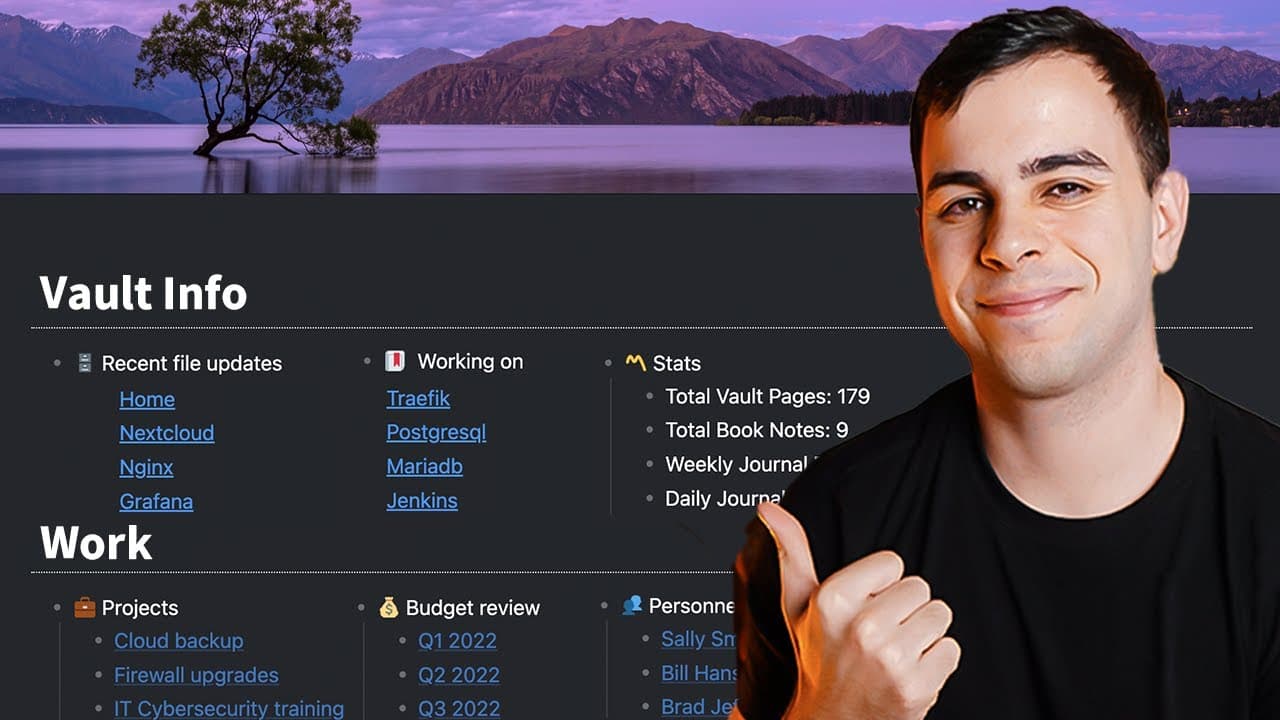
You can build a personalized dashboard in Obsidian using the CSS snippet 'dashboard++' without any CSS knowledge. Simply install the snippet, create a new page titled 'home', and apply the CSS class in the YAML header to visualize your dashboard complete with recent updates and favorite files.

Transcript

by the end of this video you're going to have a dashboard just like this one inside your obsidian Vault although there are no prerequisites for this video I'll be assuming you're not just starting out with obsidian but if you are then it might be best to go over some of my obsidian playlists before watching this one this dashboard is made possible ... Read More

Key Insights

  • 🔍 This video tutorial explains how to create a dashboard in Obsidian using a CSS snippet called Dashboard Plus Plus.
  • 📚 No CSS knowledge is required to implement this dashboard, just a simple text editor.
  • 💻 The CSS code can be obtained from the developer's GitHub repository and placed in the Snippets folder of the Obsidian Vault.
  • 🔗 The developer of Dashboard Plus Plus is an active member of the community and provides regular updates to ensure compatibility with the latest software versions.
  • 📝 The dashboard is created on a separate page called "home" and is activated by applying the CSS class "dashboard" in the YAML header.
  • 📊 The dashboard includes various components such as recent file updates, favorite files, and Vault statistics.
  • 🔎 Data queries, implemented using Data View, enable dynamic content display based on criteria such as recent files, selected tags, or specific folders.
  • 🖼️ Additional customization options include adding banners to the dashboard page and setting the homepage plugin to automatically open the dashboard at startup.

Install to Summarize YouTube Videos and Get Transcripts

Explore YouTube Video Summarizer or Get YouTube Transcript Extractor

Summary & Key Takeaways

  • The video tutorial demonstrates how to install and use the "dashboard++" CSS snippet in Obsidian to create a customized dashboard in your Obsidian Vault.

  • The process involves accessing the CSS snippet file, copying and pasting the code into a text editor, saving it as "dashboard.css," and adding it to the Snippets folder in your Obsidian Vault.

  • After enabling the dashboard CSS snippet in Obsidian, you can create a new page, assign the CSS class "dashboard" to it, and customize the content of your dashboard using Markdown.


Read in Other Languages (beta)

English

Share This Summary 📚

Summarize YouTube Videos and Get Video Transcripts with 1-Click

Download browser extensions on:

Try YouTube Summary with ChatGPT & Claude or YouTube Transcript Generator

Explore More Summaries from FromSergio 📚
What Essential Markdown Syntax Should You Know for Obsidian? thumbnail
What Essential Markdown Syntax Should You Know for Obsidian?
FromSergio
Mac Settings That ACTUALLY Make A Difference thumbnail
Mac Settings That ACTUALLY Make A Difference
FromSergio
How Can Templater Enhance Your Obsidian Workflow? thumbnail
How Can Templater Enhance Your Obsidian Workflow?
FromSergio
It’s Annoying How Good Raycast is thumbnail
It’s Annoying How Good Raycast is
FromSergio
PRODUCTIVELY Learning New Things Using Obsidian thumbnail
PRODUCTIVELY Learning New Things Using Obsidian
FromSergio
How to Automate Your Notes with Dataview in Obsidian thumbnail
How to Automate Your Notes with Dataview in Obsidian
FromSergio

Summarize YouTube Videos and Get Video Transcripts with 1-Click

Download browser extensions on:

Try YouTube Summary with ChatGPT & Claude or YouTube Transcript Generator

Apps & Extensions

  • Chrome Extension
  • Safari Extension
  • Edge Add-ons
  • Firefox Add-ons
  • iOS App
  • Android App

Key Features

  • YouTube Video Summarizer
  • Web & PDF Summarizer
  • Web & PDF Highlighter
  • Chat with PDF
  • Ask AI Clone
  • Audio Transcriber
  • Glasp Reader
  • Kindle Highlight Export
  • Idea Hatch

Integrations

  • Obsidian Plugin
  • Notion Integration
  • Pocket Integration
  • Instapaper Integration
  • Medium Integration
  • Readwise Integration
  • Snipd Integration
  • Hypothesis Integration

More Features

  • APIs
  • MCP Connector
  • Blog & Post
  • Embed Links
  • Image Highlight
  • Personality Test
  • Quote Shots

Company

  • About us
  • Our Story
  • Blog
  • Community
  • FAQs
  • Job Board
  • Newsletter
  • Pricing
Terms

•

Privacy

•

Guidelines

© 2026 Glasp Inc. All rights reserved.