How to Automate Your Notes with Dataview in Obsidian
TL;DR
Use the DataView plugin in Obsidian to enhance your note-taking by annotating metadata and querying it dynamically. The plugin supports viewing formats like tables and lists, enabling you to filter and organize your notes efficiently, similar to database functionality.
Transcript
in this video i'm not just going to show you what dataview and obsidian is and how to use it but i'll also give you some real life examples that you can apply to your vault as well as some of my own personal use cases for dataview all right so there are two key elements to using this plugin one is annotating the metadata on your notes and the other... Read More
Key Insights
- 🔍 DataView and Obsidian have two key elements: annotating metadata on notes and querying them using DataView. Querying notes is similar to using databases in Notion. Assumptions are made about the viewer's knowledge of Obsidian, such as tags, templates, aliases, and YAML.
- 🔌 To download and activate the DataView plugin, go to Settings > Community Plugins. DataView supports three view types: table, list, and task. The selected view type determines the output format of the query.
- 📃 A list view displays all notes in the vault, while a table view requires specifying headers. Headers can be added to a table by typing them after the "table" command in the DataView query.
- 🔗 Similar to Obsidian aliases, DataView allows the use of aliases in table headers to display different names for the same parameter. This can be achieved by typing "as" followed by the desired header name.
- 🔎 DataView can be filtered using the "from" function to specify where to query parameters. This can be done based on tags, folders, or incoming and outgoing links. Multiple parameters can be combined using the "and" or "or" statement.
- ❌ The "where" function can be used to further filter DataView queries. It allows you to specify conditions for the query, such as file name, size, or contents.
- 🔄 DataView queries can be sorted in ascending or descending order using the "sort" function. This function is useful for sorting tables or lists based on specific parameters, such as date or rating.
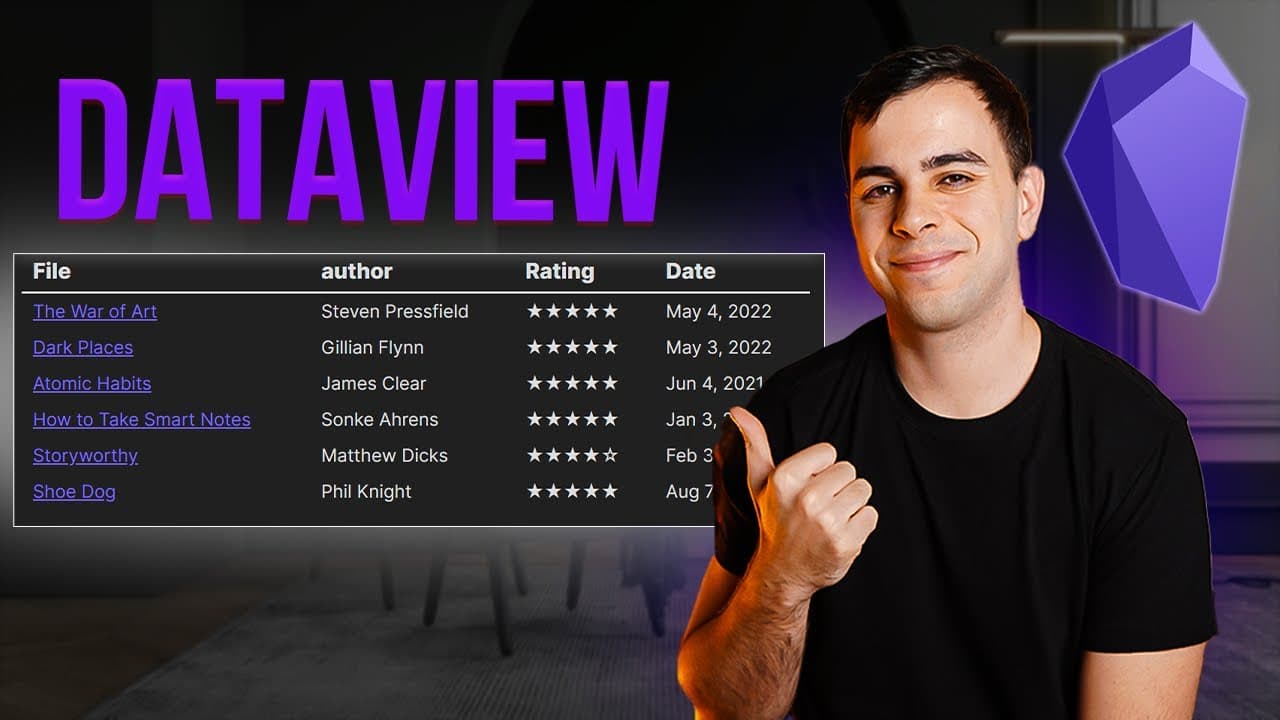
- 📚 DataView can be used to create a list of books read with star ratings. By adding YAML headers to notes with book details, DataView can generate a table with author, date, and rating. Templater plugin can automate star ratings entry and natural language dates plugin simplifies date entry.
Install to Summarize YouTube Videos and Get Transcripts
Explore YouTube Video Summarizer or Get YouTube Transcript Extractor
Questions & Answers
Q: How does the DataView plugin in Obsidian differ from databases in notion?
The DataView plugin in Obsidian provides a missing link for users transitioning from Notion, offering the ability to query across all notes and annotate metadata in a dynamic and customizable way.
Q: What are the three supported view types in the DataView plugin?
The three supported view types in the DataView plugin are table, list, and task. These allow users to choose how they want their query results to be displayed.
Q: How can you specify headers for a table view in DataView?
To specify headers for a table view in DataView, you need to type the headers after the "table" keyword in the query. For example, "table author" specifies the "author" header.
Q: How can you exclude certain notes from a DataView query based on a parameter?
To exclude certain notes from a DataView query based on a parameter, you can use the "where" function and specify the condition for exclusion. For example, "where file name is not equal to atomic habits" excludes the note "atomic habits" from the query results.
Q: How can DataView be used for tracking books read and star ratings in Obsidian?
Users can create a page in Obsidian to track books read and star ratings by annotating each book note's metadata with fields like author, tags, rating, and date, and then using DataView to generate a table with the relevant information.
Q: Can DataView be used to filter notes based on specific tags or folders?
Yes, DataView can be used to filter notes based on specific tags or folders by including the "from" function in the query. For example, "from #books" would filter notes to only include those tagged with "books."
Q: How can templates and hotkeys be used with DataView to automate note creation?
Users can create templates for DataView queries and assign hotkeys using the Templater plugin. This allows for quick and easy note creation with custom queries and outputs.
Q: What are some potential use cases for DataView in vault maintenance?
DataView can be used for vault maintenance by creating queries to identify notes that are missing certain elements, such as missing tags, and then taking actions to update or fix those notes. This can help ensure the integrity and organization of the vault.
Summary & Key Takeaways
-
The video introduces the DataView plugin in Obsidian, which allows users to annotate metadata on notes and query them.
-
The speaker explains the two key elements of using the plugin: annotating metadata and querying using DataView.
-
The video covers the basics of DataView, including different output formats, filtering options, and sorting.
Read in Other Languages (beta)
Share This Summary 📚
Summarize YouTube Videos and Get Video Transcripts with 1-Click
Try YouTube Summary with ChatGPT & Claude or YouTube Transcript Generator
Explore More Summaries from FromSergio 📚





Summarize YouTube Videos and Get Video Transcripts with 1-Click
Try YouTube Summary with ChatGPT & Claude or YouTube Transcript Generator