Excel HLookUp Tutorial - Plenty of Examples!
TL;DR
Learn how to use the HLOOKUP function in Excel to quickly look up data in a horizontal direction.
Transcript
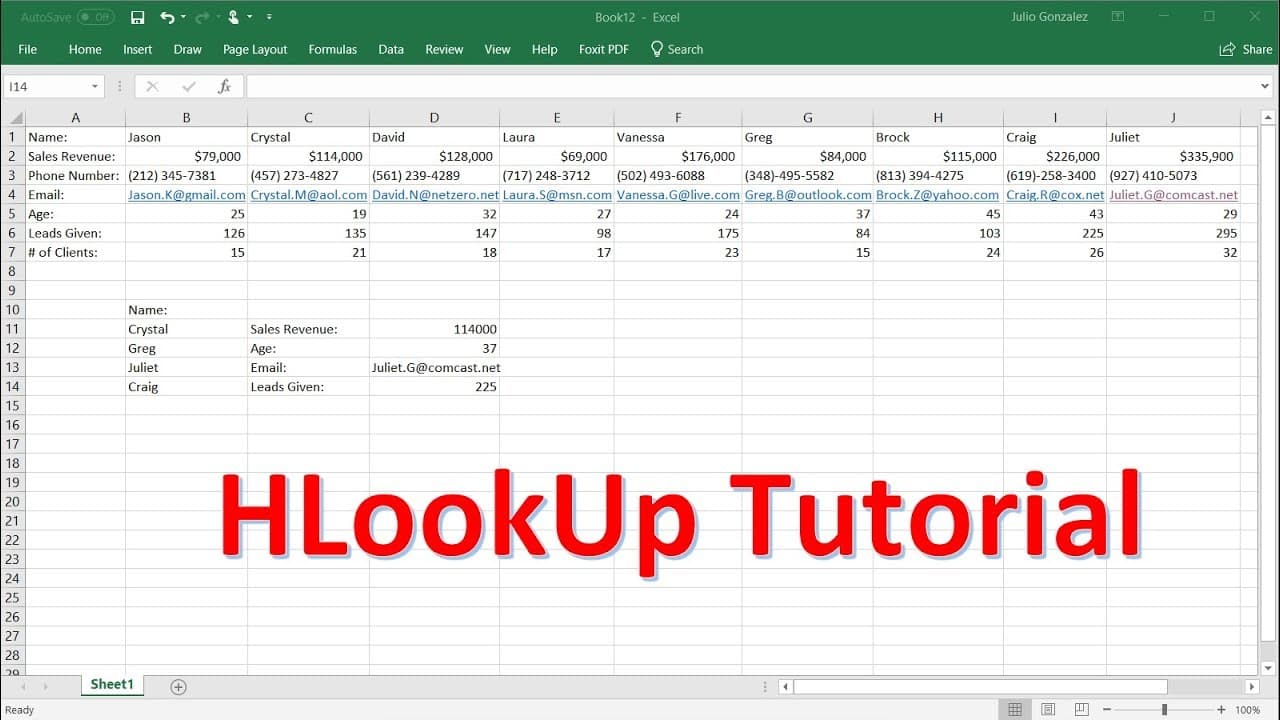
in this video we're going to talk about how to use the hlookup function so here we have some data with uh some information about these individuals like their sales revenue phone number email age leads given number of clients and so forth and the h lookup function is very similar to the vlookup function which works in the vertical direction but the ... Read More
Key Insights
- 👻 The HLOOKUP function in Excel allows users to search for data horizontally in a large data list.
- 💁 It is a useful tool for quickly retrieving specific information without manually searching through the data.
- 🤨 The HLOOKUP function requires specifying the lookup value, table array, row number, and match type (approximate or exact).
- 😒 It is important to use the correct name and spelling when using the HLOOKUP function for an exact match.
- 💱 The HLOOKUP function can be easily modified by changing the lookup value to find data for different individuals.
- 😒 It is recommended to use the false option for an exact match to prevent potential errors.
- 👨🔬 The HLOOKUP function automatically updates when the lookup value is changed, making it efficient for multiple searches.
Install to Summarize YouTube Videos and Get Transcripts
Explore YouTube Video Summarizer or Get YouTube Transcript Extractor
Questions & Answers
Q: What is the purpose of the HLOOKUP function in Excel?
The HLOOKUP function is used to search for data horizontally in a large data list. It is particularly useful when you want to quickly retrieve specific information.
Q: How is the HLOOKUP function different from the VLOOKUP function?
The HLOOKUP function works horizontally, while the VLOOKUP function works vertically. They both serve the purpose of searching and retrieving data, but in different directions.
Q: What options are available when using the HLOOKUP function?
When using the HLOOKUP function, you can choose between using an approximate match (true) or an exact match (false). The approximate match option is useful when there is a possibility of misspelling the search value.
Q: Can the HLOOKUP function be used to find various types of data?
Yes, the HLOOKUP function can be used to find different types of data. In the video, it demonstrates finding sales revenue, age, email, and number of leads for different individuals.
Summary & Key Takeaways
-
The video demonstrates how to use the HLOOKUP function in Excel, which is similar to the VLOOKUP function but works horizontally.
-
HLOOKUP is useful for quickly searching and retrieving data in a large data list.
-
The video provides step-by-step instructions on using the HLOOKUP function to find sales revenue, age, email, and number of leads for different individuals.
Read in Other Languages (beta)
Share This Summary 📚
Summarize YouTube Videos and Get Video Transcripts with 1-Click
Try YouTube Summary with ChatGPT & Claude or YouTube Transcript Generator
Explore More Summaries from The Organic Chemistry Tutor 📚




Summarize YouTube Videos and Get Video Transcripts with 1-Click
Try YouTube Summary with ChatGPT & Claude or YouTube Transcript Generator