Material UI 5 (MUI) React Tutorial | MUI Responsive Real Project
TL;DR
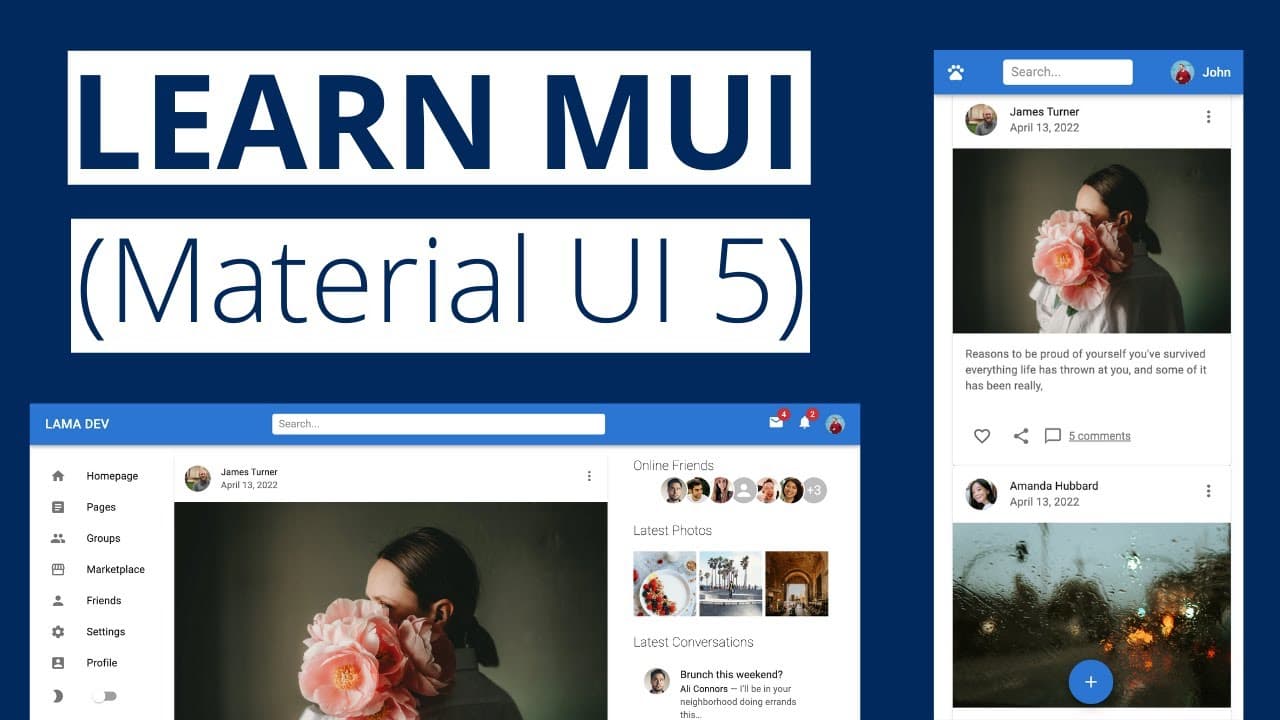
Learn how to create a stunning website using Material UI, including designing components, customizing styles, implementing dark mode, and deploying the website with a hosting service.
Transcript
hello my friends today we are gonna design this beautiful website using material ui you are gonna learn how to use the most common material ui components by creating a real world project cards lists models icons and more and also you will learn how to create your own themes how to customize styles and how to build your own components then we'll go ... Read More
Key Insights
- 🎨 Material UI simplifies the process of web design by providing pre-designed components and themes.
- 👻 Customization options in Material UI allow for the creation of unique and personalized website designs.
- 👀 Material UI offers responsive components that ensure the website looks great across different devices and screen sizes.
- 👤 Dark mode implementation in Material UI can enhance user experience and provide a visually appealing website design.
- 👻 Deploying a website using a hosting service like Hostinger is quick and easy, and it provides various benefits such as domain registration and SSL certificates.
Install to Summarize YouTube Videos and Get Transcripts
Explore YouTube Video Summarizer or Get YouTube Transcript Extractor
Questions & Answers
Q: What will I learn in this tutorial?
In this tutorial, you will learn how to use Material UI components, customize styles, create responsive designs, implement dark mode, and deploy the website using Hostinger.
Q: Is Material UI compatible with all hosting providers?
Yes, Material UI can be used with any hosting provider. In this tutorial, Hostinger is used as an example and recommended for its affordability, speed, and user-friendly dashboard.
Q: Can I create my own themes with Material UI?
Yes, you can create your own themes using Material UI's "createTheme" function. It allows you to customize colors and other style properties to match your desired theme.
Q: How can I make my website responsive using Material UI?
Material UI provides responsive components that automatically adjust their layout based on the screen size. By using these components and responsive design practices, you can create a mobile-responsive website easily.
Q: What are the benefits of using Material UI in web development?
Material UI simplifies the process of designing and building websites by providing a comprehensive library of pre-designed components and themes. It also offers flexibility in customization and ensures consistent design across different devices and screen sizes.
Q: Can I use my own fonts with Material UI?
Yes, you can import and use custom fonts with Material UI. Simply add the font files to your project and reference them in your CSS or theme configuration.
Q: Are there any limitations or compatibility issues with Material UI?
Material UI is widely supported and compatible with modern browsers. However, it's always recommended to test your website in different browsers and devices to ensure optimal compatibility.
Q: Is Material UI suitable for beginner web developers?
Yes, Material UI is beginner-friendly and provides a straightforward way to implement professional and visually appealing designs. The provided components and documentation make it easy for beginners to get started with building high-quality websites.
Key Insights:
- Material UI simplifies the process of web design by providing pre-designed components and themes.
- Customization options in Material UI allow for the creation of unique and personalized website designs.
- Material UI offers responsive components that ensure the website looks great across different devices and screen sizes.
- Dark mode implementation in Material UI can enhance user experience and provide a visually appealing website design.
- Deploying a website using a hosting service like Hostinger is quick and easy, and it provides various benefits such as domain registration and SSL certificates.
- Material UI is a popular choice among web developers due to its ease of use, flexibility, and compatibility with different hosting providers and browsers.
Summary & Key Takeaways
-
This tutorial teaches how to design a website using Material UI, covering the creation of components, customization of styles, and building responsive designs.
-
It includes instructions on how to create a dark mode theme and implements it in the website.
-
The tutorial also demonstrates how to deploy the website using a hosting service, specifically using Hostinger.
Read in Other Languages (beta)
Share This Summary 📚
Summarize YouTube Videos and Get Video Transcripts with 1-Click
Try YouTube Summary with ChatGPT & Claude or YouTube Transcript Generator
Explore More Summaries from Lama Dev 📚
Summarize YouTube Videos and Get Video Transcripts with 1-Click
Try YouTube Summary with ChatGPT & Claude or YouTube Transcript Generator