All useEffect Mistakes Every Junior React Developer Makes
TL;DR
This video explains the main concepts of the useEffect hook in React and addresses common problems and solutions related to its usage.
Transcript
Hello friends, let’s try to understand useEffect and how it works, and talk about the most common useEffect problems. You might think that you know how to use useEffect, but it's really important to understand the main concepts of this hook. When does it run? How do dependencies work? What's the difference between primitive and non-primit... Read More
Key Insights
- 🏃 useEffect runs after rendering and can be used to perform various tasks.
- 🏃 Dependencies in useEffect determine when the effect should run.
- 😨 Care should be taken when using non-primitive dependencies, as React compares their references instead of their content.
- ❓ useMemo can be used to memoize values in the state and optimize performance.
- 🔁 Updating state using an updating function instead of the state variable itself can prevent infinite loops in useEffect.
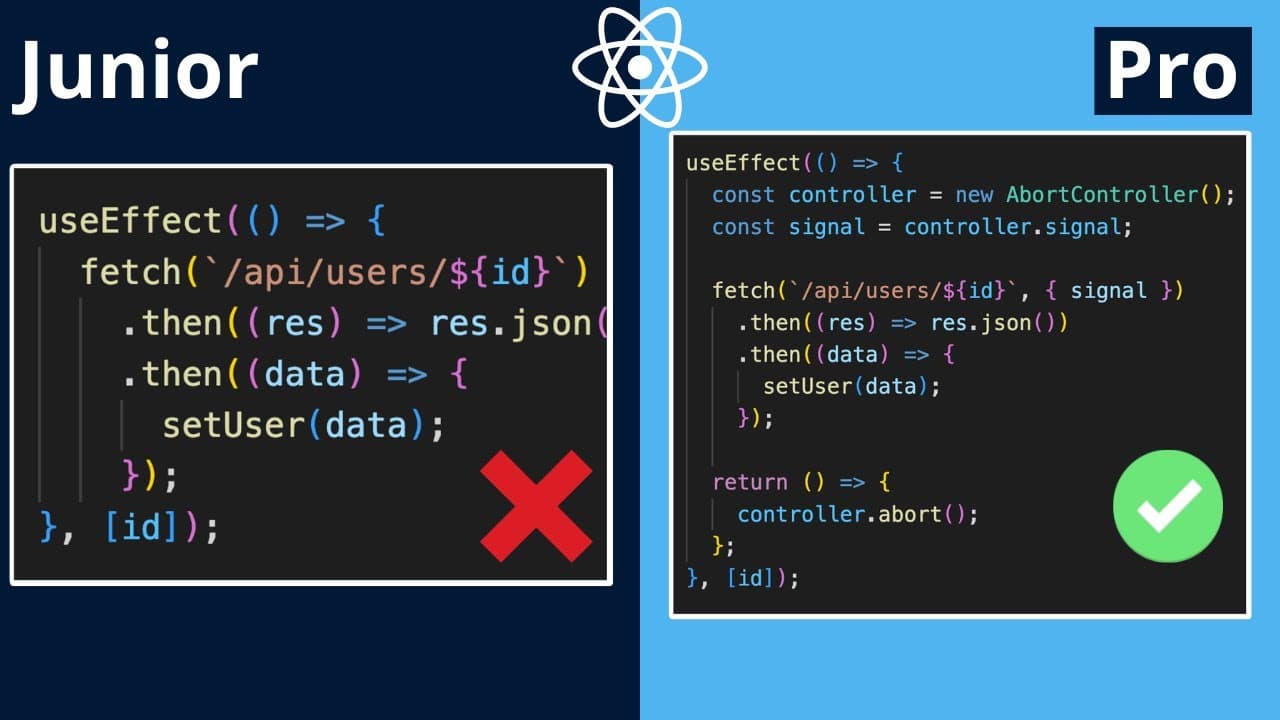
- ❓ Clean-up functions in useEffect are important to prevent memory leaks and cancel ongoing tasks.
- 🆘 React Strict Mode helps identify potential issues in the useEffect lifecycle.
Install to Summarize YouTube Videos and Get Transcripts
Explore YouTube Video Summarizer or Get YouTube Transcript Extractor
Questions & Answers
Q: How does useEffect work in React?
useEffect is a hook in React that allows you to run side effects in functional components. It runs after rendering and can be used to perform tasks such as making API requests, modifying the DOM, or updating component state.
Q: What are the main concepts of useEffect that developers should understand?
Developers should understand when useEffect runs (after rendering), how dependencies work (to control when the effect should run), and the use of clean-up functions (to prevent memory leaks and cancel ongoing tasks).
Q: What is the difference between primitive and non-primitive dependencies in useEffect?
Primitive dependencies, such as numbers or strings, can be used directly in the dependencies array of useEffect. Non-primitive dependencies, such as objects or arrays, should be carefully considered as changes to them may not trigger the effect, as React compares their references instead of their content.
Q: How can you prevent useEffect from running on every render?
You can specify dependencies in the dependencies array of useEffect to control when it should run. By providing only the necessary dependencies, the effect will only run when those dependencies change.
Q: How can you cancel ongoing tasks or prevent memory leaks in useEffect?
You can use a clean-up function in useEffect to cancel ongoing tasks or clean up any resources created by the effect. This ensures that the effect only runs once and prevents unnecessary memory usage.
Key Insights:
- useEffect runs after rendering and can be used to perform various tasks.
- Dependencies in useEffect determine when the effect should run.
- Care should be taken when using non-primitive dependencies, as React compares their references instead of their content.
- useMemo can be used to memoize values in the state and optimize performance.
- Updating state using an updating function instead of the state variable itself can prevent infinite loops in useEffect.
- Clean-up functions in useEffect are important to prevent memory leaks and cancel ongoing tasks.
- React Strict Mode helps identify potential issues in the useEffect lifecycle.
- Understanding the correct usage of useEffect and its common problems can greatly improve the development experience in React.
Summary & Key Takeaways
-
The video provides an overview of the useEffect hook and discusses concepts such as when it runs, how dependencies work, and the use of clean-up functions.
-
It demonstrates the use of useEffect in a simple component, showcasing how it runs after rendering and how to use dependencies to control when it should run.
-
The video highlights common problems such as incorrect dependency usage and demonstrates solutions using useMemo and carefully updating state. It also discusses the use of clean-up functions to prevent memory leaks and shows how to cancel API requests.
Read in Other Languages (beta)
Share This Summary 📚
Summarize YouTube Videos and Get Video Transcripts with 1-Click
Try YouTube Summary with ChatGPT & Claude or YouTube Transcript Generator
Explore More Summaries from Lama Dev 📚






Summarize YouTube Videos and Get Video Transcripts with 1-Click
Try YouTube Summary with ChatGPT & Claude or YouTube Transcript Generator