How to Create an Animated Portfolio Website with React
TL;DR
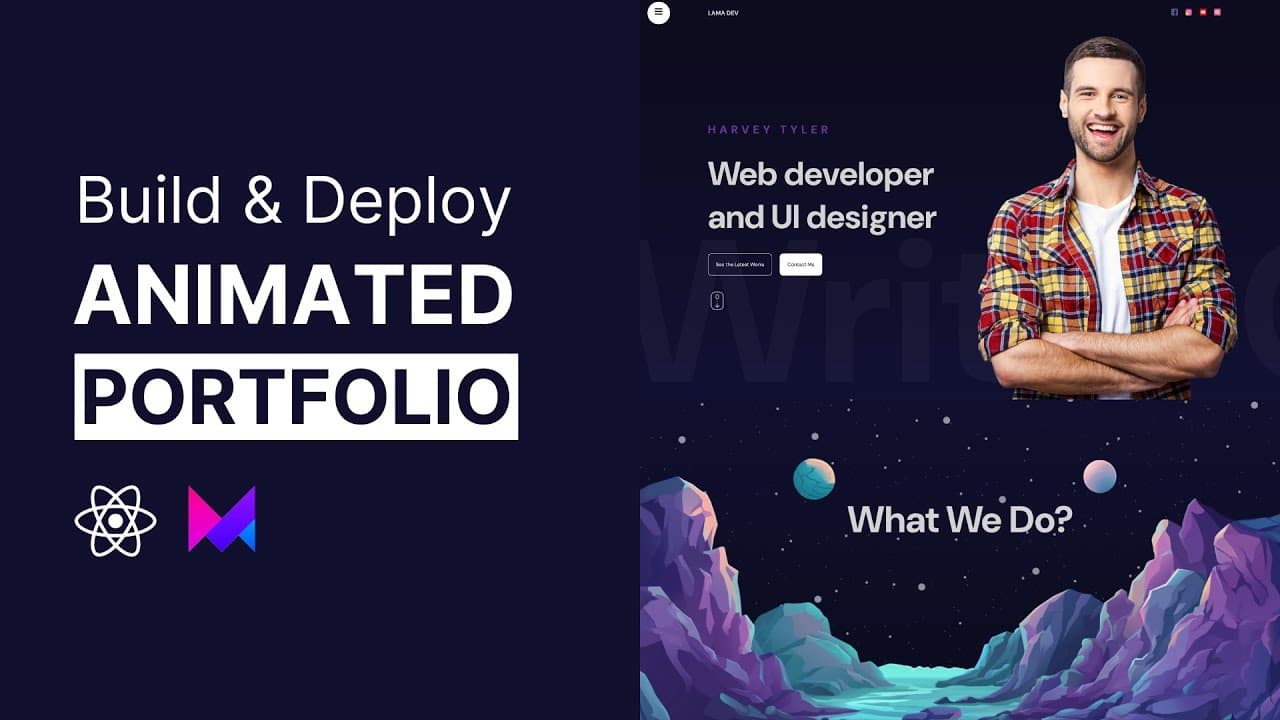
To create an animated portfolio website with React and Framer Motion, start by setting up a new React project. Implement components for animated transitions, parallax effects, and a sliding text effect. Add a functional contact form and deploy the site using Hostinger for hosting, which offers unlimited bandwidth and a free domain.
Transcript
Hello friends today we are going to create a beautiful portfolio website using react and framer motion and you will learn tons of react animations when I refresh the page you can see this transition we will have this animated button and the sliding text behind and here we have a menu button when I click this circle expands and shows our links and t... Read More
Key Insights
- 🌟 Animated portfolio website using React and Framer Motion:
- React and Framer Motion are used to create a beautiful and animated portfolio website.
- Tons of React animations can be learned through this tutorial.
- The website includes transitions, scroll effects, and parallax sections.
- Framer hooks and responsive design techniques are also demonstrated.
- The website can be easily deployed using the hosting sponsor Hostinger.
- The Business Hosting plan provides unlimited bandwidth, a free domain, and a free SSL certificate.
- The contact section includes functional SVG animations and a contact form that sends messages to an email inbox.
- The tutorial provides a step-by-step guide for setting up the website and deploying it using Hostinger.
Install to Summarize YouTube Videos and Get Transcripts
Explore YouTube Video Summarizer or Get YouTube Transcript Extractor
Questions & Answers
Q: What are some of the features of the portfolio website created in the video?
The portfolio website includes animated transitions, a sliding text effect, a menu button with expanding links, parallax effects, progress bars, text transitions, SVG animations, and a contact section.
Q: What are some of the benefits of using React and Framer Motion for creating animations in the website?
React provides an efficient and reusable component-based architecture, while Framer Motion simplifies the process of creating animations and allows for fine-grained control over motion effects.
Q: How can the portfolio website be made responsive for different screen sizes?
The website can be made responsive by using responsive design techniques such as media queries, flexible layouts, and adaptive font sizes.
Q: What is the purpose of using hostinger to deploy the website?
Hostinger provides hosting services that make it easy to deploy websites and ensures that the website is accessible to users on the internet.
Q: How can transitions and scroll effects be added to the website using React and Framer Motion?
Transitions and scroll effects can be added by using the animate property in Framer Motion, which allows for animating the opacity, scale, and position of elements based on scroll position or other triggers.
Summary & Key Takeaways
-
Create a portfolio website with animated transitions, a sliding text effect, and a menu button that expands to show links.
-
Implement parallax effects, including transitions, H effects, and scrolling animations.
-
Add animated progress bars, text transitions, and a contact section with SVG animations.
-
Deploy the website using hostinger.
Read in Other Languages (beta)
Share This Summary 📚
Summarize YouTube Videos and Get Video Transcripts with 1-Click
Try YouTube Summary with ChatGPT & Claude or YouTube Transcript Generator
Explore More Summaries from Lama Dev 📚


Summarize YouTube Videos and Get Video Transcripts with 1-Click
Try YouTube Summary with ChatGPT & Claude or YouTube Transcript Generator