Products
Features
YouTube Video Summarizer
Summarize YouTube videos
Web & PDF Highlighter
Highlight web pages & PDFs
Chat with PDF
Ask any PDF questions with AI
Ask AI Clone
Chat with your highlights & memories
Audio Transcriber
Transcribe audio files to text
Glasp Reader
Read and highlight articles
Kindle Highlight Export
Export your Kindle highlights
Idea Hatch
Hatch ideas from your highlights
Integrations
Obsidian Plugin
Notion Integration
Pocket Integration
Instapaper Integration
Medium Integration
Readwise Integration
Snipd Integration
Hypothesis Integration
Apps & Extensions
Chrome Extension
Safari Extension
Edge Add-ons
Firefox Add-ons
iOS App
Android App
Discover
Discover
Ideas
Discover new ideas and insights
Articles
Curated articles and insights
Books
Book recommendations by great minds
Posts
Essays and notes from readers
Quotes
Inspiring quotes collection
Videos
Curated videos and summaries
Explore Glasp
Glasp Story
How we grew from 0 to 3 million users
Glasp Newsletter
Weekly insights and updates
Glasp Talk
Interview series with great minds
Glasp Blog
Latest news and articles
Glasp Use Cases
Learn how others use Glasp
Build & Support
Glasp API
Access Glasp's API for developers
MCP Connector
Connect Glasp to Claude & ChatGPT
Community
Glasp Reddit Community
Students
Student discount and benefits
FAQs
Frequently Asked Questions
AboutPricing
DashboardLog inSign up

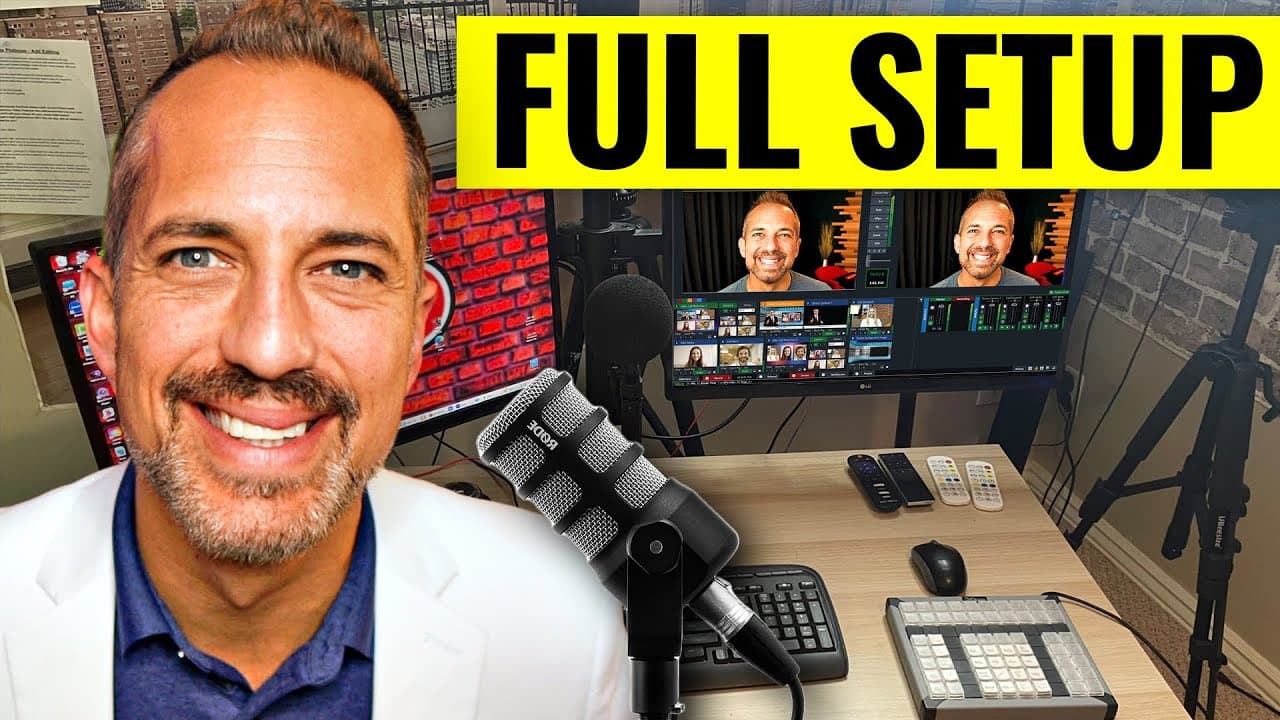
My YouTube Studio Set Up - The Gear You Need to Look Pro
November 16, 2022
by
Owen Video
YouTube video player
My YouTube Studio Set Up - The Gear You Need to Look Pro

TL;DR

Learn how to create an impressive home studio for live streaming and video recording using affordable and versatile equipment.

Transcript

if you want to have a great looking live stream studio if you want to have really impressive Zoom calls or you want to have a great sit at home desk situation for recording your YouTube videos today's video will be absolutely fantastic we put chapter markers down below so that you can skip ahead or rewind and watch this thing and really build a stu... Read More

Key Insights

  • 🫒 The Canon M6 DSLR camera is an excellent option for live streaming due to its affordability, features, and lens compatibility.
  • 🎥 Velbon tripods provide reliable camera support at an affordable price.
  • 🚚 The Camlink 4K device is essential for turning a DSLR into a webcam for live streaming.
  • 🙂 Lighting, such as the newer 18-inch ring light, is crucial for creating professional-looking live streams.
  • 🌲 Creating a visually pleasing background with pipe and drape, faux wood designs, or a green screen adds to the overall aesthetic.
  • 👂 The Alesis Multi-Mix 4 sound mixer, combined with XLR microphones, helps improve audio quality.
  • 🫒 VMix and Restream are recommended live streaming software options, each with its own strengths and features.

Install to Summarize YouTube Videos and Get Transcripts

Explore YouTube Video Summarizer or Get YouTube Transcript Extractor

Questions & Answers

Q: Why is the Canon M6 DSLR camera recommended for live streaming?

The Canon M6 is affordable, has no auto shutoff, a clean HDMI output, and uses Canon EF lenses, making it versatile and cost-effective.

Q: Can I use different tripods instead of Velbon?

While Velbon tripods are recommended, other affordable tripods available on Amazon can also get the job done.

Q: Why is the Camlink 4K device necessary for live streaming with the Canon M6?

The Camlink 4K turns the Canon M6 into a webcam by connecting it to a computer, allowing for high-quality live streaming.

Q: What computer should I use for live streaming?

An Alienware computer is recommended for streaming with two cameras, while a MacBook Pro works fine for single-camera streaming.

Summary & Key Takeaways

  • The Canon M6 DSLR camera is recommended for its affordability, clean HDMI output, and compatibility with Canon EF lenses.

  • Velbon tripods are a reliable and affordable option for camera support.

  • The Camlink 4K device allows users to turn any DSLR into a webcam, while an HDMI micro cord is needed for the Canon M6.

  • An Alienware computer is recommended for streaming with two cameras, while a MacBook Pro works fine for single-camera streaming.

  • Lighting is crucial, and the newer 18-inch ring light is highly recommended for optimum results.


Read in Other Languages (beta)

English

Share This Summary 📚

Summarize YouTube Videos and Get Video Transcripts with 1-Click

Download browser extensions on:

Try YouTube Summary with ChatGPT & Claude or YouTube Transcript Generator

Explore More Summaries from Owen Video 📚

Film PERFECT Videos In One Take - NO TELEPROMPTER thumbnail
Film PERFECT Videos In One Take - NO TELEPROMPTER
Owen Video
Are YouTube’s Demands Hurting Your Creativity? thumbnail
Are YouTube’s Demands Hurting Your Creativity?
Owen Video
How to get 4,000 hours Watchtime FAST as a small YouTuber thumbnail
How to get 4,000 hours Watchtime FAST as a small YouTuber
Owen Video
How To Charge for Brand Deals on small to medium YouTube Channels thumbnail
How To Charge for Brand Deals on small to medium YouTube Channels
Owen Video
Subtitles Translator - How to translate YouTube Captions into any language thumbnail
Subtitles Translator - How to translate YouTube Captions into any language
Owen Video
Add Pop Up Graphics To Your Live Stream - Restream Tutorial 2022 thumbnail
Add Pop Up Graphics To Your Live Stream - Restream Tutorial 2022
Owen Video

Summarize YouTube Videos and Get Video Transcripts with 1-Click

Download browser extensions on:

Try YouTube Summary with ChatGPT & Claude or YouTube Transcript Generator

Apps & Extensions

  • Chrome Extension
  • Safari Extension
  • Edge Add-ons
  • Firefox Add-ons
  • iOS App
  • Android App

Key Features

  • YouTube Video Summarizer
  • Web & PDF Summarizer
  • Web & PDF Highlighter
  • Chat with PDF
  • Ask AI Clone
  • Audio Transcriber
  • Glasp Reader
  • Kindle Highlight Export
  • Idea Hatch

Integrations

  • Obsidian Plugin
  • Notion Integration
  • Pocket Integration
  • Instapaper Integration
  • Medium Integration
  • Readwise Integration
  • Snipd Integration
  • Hypothesis Integration

More Features

  • APIs
  • MCP Connector
  • Blog & Post
  • Embed Links
  • Image Highlight
  • Personality Test
  • Quote Shots

Company

  • About us
  • Our Story
  • Blog
  • Community
  • FAQs
  • Job Board
  • Newsletter
  • Pricing
Terms

•

Privacy

•

Guidelines

© 2026 Glasp Inc. All rights reserved.




