How To Make The MOST Of The DJI Osmo Pocket 3 (BEST HACKS AND ACCESSORIES!)
TL;DR
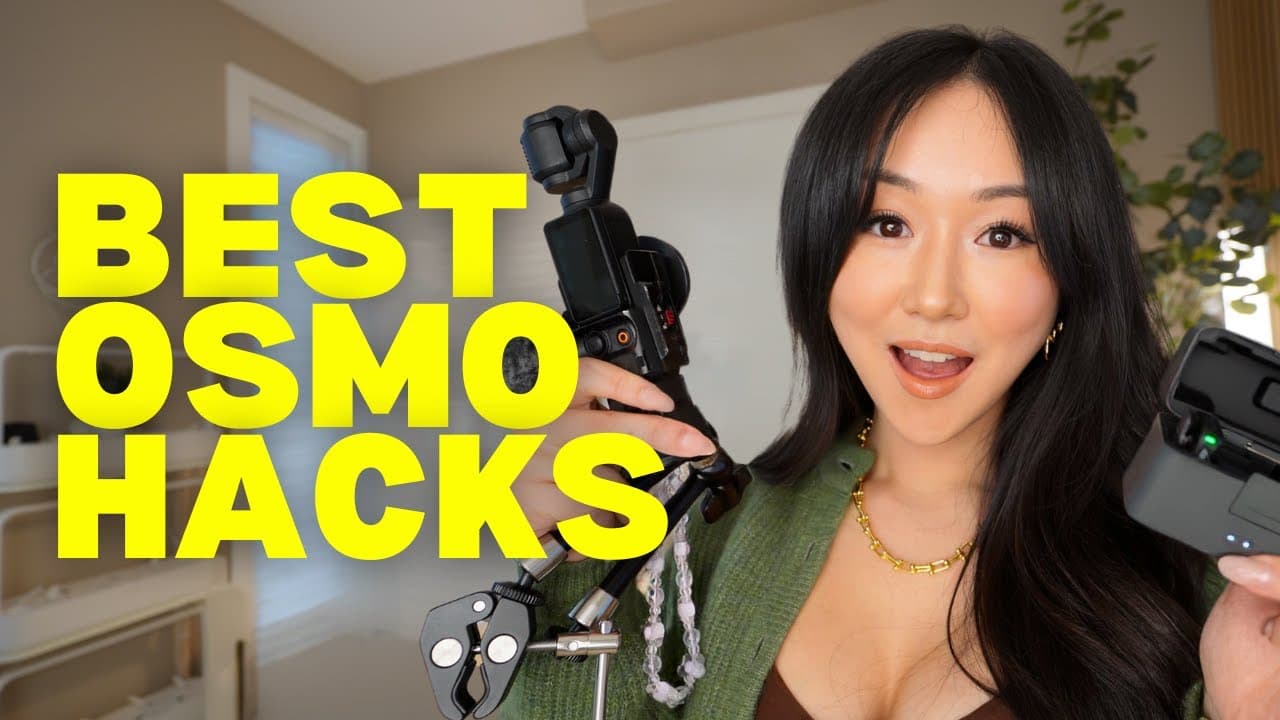
Discover essential accessories and hacks for the DJI Osmo Pocket 3.
Transcript
when I first got the DJI osmo pocket 3 I didn't like it I let it collect dust for over a year even though I had the Creator combo it wasn't until I got the right accessories learned how to maximize the camera where now today it is considered one of the top five purchases that have genuinely improved my life I used to only do sit down teaching Style... Read More
Key Insights
- The DJI Osmo Pocket 3 initially underwhelmed the creator until discovering essential accessories that significantly enhanced its utility.
- Key accessories include the Creator Combo, Ulanzi Cage, and ND filter, each offering unique benefits for vlogging and filming.
- The Creator Combo is valuable for its battery pack, extender, wide-angled lens, and microphone, enhancing long-duration filming and audio quality.
- The Ulanzi Cage allows for additional accessories like a wrist strap and microphone, making vlogging more convenient and hands-free.
- Utilizing the DJI Osmo Pocket 3 as a webcam with face tracking and microphone integration enhances video call quality and functionality.
- The Mimo app and iPad integration provide an enhanced viewfinder experience, allowing for better framing and control during filming.
- The DJI Mic Mini is a preferred choice for audio due to its discreet size and wireless capabilities, suitable for both indoor and outdoor filming.
- Music selection through Epidemic Sound elevates video engagement, offering a vast library categorized by mood and style to match content themes.
Install to Summarize YouTube Videos and Get Transcripts
Explore YouTube Video Summarizer or Get YouTube Transcript Extractor
Questions & Answers
Q: Why did the creator initially dislike the DJI Osmo Pocket 3?
The creator initially disliked the DJI Osmo Pocket 3 because it did not meet their expectations and collected dust for over a year. It wasn't until they discovered the right accessories and learned how to maximize the camera's potential that it became one of their top five purchases, significantly enhancing their content creation process.
Q: What are the main benefits of the Creator Combo?
The Creator Combo offers numerous benefits, including a battery pack for extended filming, an extender that allows for various attachments, and a wide-angled lens for capturing more of the environment. Additionally, the microphone included in the combo provides noise-canceling capabilities, which is crucial for filming in noisy environments, ensuring high-quality audio.
Q: How does the Ulanzi Cage enhance the Osmo Pocket 3's functionality?
The Ulanzi Cage enhances the Osmo Pocket 3's functionality by allowing additional attachments like a wrist strap, making it easier to carry and use during vlogging. It also provides a slot for the microphone and a screw thread for other attachments, increasing the camera's versatility and convenience for on-the-go filming.
Q: What role does the Mimo app play in using the Osmo Pocket 3?
The Mimo app plays a critical role in using the Osmo Pocket 3 by providing an enhanced viewfinder experience, allowing users to adjust settings, turn on beauty mode, and control the camera remotely. When used with an iPad, it offers a larger screen for better framing and control, making it easier to capture high-quality footage.
Q: Why is the DJI Mic Mini preferred over other microphones?
The DJI Mic Mini is preferred over other microphones due to its compact size, making it discreet and easy to use, especially for female creators. It connects wirelessly to the Osmo Pocket 3, providing excellent audio quality without the bulkiness of other microphones like the Rode Wireless Pro, which is considered too large and cumbersome for everyday use.
Q: How does Epidemic Sound improve video production?
Epidemic Sound improves video production by offering a vast library of music tracks categorized by mood and style, allowing creators to find the perfect soundtrack for their videos. This enhances viewer engagement and emotional connection, making the content more appealing and professional. The platform also provides alternatives to copyrighted songs, ensuring videos remain free of copyright issues.
Q: What are the advantages of using the Osmo Pocket 3 as a webcam?
Using the Osmo Pocket 3 as a webcam offers several advantages, including high-quality video with face tracking capabilities, ensuring the user remains in focus during video calls. It also allows for the integration of the DJI microphone, enhancing audio quality for meetings and screen recordings, making it a versatile tool for professional communication.
Q: What is the significance of the ND filter for the Osmo Pocket 3?
The ND filter is significant for the Osmo Pocket 3 as it acts like sunglasses for the camera, improving image quality by reducing glare and overexposure, especially in bright outdoor conditions. It allows users to adjust exposure settings on the lens itself, ensuring vibrant colors and optimal lighting without manually adjusting camera settings, enhancing the overall video quality.
Summary & Key Takeaways
-
The video explores how the DJI Osmo Pocket 3 became a favorite tool for vlogging after initially collecting dust. Essential accessories like the Creator Combo and Ulanzi Cage transformed its usability, enhancing creativity and convenience in content creation.
-
Key accessories such as the ND filter, Magic Arm, and small tripod significantly improve the vlogging experience, making the camera versatile for various filming scenarios. The video also highlights the importance of selecting the right music to enhance viewer engagement.
-
The creator emphasizes the importance of the DJI Mic Mini for superior audio quality and the Mimo app for improved camera control. These tools, combined with thoughtful accessory choices, make the DJI Osmo Pocket 3 a powerful tool for vloggers and content creators.
Read in Other Languages (beta)
Share This Summary 📚
Summarize YouTube Videos and Get Video Transcripts with 1-Click
Try YouTube Summary with ChatGPT & Claude or YouTube Transcript Generator
Explore More Summaries from Vanessa Lau 📚

Summarize YouTube Videos and Get Video Transcripts with 1-Click
Try YouTube Summary with ChatGPT & Claude or YouTube Transcript Generator