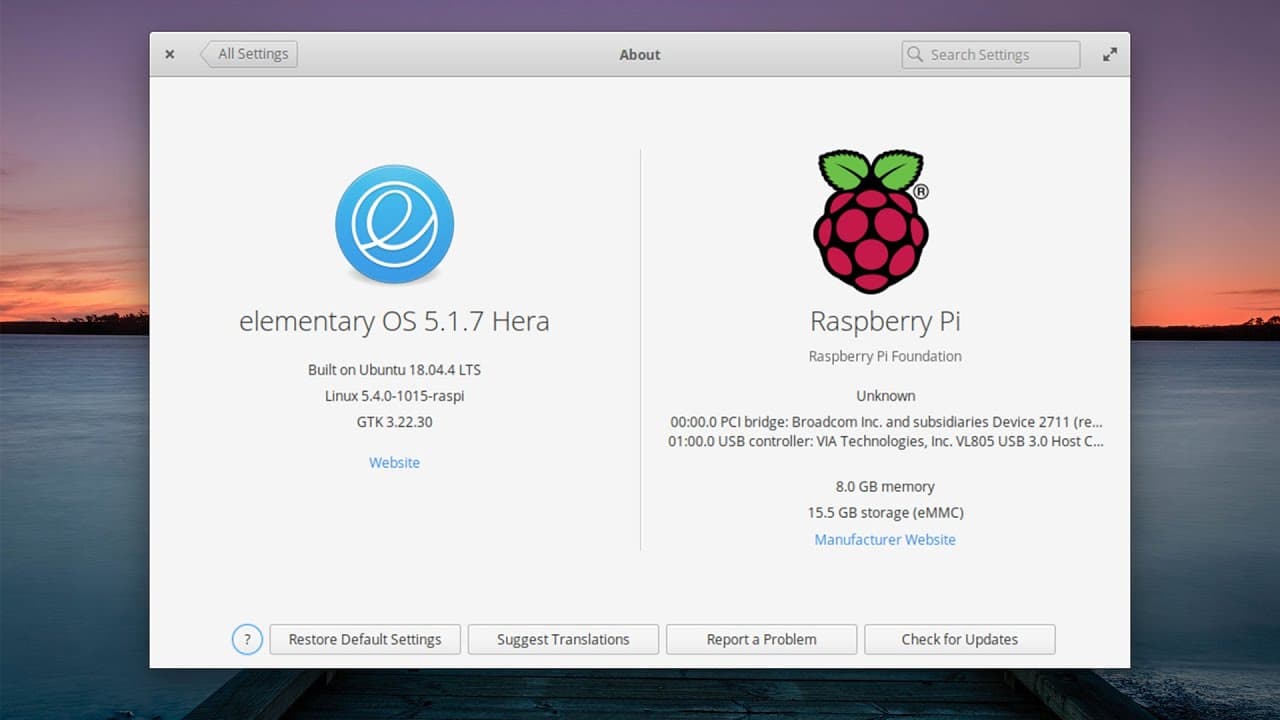
Elementary OS Hera on Raspberry Pi 4
TL;DR
A guide on installing and using Elementary OS on Raspberry Pi 4.
Transcript
hey guys what's going on it's don here from nova spirit tech and welcome back to the channel and today we are going to be checking out elementary os on the raspberry pi 4. so let's get started it's no huge secret that i am a huge fan of elementary os i actually covered the operating system a couple of times on my channel and this was a project i wa... Read More
Key Insights
- 🕴️ Elementary OS is an unofficial yet functional build suited for Raspberry Pi 4, using packages from official repositories.
- 👻 Installation is flexible, allowing users to opt for either a direct image download or a custom build process.
- 🏛️ Performance varies, with video tearing being an issue due to driver limitations in the current build.
- 😚 Elementary OS requires limited resources, making it applicable for basic desktop tasks on Raspberry Pi 4.
- 💦 The operating system includes an App Center for easy software installation, but some popular applications may not work well.
- 😪 Users may encounter sleep mode issues, with the need to disable it to maintain system stability.
- 🆘 Overall, the OS is considered more appealing and usable for casual desktop tasks compared to standard Raspberry Pi OS.
Install to Summarize YouTube Videos and Get Transcripts
Explore YouTube Video Summarizer or Get YouTube Transcript Extractor
Questions & Answers
Q: What is the main focus of the video?
The video focuses on demonstrating how to install Elementary OS on a Raspberry Pi 4, specifically utilizing an unofficial build. The presenter shares insights from their experience, installation methods, and discusses the performance of the operating system on the Raspberry Pi.
Q: How can users install Elementary OS on Raspberry Pi 4?
Users can install Elementary OS either by downloading a pre-built image from a GitHub repository or by following a build script that involves adding the appropriate app repositories to Ubuntu. The steps require familiarity with SD card setup and terminal commands, making it accessible to users with basic tech skills.
Q: What performance issues are noted with Elementary OS on Raspberry Pi?
The video mentions performance drawbacks, particularly with video acceleration and the Epiphany browser, which runs sluggishly. While the OS handles many tasks well, there is noticeable tearing during fast movements and lag when using certain applications, prompting the use of alternatives like Chromium or Firefox for better performance.
Q: What are the advantages of using Elementary OS over Raspberry Pi OS?
Elementary OS is praised for its lightweight nature and visually appealing interface compared to the default Raspberry Pi OS. The presenter finds it to be more responsive and less bloated, providing a cleaner desktop experience, which is significant for users seeking aesthetic and functional improvements.
Summary & Key Takeaways
-
The video presents a tutorial on installing Elementary OS on a Raspberry Pi 4 using an unofficial build, highlighting the simplicity of the installation process.
-
While the OS runs smoothly, some limitations include issues with video acceleration and certain applications like the Epiphany browser performing poorly compared to alternatives.
-
The presenter notes the responsiveness and aesthetics of Elementary OS, suggesting it can effectively serve as a lightweight desktop OS.
Read in Other Languages (beta)
Share This Summary 📚
Summarize YouTube Videos and Get Video Transcripts with 1-Click
Try YouTube Summary with ChatGPT & Claude or YouTube Transcript Generator
Explore More Summaries from Novaspirit Tech 📚





Summarize YouTube Videos and Get Video Transcripts with 1-Click
Try YouTube Summary with ChatGPT & Claude or YouTube Transcript Generator