iPadOS 17 Walkthrough: EVERYTHING You Need to Know
TL;DR
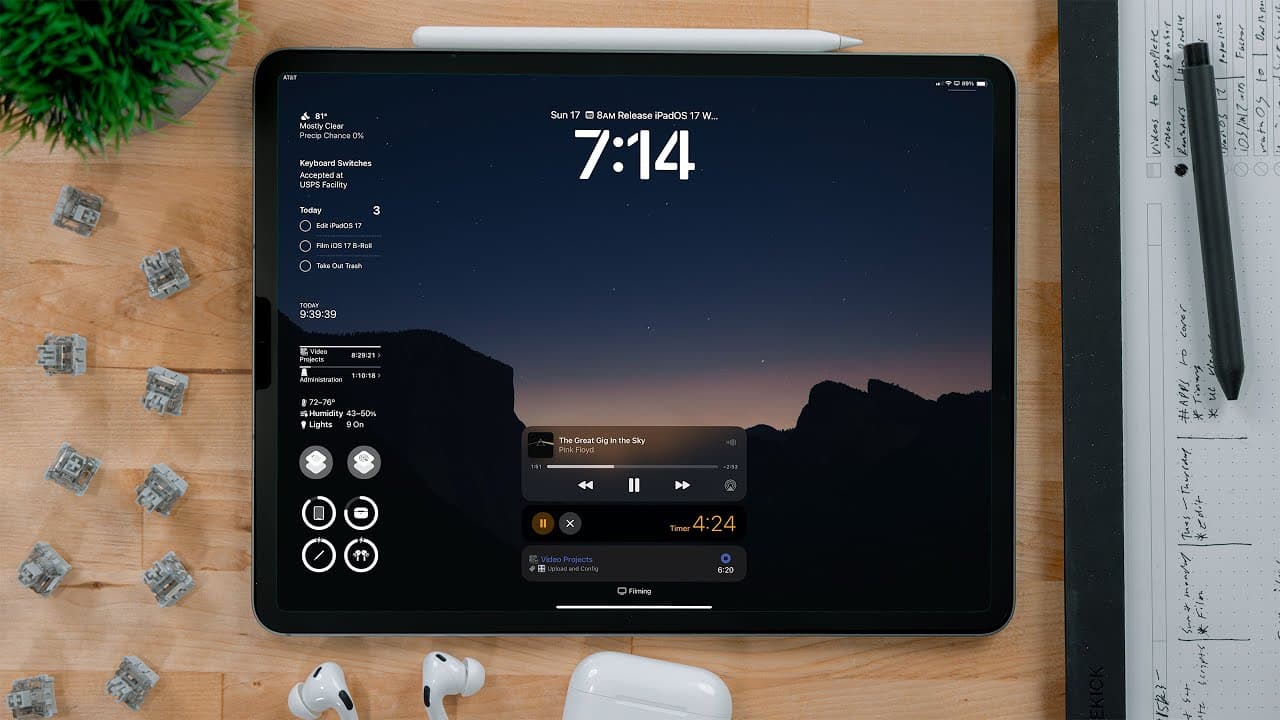
iPad OS 17 brings several refinements and exciting features to enhance the user experience, including lock screen customization, interactive widgets, improved Stage Manager, updated Safari, enhanced Notes app, and more.
Transcript
this is the version of iPad OS that I am the most excited for since iPad OS 13. now we're not seeing a ton of changes this is a refinement year and I'm okay with that the refinements that we are getting this year with iPad OS 17 have a bigger positive impact than the massive changes that we got in iPad OS 16. iPad OS 17 makes using an iPad faster a... Read More
Key Insights
- 👤 iPad OS 17 focuses on refinement and brings several significant improvements to enhance the user experience.
- 💻 Customization options for the lock screen provide a personalized touch, while interactive widgets on the lock screen and home screen offer convenience and usability.
- 👻 Stage Manager improvements make multitasking more fluid and flexible, allowing for better window placement and grid-style views.
- 💨 Safari enhancements, including profile support and faster search, contribute to a smoother browsing experience.
- 😀 The Notes app sees significant updates with the addition of rich text links, improved drawing tools, PDF markup, and collaborative features.
- 🎹 The keyboard receives improvements in autocorrect, predictive typing, and dictation, enhancing the typing experience.
- 😀 Shortcuts app introduces minor updates, such as the ability to run shortcuts from Spotlight and exclude confirmation for personal automation triggers.
Install to Summarize YouTube Videos and Get Transcripts
Explore YouTube Video Summarizer or Get YouTube Transcript Extractor
Questions & Answers
Q: What are the key enhancements to the lock screen in iPad OS 17?
In iPad OS 17, the lock screen allows for customization of wallpaper, typography, and the addition of interactive widgets. Multiple lock screens can be set up, and there are various built-in wallpaper options to choose from, including astronomy and kaleidoscope themes. Additionally, widgets on the lock screen are now interactive, allowing for tasks such as marking reminders as complete or toggling smart home devices.
Q: How does Stage Manager improve in iPad OS 17?
Stage Manager in iPad OS 17 offers better resizing capabilities, increased flexibility in window placement, and the ability to lay out four apps in a grid-style view. Windows can be positioned anywhere on the screen, and when overlapping windows, the background app now shifts slightly rather than dramatically moving to the opposite side. The feature also introduces improved options for adding apps to the current stage, making it easier and faster to build out stages.
Q: What are the new features in the Notes app?
The Notes app in iPad OS 17 introduces rich text links, allowing users to add clickable links within their notes. It also supports in-line PDF viewing, collaborative real-time editing of documents, and enhanced drawing tools, including a watercolor brush, calligraphy pen, highlighters, variable width pen, ruler, and a new diagramming mode. Additionally, the app allows for the movement of documents to Pages for easier editing and expansion.
Q: What improvements are made to Safari in iPad OS 17?
Safari receives several enhancements in iPad OS 17, including profile support for separating different kinds of browsing activities. The search feature is faster and provides more relevant information, such as details about people, places, and sports teams. The browser also introduces a "listen to page" feature, which reads articles aloud, and PDF support with form detection and improved PDF markup capabilities.
Key Insights:
- iPad OS 17 focuses on refinement and brings several significant improvements to enhance the user experience.
- Customization options for the lock screen provide a personalized touch, while interactive widgets on the lock screen and home screen offer convenience and usability.
- Stage Manager improvements make multitasking more fluid and flexible, allowing for better window placement and grid-style views.
- Safari enhancements, including profile support and faster search, contribute to a smoother browsing experience.
- The Notes app sees significant updates with the addition of rich text links, improved drawing tools, PDF markup, and collaborative features.
- The keyboard receives improvements in autocorrect, predictive typing, and dictation, enhancing the typing experience.
- Shortcuts app introduces minor updates, such as the ability to run shortcuts from Spotlight and exclude confirmation for personal automation triggers.
- The health app makes its debut on iPad, providing health-related data and corresponding shortcut actions.
Summary & Key Takeaways
-
iPad OS 17 focuses on refinements rather than major changes, resulting in a faster and smarter user experience.
-
The lock screen receives a big overhaul, allowing customization of wallpaper, typography, and adding interactive widgets.
-
Interactive widgets are now available not only on the lock screen but also on the home screen, bringing convenience and ease of use.
-
Stage Manager, the multitasking feature, improves with better resizing, flexible window placement, and options for grid-style view.
-
Safari gets profile support, faster search, in-line PDF viewing, and enhanced reading feature.
-
Notes app introduces rich text links, PDF markup, collaborative features, and improved drawing tools.
-
Reminders app adds grocery list functionality and sections in lists.
-
Several improvements are made to the keyboard, including better autocorrect, predictive typing, and dictation.
-
Shortcuts app receives minor updates, such as support for running shortcuts from Spotlight and excluding confirmation for personal automation triggers.
-
Health app is now available on iPad, offering health-related data and corresponding shortcut actions.
Read in Other Languages (beta)
Share This Summary 📚
Summarize YouTube Videos and Get Video Transcripts with 1-Click
Try YouTube Summary with ChatGPT & Claude or YouTube Transcript Generator
Explore More Summaries from Christopher Lawley 📚
Summarize YouTube Videos and Get Video Transcripts with 1-Click
Try YouTube Summary with ChatGPT & Claude or YouTube Transcript Generator