How to Create Animated Cartoon Videos of Yourself Quickly
TL;DR
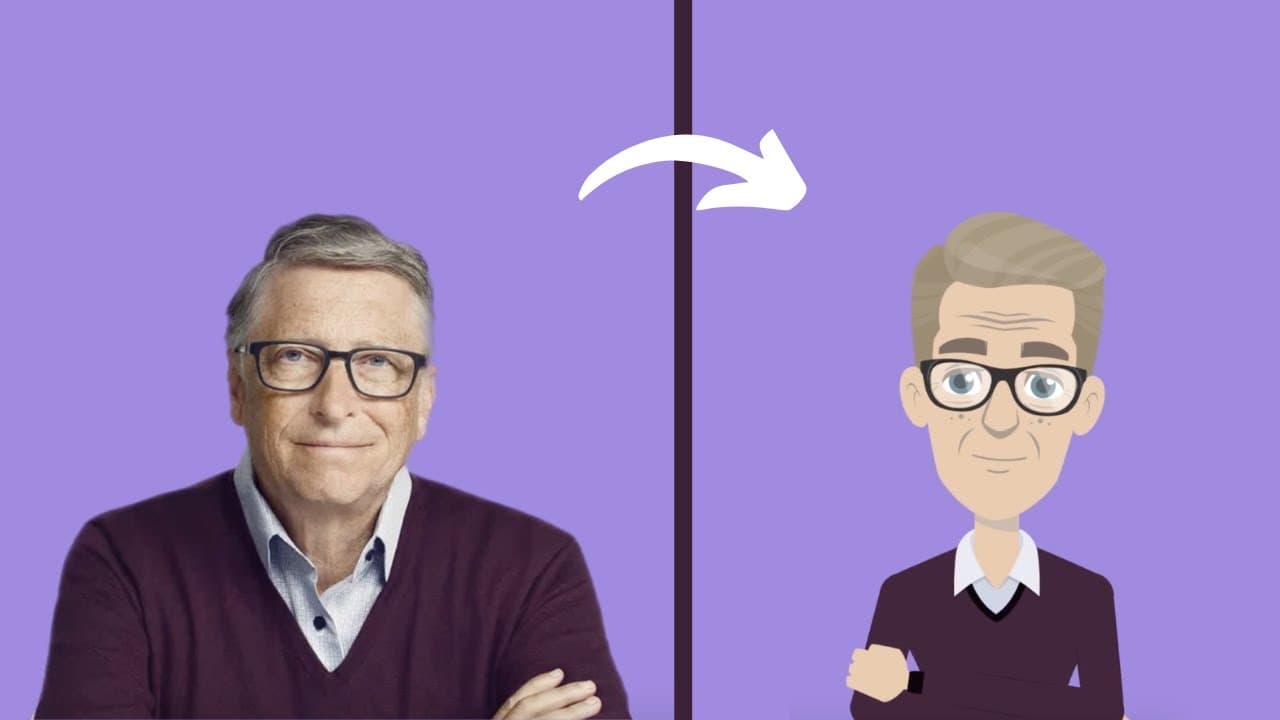
To create animated character videos, use Animaker to design characters that resemble real-life people in just a few minutes. Start by creating a free account, customize your character with various features, and use the platform's tools to add scenes, text, and music, then download your video seamlessly.
Transcript
hello everyone in this video we will show you how to create animation characters that look like real life people and how to use them to create videos this video is for beginners who don't have any prior knowledge of animation hop on let's get started oh wait wait wait before jumping on to the video a quick request we notice 97 of our viewers have n... Read More
Key Insights
- 📸 Creating Realistic Animation Characters: This video provides step-by-step instructions on how to create animation characters that look like real life people, making it accessible to beginners with no prior animation knowledge.
- 👥 Increase Subscribers: The video mentions that 97% of viewers have not subscribed to the channel, implying a desire for more subscribers and engagement.
- 🎨 Customizing Characters: The video demonstrates how to customize the character's gender, facial features, attire, and accessories, allowing for the creation of billions of unique characters.
- 🎥 Creating Animated Videos: After creating a character, viewers can learn how to use it to create amazing animated videos using the AniMaker software, which provides a user-friendly interface and features like a timeline and scene preview.
- 🌈 Background Customization: The video explains how to change the background color and add 2D or image backgrounds to enhance the visual appeal of the videos.
- 🔤 Adding Text: Viewers can learn how to add text to their videos, customize its font style, size, color, and spacing, as well as apply animation effects like enter and exit animations.
- 🎵 Adding Music: The video showcases a library of over 30,000 copyright-free music tracks that can be previewed and added to the videos, with options to control volume, duplicate, and delete the track.
- 💻 Downloading the Videos: Once the video creation is complete, viewers can download their videos through the AniMaker software's publish option, allowing them to share and distribute their creations.
- ⭐️ Call to Action: The video provides a link in the description for viewers to access the AniMaker software and encourages them to start creating their own videos, while requesting likes and subscriptions for more similar tutorials.
Install to Summarize YouTube Videos and Get Transcripts
Explore YouTube Video Summarizer or Get YouTube Transcript Extractor
Questions & Answers
Q: How can I create animation characters that resemble real-life people?
To create animation characters that resemble real-life people, you can use the Animaker platform. Start by choosing a basic template that resembles your desired picture, then customize the character's features like skin color, facial features, and attire to match the reference image.
Q: How can I use the created characters to make animated videos?
After creating your character, you can use it to make animated videos on the Animaker platform. Start by creating a new project and accessing the workspace. You can find the characters in the library and apply actions to them using the actions tab. You can also add backgrounds, text, and music to enhance your videos.
Q: Can I customize the text in my animated videos?
Yes, you can customize the text in your animated videos. Open the text section of the library and choose a text box. Type in your desired text and use the settings tab to customize the font style, size, color, spacing, and transparency. You can also apply animation effects to the text, such as enter and exit effects.
Q: How can I add music to my animated videos?
To add music to your animated videos, open the music section of the library where you can find over 30,000 copyright-free music tracks. Preview the tracks by hovering over them, and when you find the desired track, click on it to add it to your video timeline. You can control its volume, duplicate it, or delete it.
Q: How do I download my completed animation video?
Once you have finished creating your animation video, go to the publish option at the top of the platform. Click on "Download Video" and then "Download" to save the video to your device.
Summary & Key Takeaways
-
The video provides step-by-step instructions on how to create animation characters that look like real-life people.
-
The tutorial demonstrates how to use the characters to create animated videos using the Animaker platform.
-
It covers aspects such as character customization, adding backgrounds, adding text, and incorporating music into the videos.
Read in Other Languages (beta)
Share This Summary 📚
Summarize YouTube Videos and Get Video Transcripts with 1-Click
Try YouTube Summary with ChatGPT & Claude or YouTube Transcript Generator
Explore More Summaries from Animaker 📚

Summarize YouTube Videos and Get Video Transcripts with 1-Click
Try YouTube Summary with ChatGPT & Claude or YouTube Transcript Generator