How to make your smartphone into a dumb phone - (Modern Dumbphone)
TL;DR
Guide to converting a smartphone into a distraction-free device.
Transcript
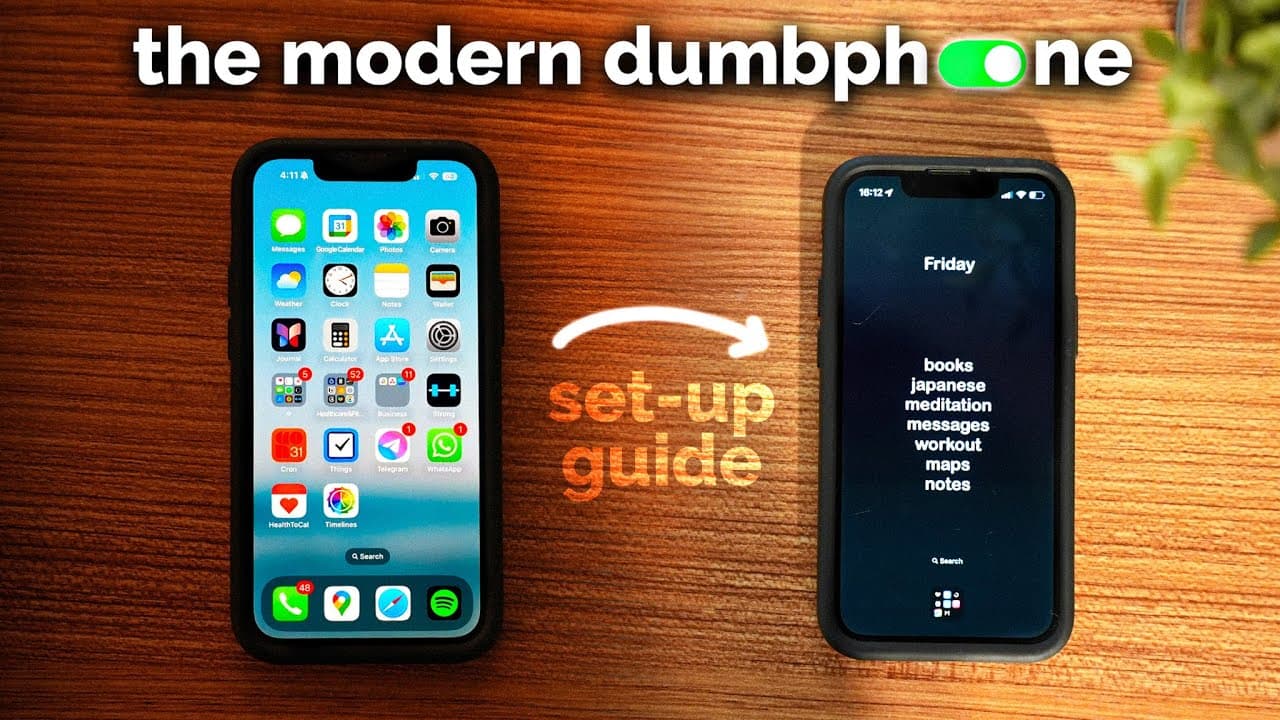
This is probably what your smartphone looks like, and this is called a modern dumb phone. And today I'm going to show you how to install the modern dumb phone set up on your iPhone. So, I'm going to walk through all the features and go through a step-by-step process of how to set it up on this phone. Although you can just buy a dumb phone, I thin... Read More
Key Insights
- The 'modern dumb phone' setup allows users to retain essential app functionality while minimizing distractions from social media and notifications.
- Key features include a minimalist home and lock screen, scheduled social media blocking, and customizable app access.
- Users can toggle between dark and light modes automatically based on work and personal schedules, enhancing user experience.
- Apps like 'Blank Spaces' and 'Opal' are recommended for creating a distraction-free environment by hiding unnecessary apps and blocking social media.
- Customization options allow users to choose which apps remain accessible, such as essential utilities or productivity tools.
- Widgets can be added for functionality, including date displays, and can be customized in terms of font, size, and alignment.
- Grayscale and red light modes are available to reduce screen distractions and blue light exposure, promoting healthier screen use habits.
- The 'How We Feel' app is recommended for tracking mood and emotional well-being, offering insights into how lifestyle factors affect mood.
Install to Summarize YouTube Videos and Get Transcripts
Explore YouTube Video Summarizer or Get YouTube Transcript Extractor
Questions & Answers
Q: What is the purpose of a modern dumb phone?
The modern dumb phone setup aims to reduce digital distractions by limiting access to non-essential apps and notifications. It retains necessary smartphone functionalities, like utility apps, while blocking social media and other distracting elements. This setup helps users focus on productivity and well-being by minimizing unnecessary digital engagement.
Q: How does the video suggest blocking social media apps?
The video recommends using apps like 'Opal' to block social media applications. 'Opal' allows users to set schedules for blocking apps and offers various difficulty levels to prevent bypassing the blocks. This ensures that social media distractions are minimized, helping users maintain focus on important tasks.
Q: What customization options are available for the home screen?
Users can customize their home screen by selecting which apps remain visible, choosing widgets for functionalities like date display, and adjusting font size and alignment. The setup includes options to hide the app dock and create a minimalist interface, enhancing focus and reducing visual clutter.
Q: How does the video address the issue of notifications?
The video suggests turning off notifications for most apps to reduce distractions. It recommends reviewing app settings to disable notifications for non-essential apps, ensuring that users are not constantly interrupted by alerts, which helps in maintaining focus and reducing stress.
Q: What is the role of the 'Blank Spaces' app in the setup?
'Blank Spaces' is used to create a minimalist home screen by allowing users to hide apps and customize the layout. It helps maintain a clean interface by removing unnecessary app icons, which supports the goal of reducing distractions and promoting a more focused smartphone experience.
Q: How does the video suggest using grayscale and red light modes?
Grayscale mode is recommended to make the screen less visually stimulating, while red light mode is suggested to reduce blue light exposure at night. These modes can be activated via shortcuts, helping users reduce eye strain and improve sleep quality by minimizing the impact of screen time.
Q: What insights does the 'How We Feel' app provide?
The 'How We Feel' app allows users to log their moods and track emotional patterns over time. It provides insights into how various factors, like sleep and exercise, affect mood, helping users understand and improve their emotional well-being. The app is developed with input from Yale University, ensuring a scientific approach to mood tracking.
Q: How can users automate the transition between dark and light modes?
The video explains how to set up automation using the 'Shortcuts' app to switch between dark and light modes based on 'Do Not Disturb' status. This automation enhances the user experience by adapting the phone's appearance to the user's schedule, promoting a more comfortable and personalized interaction with the device.
Summary & Key Takeaways
-
The video provides a detailed guide on transforming a smartphone into a 'modern dumb phone' by minimizing distractions and focusing on essential apps. It covers setting up a minimalist interface, blocking social media, and using apps like 'Blank Spaces' for customization.
-
Viewers are shown how to automate dark and light modes based on their schedules, further enhancing the phone's usability without distracting features. The guide also includes steps to reduce notifications and implement grayscale and red light modes.
-
A mood tracking app is recommended to help users understand their emotional patterns. The video emphasizes creating a balance between retaining necessary smartphone functionalities and reducing digital distractions.
Read in Other Languages (beta)
Share This Summary 📚
Summarize YouTube Videos and Get Video Transcripts with 1-Click
Try YouTube Summary with ChatGPT & Claude or YouTube Transcript Generator
Explore More Summaries from Reysu 📚

Summarize YouTube Videos and Get Video Transcripts with 1-Click
Try YouTube Summary with ChatGPT & Claude or YouTube Transcript Generator