Recall: AI-Powered Notes to Remember Everything You Read
TL;DR
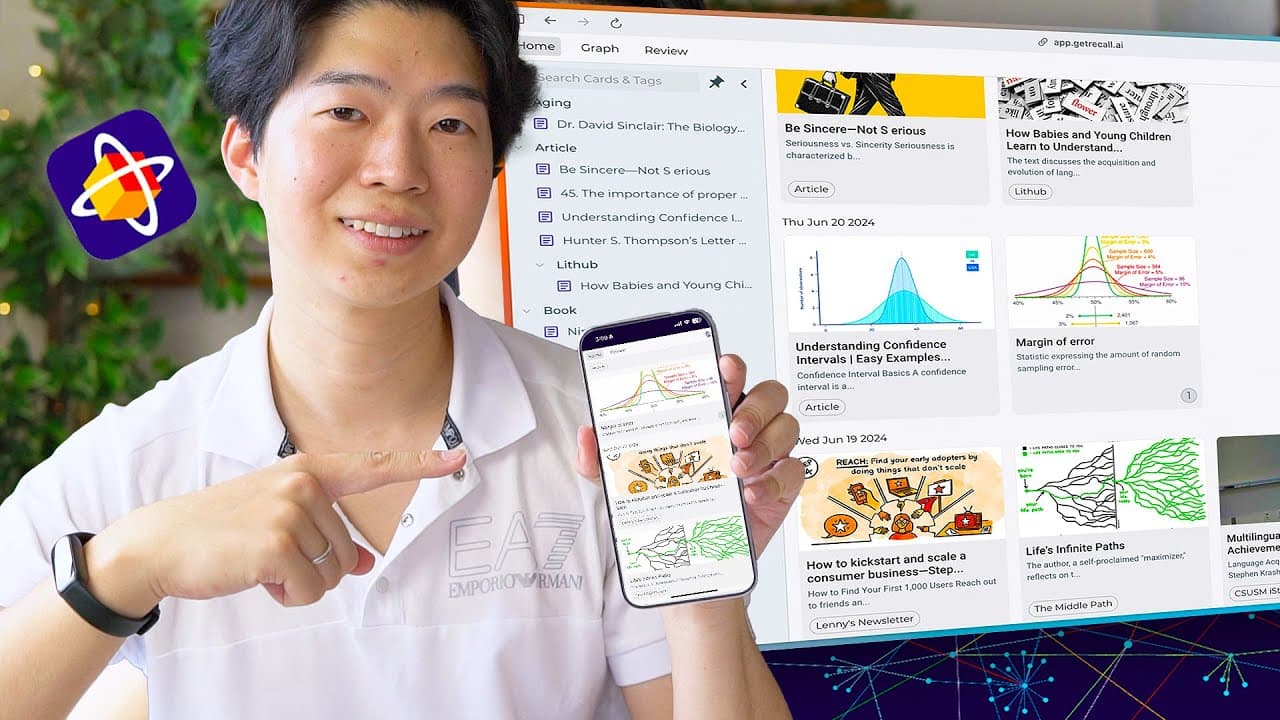
Recall transforms content into notes and flashcards for easy learning.
Transcript
this new AI tool is one of the best studing tools I ever tried it makes it easy to digest information and internalize it so you can remember what you learned for a long time Reco combines linked nodes flashcards and AI perfectly I've been using it for the past few months and loving it so I'm glad that they currently offer to sponsor... Read More
Key Insights
- Recall is an AI-powered tool that converts online content into concise notes and generates flashcards, enhancing the learning process.
- The tool supports various content types, including articles, videos, Wikipedia pages, and even recipes, making it versatile for different learning needs.
- Recall's browser extension and mobile app facilitate easy saving of content, ensuring accessibility and convenience for users across devices.
- The tool automatically highlights keywords and organizes content into categories, simplifying the exploration and understanding of complex topics.
- Recall offers a graph view to visualize topic relationships, aiding users in exploring and connecting ideas more intuitively.
- Users can create custom links and pages within Recall, allowing for personalized organization and deeper engagement with the content.
- The AI-generated flashcards feature helps users retain important information efficiently, making it a valuable tool for students and professionals alike.
- Recall's mobile app enables on-the-go learning, allowing users to review flashcards and notes during idle moments, enhancing productivity.
Install to Summarize YouTube Videos and Get Transcripts
Explore YouTube Video Summarizer or Get YouTube Transcript Extractor
Questions & Answers
Q: How does Recall help with learning and memory retention?
Recall aids learning and memory retention by transforming online content into concise notes and generating flashcards. This process helps users digest information more effectively and internalize key concepts, ensuring long-term retention. The tool's features, such as keyword highlighting and automatic organization, further support efficient learning.
Q: What types of content can be saved and used with Recall?
Recall supports a wide range of content types, including articles, videos, Wikipedia pages, PDF files, and even recipes. This versatility allows users to save and learn from various sources, catering to different learning needs and preferences. The tool's browser extension and mobile app facilitate easy content saving.
Q: How does Recall's graph view enhance topic exploration?
Recall's graph view visualizes the relationships between topics, helping users explore and connect ideas more intuitively. This feature allows users to see how different topics are related, encouraging deeper engagement and understanding. Users can click on topics within the graph to access more detailed information.
Q: Can users create custom content within Recall?
Yes, users can create custom links and pages within Recall, allowing for personalized organization and deeper engagement with the content. This feature enables users to highlight words or phrases and create links, fostering a more tailored learning experience and enhancing their understanding of complex topics.
Q: What benefits does Recall's mobile app offer?
Recall's mobile app offers the benefit of on-the-go learning, allowing users to review flashcards and notes during idle moments, such as commuting or waiting. This feature promotes efficient use of time and enhances productivity, making it easier for users to reinforce their learning and retain important information.
Q: How does Recall's AI-generated flashcards feature work?
Recall's AI-generated flashcards feature creates flashcards from saved content, helping users retain important information. Users can generate questions from the content and customize the flashcards by adding or deleting questions. This feature is particularly useful for students and professionals looking to reinforce their learning.
Q: What makes Recall a valuable tool for students and professionals?
Recall is valuable for students and professionals because it streamlines the learning process by converting content into notes and flashcards. Its features, such as automatic organization, keyword highlighting, and AI-generated flashcards, support efficient learning and memory retention, making it an essential tool for academic and professional success.
Q: How does Recall facilitate content organization and exploration?
Recall facilitates content organization and exploration by automatically categorizing content into topics and highlighting keywords. This organization helps users navigate and understand complex information more easily. Additionally, the tool's graph view and custom link creation features enable users to explore and connect ideas, enhancing their learning experience.
Summary & Key Takeaways
-
Recall is an innovative AI tool that transforms online content into notes and flashcards, aiding long-term memory retention. It offers features like keyword highlighting, automatic organization, and a graph view for exploring topic relationships, making it a versatile tool for both students and professionals.
-
The tool's browser extension and mobile app allow users to save content from various sources, including articles, videos, and Wikipedia pages, ensuring easy access and convenience. Recall also enables users to create custom links and pages, fostering personalized learning experiences.
-
Recall's AI-generated flashcards feature is particularly beneficial for retaining essential information, making it a valuable resource for academic and professional settings. The mobile app further enhances learning by allowing users to review flashcards during idle moments, promoting efficient use of time.
Read in Other Languages (beta)
Share This Summary 📚
Summarize YouTube Videos and Get Video Transcripts with 1-Click
Try YouTube Summary with ChatGPT & Claude or YouTube Transcript Generator
Explore More Summaries from Shu Omi 📚
Summarize YouTube Videos and Get Video Transcripts with 1-Click
Try YouTube Summary with ChatGPT & Claude or YouTube Transcript Generator