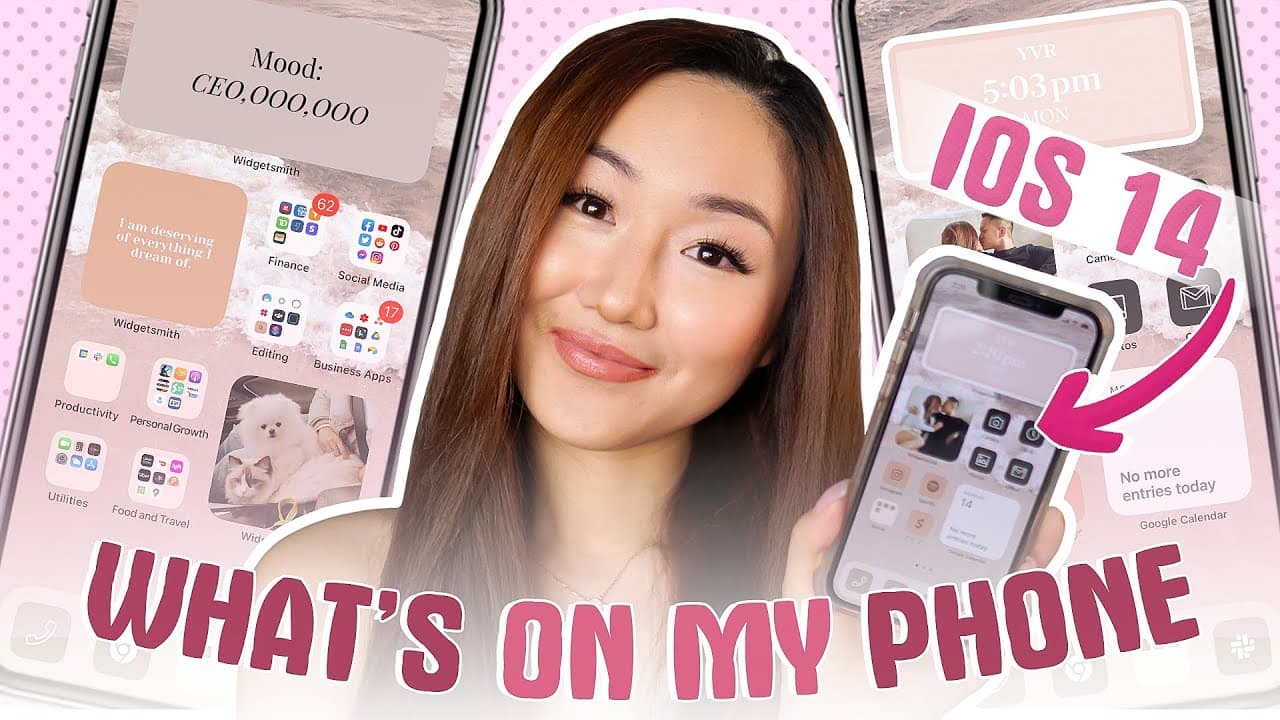
WHAT'S ON MY IPHONE | ** iOS14 AESTHETIC Customization ** (STEP BY STEP TUTORIAL!)
TL;DR
Step-by-step iPhone customization guide with app recommendations.
Transcript
What's up. Welcome back to my channel, the best place for new coaches, content, creators, and entrepreneurs in today's video, I'm going to walk you through step-by-step what's in my iPhone and how I customize my iPhone and everything about my iPhone. Now, just to give you guys a preview, this is what my iPhone currently looks like and how it's set ... Read More
Key Insights
- The video provides a detailed guide on customizing an iPhone using iOS 14 features, including widgets and app icons.
- Aesthetic app is recommended for creating custom icons, offering a free trial for easier access to various designs.
- Widget Smith is a key tool for creating various widgets, allowing for personalized home screen layouts.
- Pinterest can be used to create a dynamic vision board on your iPhone, with rotating quotes and images.
- The video emphasizes the importance of using Google Calendar widget for seamless calendar integration on the home screen.
- For business operations, apps like TransferWise and YouTube Creator Studio are highlighted for their efficiency.
- The tutorial covers creating custom shortcuts for app icons, although it notes the minor inconvenience of opening through shortcuts first.
- The speaker shares personal insights and app recommendations for entrepreneurs and content creators to enhance productivity.
Install to Summarize YouTube Videos and Get Transcripts
Explore YouTube Video Summarizer or Get YouTube Transcript Extractor
Questions & Answers
Q: How can I create a vision board on my iPhone?
To create a vision board on your iPhone, use the Pinterest app to compile boards with motivational quotes and images. Then, add Pinterest widgets to your home screen, linking them to your boards. Set the widget to update hourly or daily for dynamic content.
Q: What apps are essential for customizing my iPhone?
For iPhone customization, essential apps include Widget Smith for creating widgets, Aesthetic for designing custom app icons, and Shortcuts for managing icon shortcuts. These apps allow you to personalize your home screen with various styles and functionalities.
Q: How do I set up Google Calendar on my home screen?
To set up Google Calendar on your home screen, first ensure the Google Calendar app is installed. Then, add the Google Calendar widget by searching for it in the widget menu. Choose the desired widget size and place it on your home screen for easy access to your schedule.
Q: What are the benefits of using TransferWise in business?
TransferWise is beneficial for businesses due to its low fees for international payments compared to PayPal. It offers competitive exchange rates and is particularly useful for paying contractors abroad, ensuring more of your money goes where it's needed instead of being lost to fees.
Q: How can I create custom app icons without using Canva or Photoshop?
To create custom app icons without Canva or Photoshop, use the Aesthetic app. It offers a variety of pre-designed icons, allowing you to easily download and apply them to your apps. This method saves time and simplifies the customization process.
Q: What are some key apps for managing a business on an iPhone?
Key apps for managing a business on an iPhone include OneDrive for file sharing, YouTube Creator Studio for video management, Asana for project management, and LastPass for password management. These apps help streamline business operations and improve productivity.
Q: How can I optimize my YouTube channel using my phone?
To optimize your YouTube channel on your phone, use the YouTube Creator Studio app. It allows you to manage video uploads, monitor performance, engage with comments, and adjust video settings on the go. This app is essential for maintaining your channel's activity and growth.
Q: Why might someone choose to use app shortcuts despite the delay in opening apps?
People might choose to use app shortcuts for the aesthetic customization of their home screen, despite the delay in opening apps. Shortcuts allow for personalized icons and a cohesive look, which can enhance user experience and make the device feel more personalized and visually appealing.
Summary & Key Takeaways
-
The video is a comprehensive tutorial on customizing an iPhone using iOS 14, focusing on creating an aesthetic and functional home screen. It covers using apps like Widget Smith and Aesthetic for widgets and icons.
-
The speaker shares personal insights on the apps used for running a business, such as TransferWise for payments and YouTube Creator Studio for managing YouTube content. The emphasis is on efficiency and aesthetic appeal.
-
A dynamic vision board using Pinterest is demonstrated, showing how to integrate motivational quotes and images into the home screen. The tutorial also includes detailed steps for setting up Google Calendar and custom app icons.
Read in Other Languages (beta)
Share This Summary 📚
Summarize YouTube Videos and Get Video Transcripts with 1-Click
Try YouTube Summary with ChatGPT & Claude or YouTube Transcript Generator
Explore More Summaries from Vanessa Lau 📚

Summarize YouTube Videos and Get Video Transcripts with 1-Click
Try YouTube Summary with ChatGPT & Claude or YouTube Transcript Generator