Products
Features
YouTube Video Summarizer
Summarize YouTube videos
Web & PDF Highlighter
Highlight web pages & PDFs
Chat with PDF
Ask any PDF questions with AI
Ask AI Clone
Chat with your highlights & memories
Audio Transcriber
Transcribe audio files to text
Glasp Reader
Read and highlight articles
Kindle Highlight Export
Export your Kindle highlights
Idea Hatch
Hatch ideas from your highlights
Integrations
Obsidian Plugin
Notion Integration
Pocket Integration
Instapaper Integration
Medium Integration
Readwise Integration
Snipd Integration
Hypothesis Integration
Apps & Extensions
Chrome Extension
Safari Extension
Edge Add-ons
Firefox Add-ons
iOS App
Android App
Discover
Discover
Ideas
Discover new ideas and insights
Articles
Curated articles and insights
Books
Book recommendations by great minds
Posts
Essays and notes from readers
Quotes
Inspiring quotes collection
Videos
Curated videos and summaries
Explore Glasp
Glasp Newsletter
Weekly insights and updates
Glasp Talk
Interview series with great minds
Glasp Blog
Latest news and articles
Glasp Use Cases
Learn how others use Glasp
Build & Support
Glasp API
Access Glasp's API for developers
MCP Connector
Connect Glasp to Claude & ChatGPT
Community
Glasp Reddit Community
Students
Student discount and benefits
FAQs
Frequently Asked Questions
AboutPricing
DashboardLog inSign up

Autosum, Average, Max, Min, Count & Autofill Functions | Excel

May 31, 2018
by
The Organic Chemistry Tutor
YouTube video player
Autosum, Average, Max, Min, Count & Autofill Functions | Excel

TL;DR

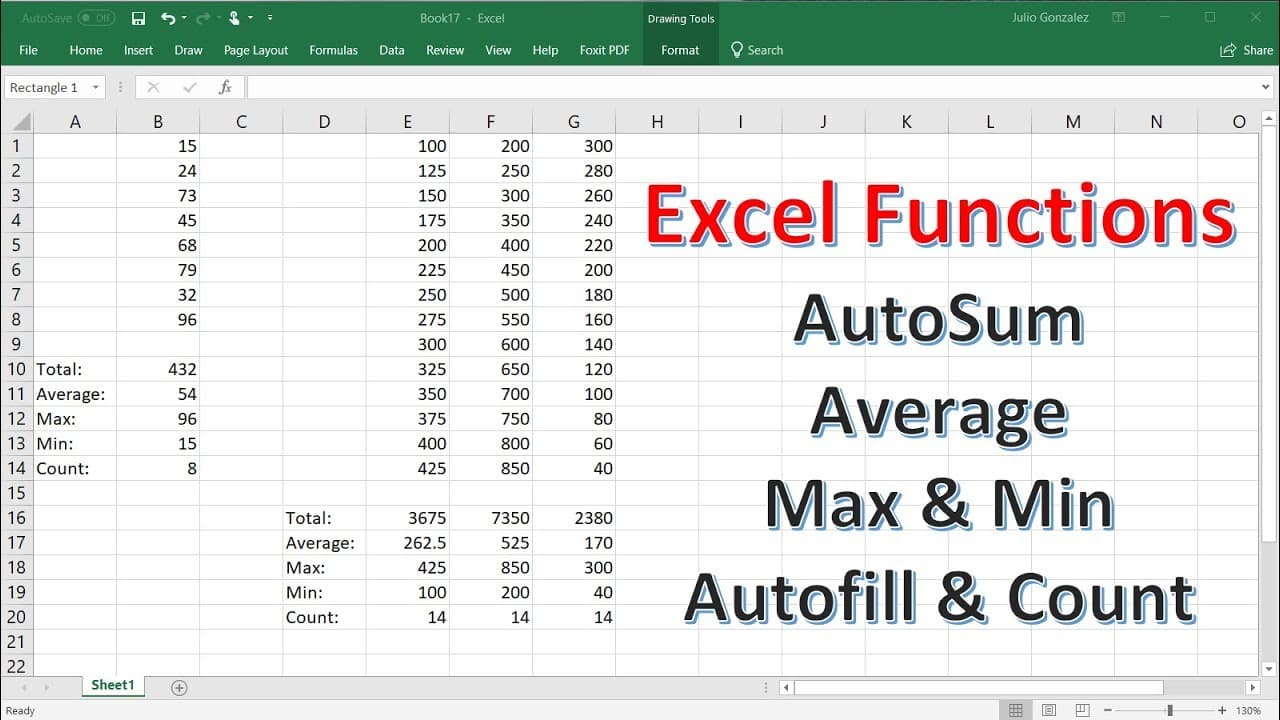
Learn how to use Autosum, Average, Max, Min, and Count functions in Excel to quickly calculate sums, averages, maximums, minimums, and counts of numbers.

Transcript

in this lesson we're going to talk about how to use the autosum the average the max the min and the count functions in excel so first let's zoom in so you can see this better and in this column let's write some numbers so let's say 15 24 74 or 73 45 68 79 32 and 96 so let's say if we want to find the total or the sum of these numbers so what we cou... Read More

Key Insights

  • 🪜 The Autosum feature in Excel helps quickly add up numbers without using separate cells.
  • 🔂 The Average function can calculate the average of numbers in separate cells or within a single cell.
  • 🧡 The Max function identifies the highest number in a selected range.
  • 😘 The Min function determines the lowest number in a selected range.
  • 👂 The Count function counts the number of entries in a list.
  • ⌛ These functions can save time and simplify calculations in Excel.
  • 👻 Autofill feature allows for quick extension of formulas in multiple cells.

Install to Summarize YouTube Videos and Get Transcripts

Explore YouTube Video Summarizer or Get YouTube Transcript Extractor

Questions & Answers

Q: How do you use the Autosum feature in Excel?

To use Autosum, type "=SUM(" and then select the range of numbers you want to add. It's convenient for quickly obtaining the sum of numbers without placing them in separate cells.

Q: Can you calculate the average of numbers using the Average function in Excel?

Yes, you can. Just type "=AVERAGE(" and then select the range of numbers you want to average. It can be used for numbers in separate cells or within a single cell.

Q: How do you find the maximum number in Excel?

To find the maximum number, use the Max function. Type "=MAX(" and then select the range of numbers you want to analyze. It will return the highest number in the selected range.

Q: Is there a function to find the minimum number in Excel?

Yes, you can use the Min function. Simply type "=MIN(" and then select the range of numbers you want to evaluate. It will give you the lowest number in the selected range.

Summary & Key Takeaways

  • Autosum feature allows you to easily add up numbers in a column without placing them in separate cells.

  • Average function helps calculate the average of a group of numbers, either from separate cells or within a single cell.

  • Max and Min functions identify the highest and lowest numbers in a list, respectively.

  • Count function counts the number of entries in a list.


Read in Other Languages (beta)

English

Share This Summary 📚

Summarize YouTube Videos and Get Video Transcripts with 1-Click

Download browser extensions on:

Try YouTube Summary with ChatGPT & Claude or YouTube Transcript Generator

Explore More Summaries from The Organic Chemistry Tutor 📚
How To Calculate The Height of a Cylinder Given The Volume, Radius, & Diameter thumbnail
How To Calculate The Height of a Cylinder Given The Volume, Radius, & Diameter
The Organic Chemistry Tutor
High Voltage Surge Protection Transient Suppressor Circuit Using Zener Diodes & Fuses thumbnail
High Voltage Surge Protection Transient Suppressor Circuit Using Zener Diodes & Fuses
The Organic Chemistry Tutor
How To Create a Calendar In Excel 2016 - VERY EASY! thumbnail
How To Create a Calendar In Excel 2016 - VERY EASY!
The Organic Chemistry Tutor
Graphing Exponential Functions With e, Transformations, Domain and Range, Asymptotes, Precalculus thumbnail
Graphing Exponential Functions With e, Transformations, Domain and Range, Asymptotes, Precalculus
The Organic Chemistry Tutor
The Unit Circle, Basic Introduction, Trigonometry thumbnail
The Unit Circle, Basic Introduction, Trigonometry
The Organic Chemistry Tutor
Celsius to Fahrenheit to Kelvin Formula Conversions - Temperature Units C to F to K thumbnail
Celsius to Fahrenheit to Kelvin Formula Conversions - Temperature Units C to F to K
The Organic Chemistry Tutor

Summarize YouTube Videos and Get Video Transcripts with 1-Click

Download browser extensions on:

Try YouTube Summary with ChatGPT & Claude or YouTube Transcript Generator

Apps & Extensions

  • Chrome Extension
  • Safari Extension
  • Edge Add-ons
  • Firefox Add-ons
  • iOS App
  • Android App

Key Features

  • YouTube Video Summarizer
  • Web & PDF Summarizer
  • Web & PDF Highlighter
  • Chat with PDF
  • Ask AI Clone
  • Audio Transcriber
  • Glasp Reader
  • Kindle Highlight Export
  • Idea Hatch

Integrations

  • Obsidian Plugin
  • Notion Integration
  • Pocket Integration
  • Instapaper Integration
  • Medium Integration
  • Readwise Integration
  • Snipd Integration
  • Hypothesis Integration

More Features

  • APIs
  • MCP Connector
  • Blog & Post
  • Embed Links
  • Image Highlight
  • Personality Test
  • Quote Shots

Company

  • About us
  • Blog
  • Community
  • FAQs
  • Job Board
  • Newsletter
  • Pricing
Terms

•

Privacy

•

Guidelines

© 2026 Glasp Inc. All rights reserved.