How to Sync Your Snipd Highlights with Glasp

Oct 27, 2026
1 min read
1 views
Snipd is an AI-powered podcast app that lets you capture any insight you hear in a podcast - simply by tapping your headphones. You can now sync your Snipd highlights directly to Glasp in just a few steps:
Open the app and go to the Account tab in the bottom-right corner.
Tap Export & Sync, then choose Glasp Integration.
Select Find your Glasp Access Token to retrieve your access token from your Glasp settings page.
Tap Connect to complete the sync.
💡 By default, your imported highlights will be public on Glasp. You can update your highlight visibility anytime from your settings.
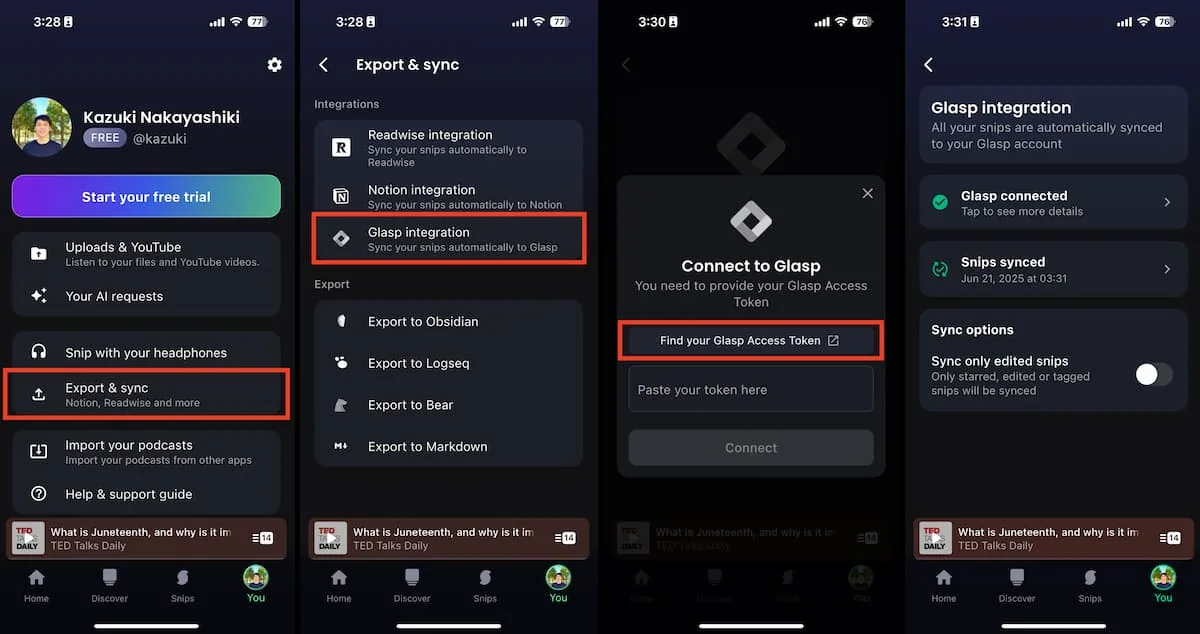
How to Integrate with Glasp on Snipd app
Comments
Add a comment