How to Create a Q&A-Style Article from a YouTube Summary

Sep 22, 2025
5 min read
87 views

Do you want to turn a YouTube video into a Q&A-style article quickly and easily? With Glasp’s YouTube Summary extension, you can copy full transcripts from YouTube videos and transform them into engaging Q&A articles using an AI tool like ChatGPT, Gemini, or Claude. This method is perfect for podcasters, interviewers, journalists, students, and content creators who want to repurpose video content into written form.
In this tutorial, we’ll walk you through how to use YouTube Summary with Glasp to extract a transcript, format it into a Q&A dialogue, and publish it as a polished article. By the end, you’ll know exactly how to repurpose YouTube videos into blog posts, newsletters, or knowledge resources without wasting time on manual transcription.
Here’s the example post we made through the feature.
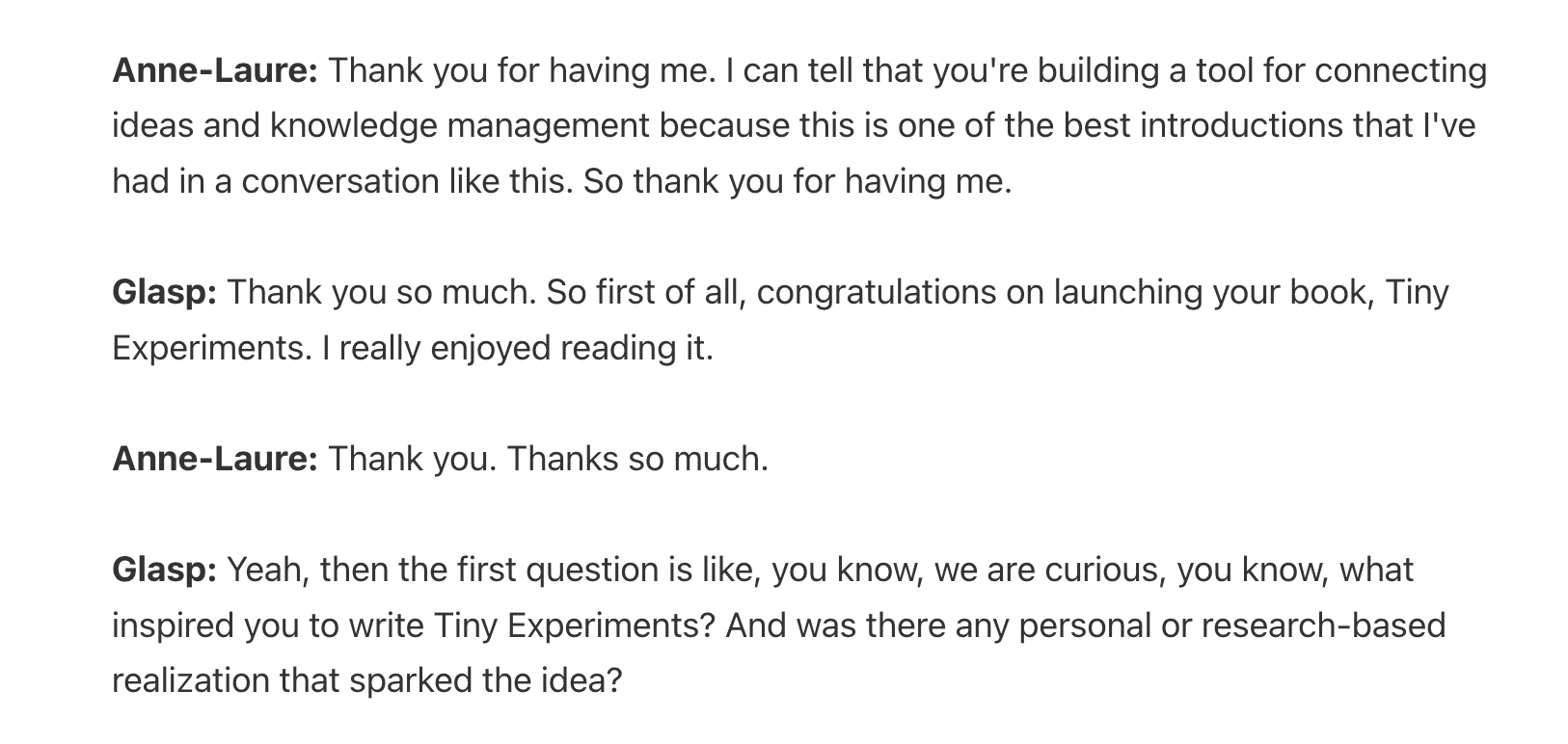
Anne-Laure Le Cunff: How to Build a Growth Mindset through Tiny Experiments | Glasp Talk #45
Step 1: Install the YouTube Summary extension
Please install the Glasp’s browser extension that has YouTube Summary function.
👉 YouTube Summary with ChatGPT & Claude
👉 Glasp Web Highlighter: PDF & Web Highlight
Please see the tutorial video below to see how it works

👉 YouTube Summary with ChatGPT & Claude | Tutorial Video
Step 2: Open a YouTube video
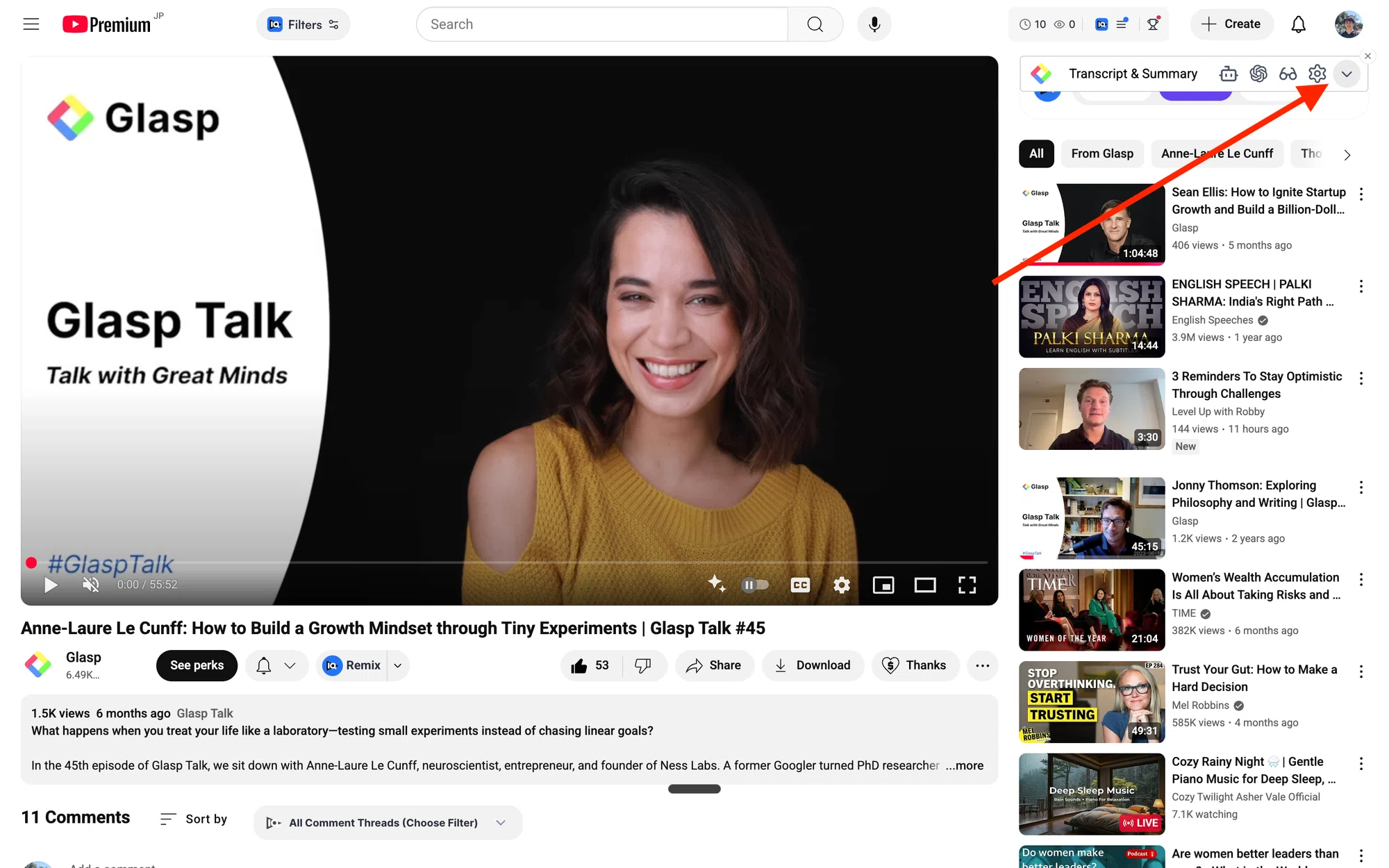
After installing the extension, please open a video you’d like to make a Q&A-style article. Then, click the bottom arrow on the bar. It opens the bar and allows you to see the full transcript of the video.
Anne-Laure Le Cunff: How to Build a Growth Mindset through Tiny Experiments | Glasp Talk #45
Step 3: Get the Transcript of the YouTube video
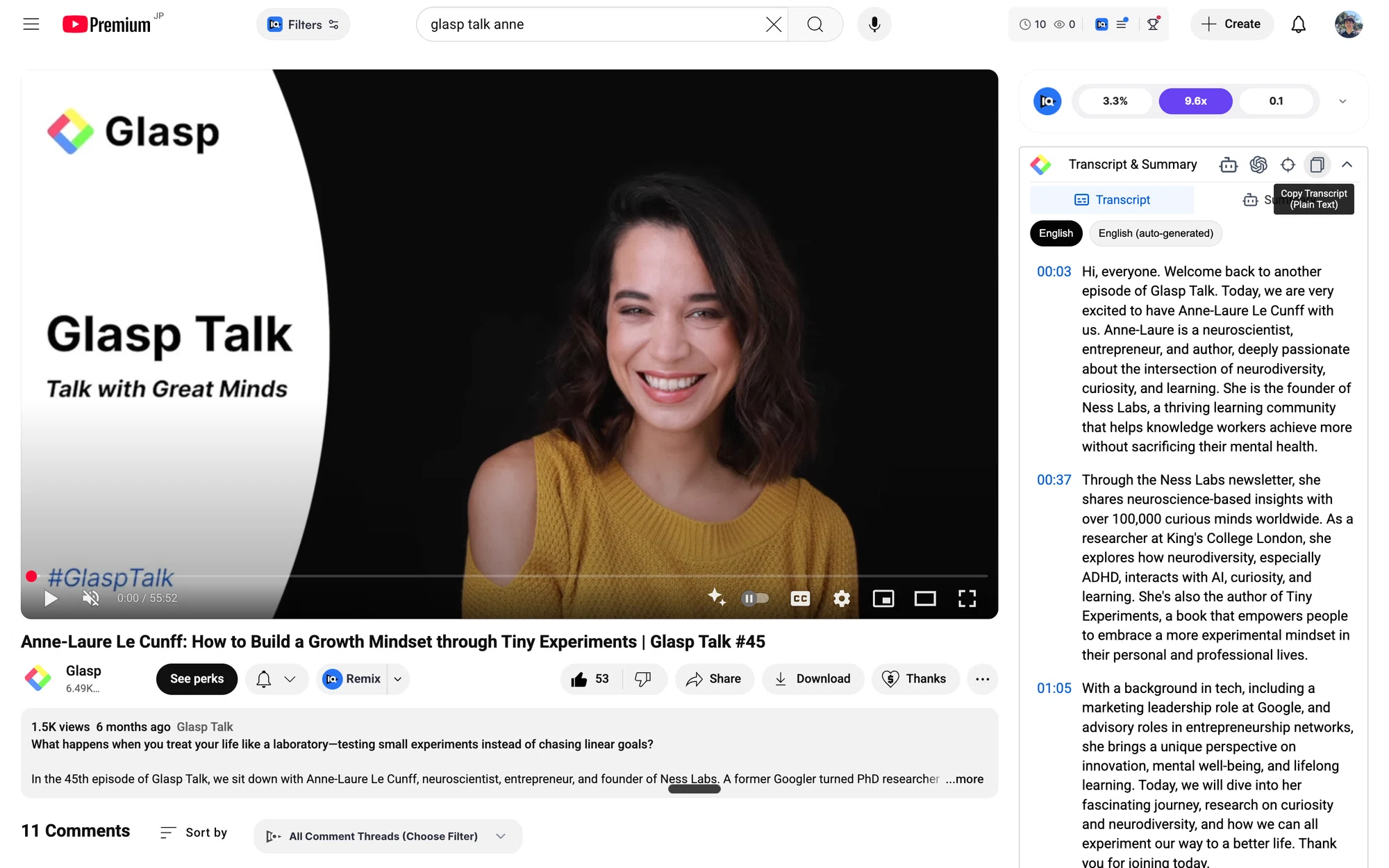
Then, click “Copy Transcript” at the bar. It allows you to copy the full transcript of the video.
Step 4: Open an AI Tool
Open an AI tool such as ChatGPT, Gemini, NotebookLM, Claude, etc. In this tutorial, we will use Gemini as an example.
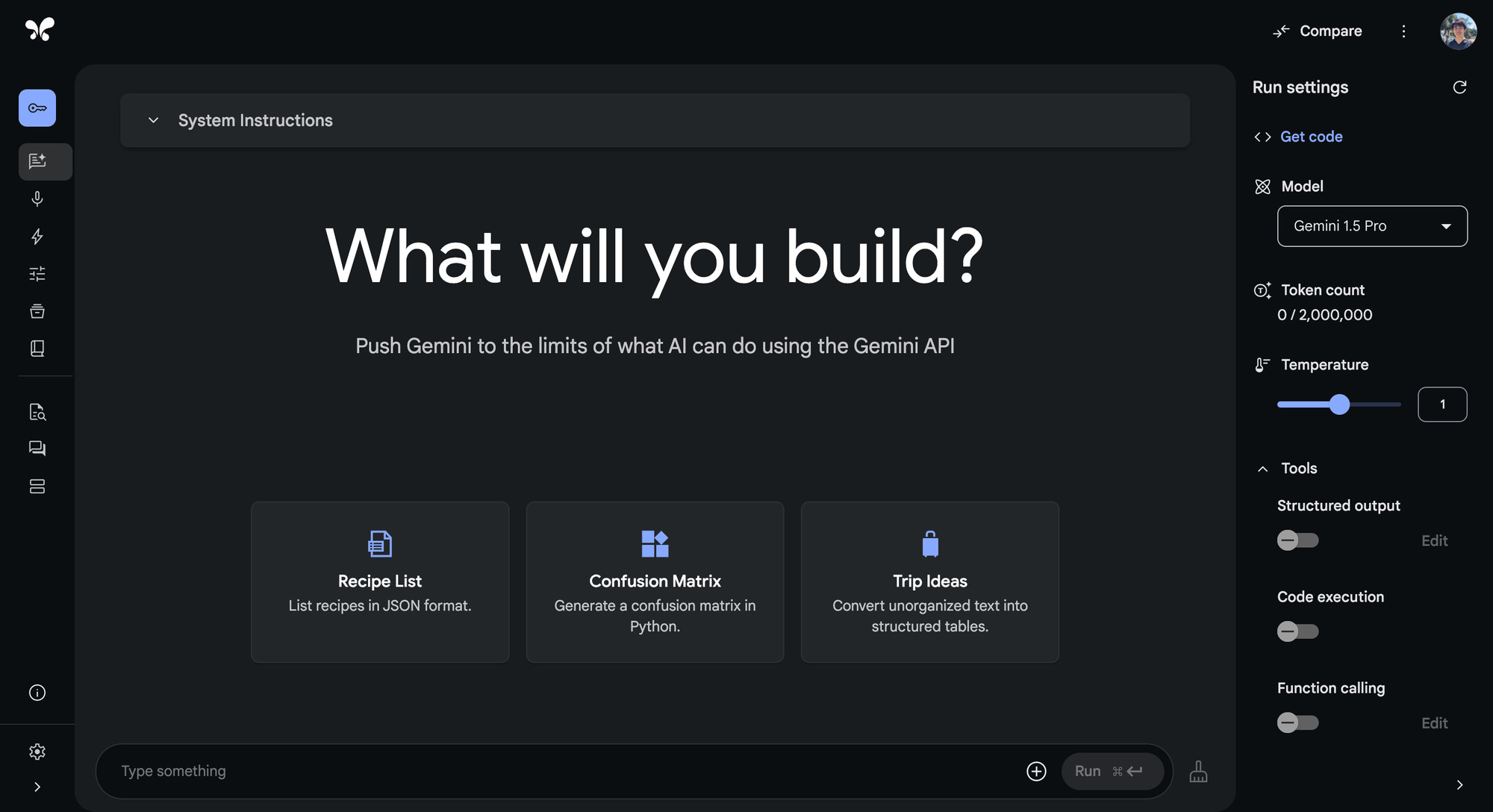
Step 5: Format the Transcript
Paste the transcript you copied on Gemini. Then, type the prompt below beneath the transcript.
This is the transcript of a YouTube video. There are two speakers. Format the transcript like below. Do not summarize or remove the transcript. Use the full transcript. Remove filler words such as "uh," "um," and "well."
Glasp: Hi
Anne-Laure: Hello
This prompt is just an example. Please modify it depending on the output. FYI, we explicitly mention Do not summarize nor remove the transcript. Use the full transcript. This is because AI tools tend to summarize or remove long transcripts.
If you can successfully format the transcript, you can see a Q&A-style output like below.
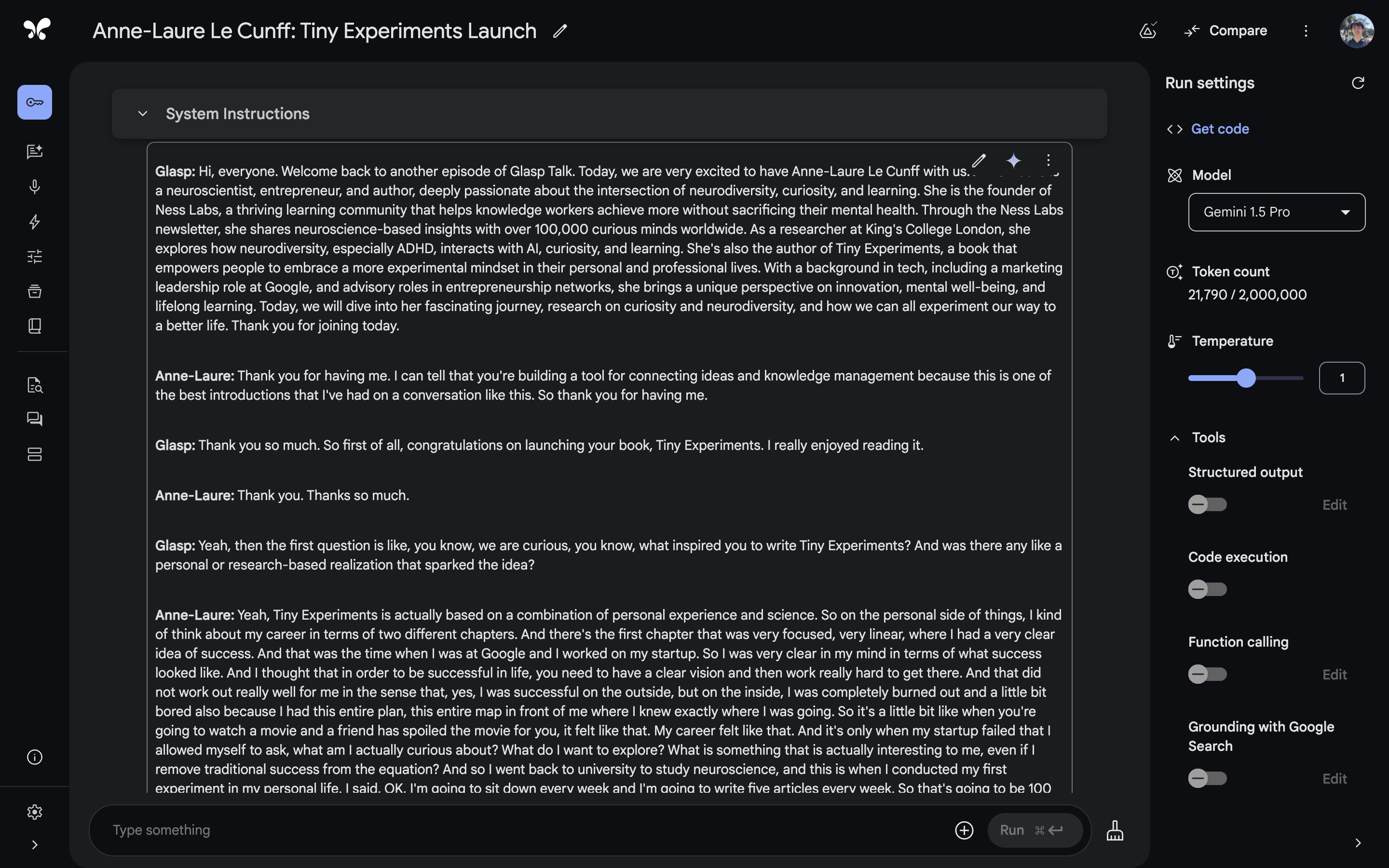
Please copy and paste the formatted transcript on an article draft.
Step 6: Publish an article
Open any publishing platform you’d like to publish. We use Glasp Post as an example this time.
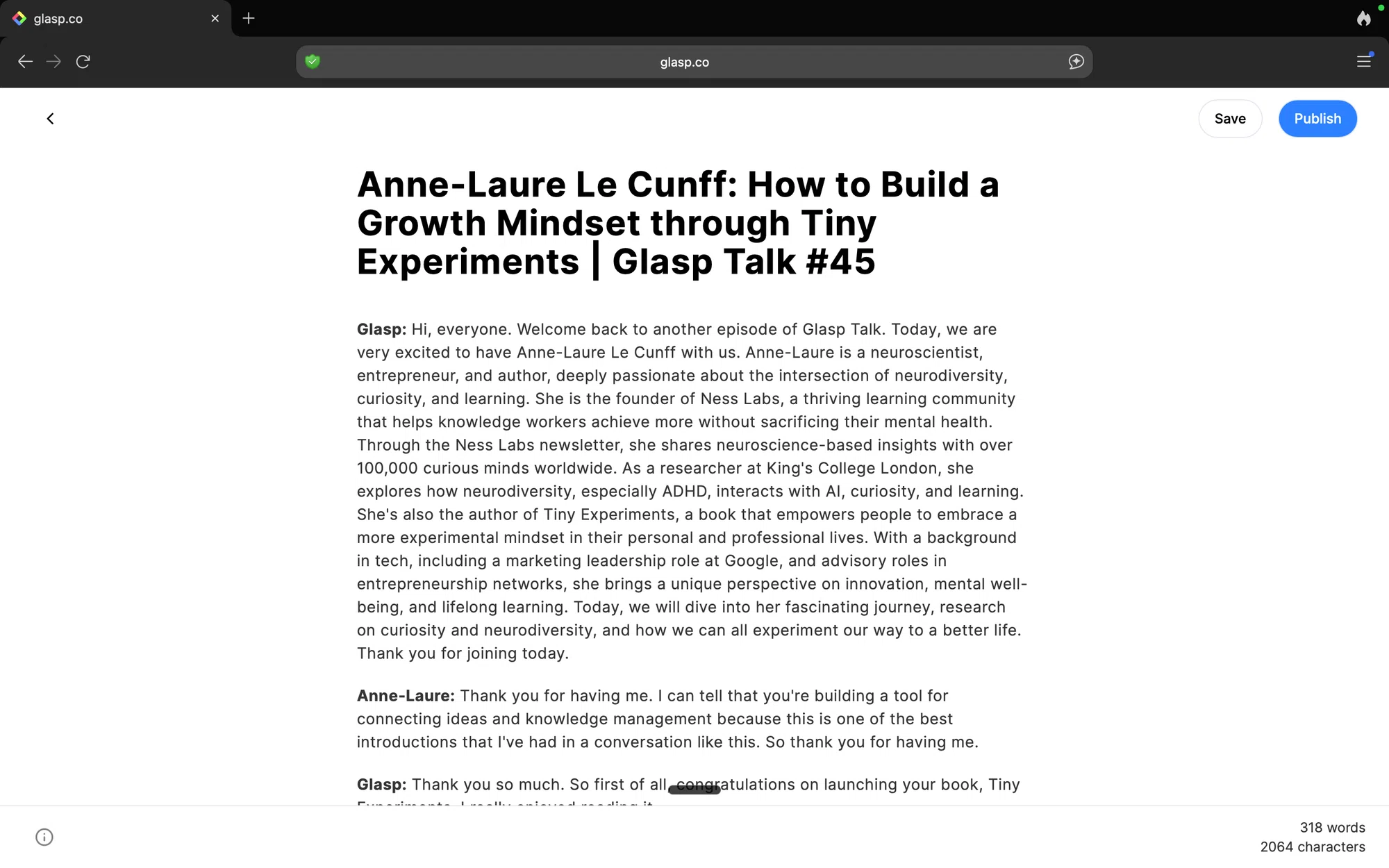
If you want to modify the formatted transcript, please do so before publishing.
Isn't it easy? With Glasp, you can easily write a Q&A-style article from a YouTube video.
If you want to make a Q&A-style article from an audio file, please visit the tutorial below.
FAQs
Q. Do I need a Glasp account to create a Q&A article from YouTube?
No. You only need the Glasp browser extension to copy transcripts. However, if you want to highlight, organize, or publish the article on Glasp, then you’ll need a free account.
Q. Does this method work for all YouTube videos?
It works for most videos that provide transcripts. If the video has no transcript (e.g., new uploads, music videos, or livestreams), Glasp can create one from the video's audio with Audio Transcription (up to 30 minutes per month on the free plan, 300 minutes on Pro, and 1,500 minutes on Unlimited).
Q. Can I edit the transcript before formatting it into Q&A?
Yes. After copying the transcript, you can edit it manually or let an AI tool clean up filler words and structure it as Q&A.
Q. Which AI tools can I use to format the transcript?
You can use ChatGPT, Claude, Gemini, or NotebookLM. Just paste the transcript and give a clear prompt to format it into a Q&A dialogue.
Q. Does Glasp automatically turn YouTube videos into Q&A articles?
Not yet. Glasp helps you extract transcripts. The Q&A formatting step requires using an AI tool.
Q. Can I publish the Q&A article directly on Glasp?
Yes. You can paste the formatted Q&A into Glasp Posts to publish it, or export it to other platforms like Notion, Medium, or WordPress.
Q. Is this feature free?
Yes. Both YouTube Summary and transcript copying are free. AI tools may require a separate subscription depending on usage.
Q. Can I highlight parts of the transcript for emphasis?
Yes. Using Glasp, you can highlight specific sections of the transcript and include them in your article as key quotes.
Q. Can Claude or ChatGPT read my Glasp highlights?
Yes. With the Glasp MCP Connector, AI assistants such as Claude, ChatGPT, and Claude Code can search and read your own highlights, notes, Kindle highlights, and AI summaries, including your YouTube summaries. The connection is read-only and private to you. See How to Connect Glasp to Claude, ChatGPT, and Claude Code (MCP Connector).
Q. Where are my YouTube summaries saved?
When you are signed in, the YouTube summaries you create are saved to your Glasp profile under the Summaries tab, so you can review all of them later. You can also get them through the Glasp API, and AI assistants such as Claude and ChatGPT can read them through the Glasp MCP Connector.
Q. Can I use Glasp on my phone?
Yes. Glasp has native apps for iPhone, iPad, and Android, and the Glasp Safari extension for iPhone and iPad comes with the iOS app. Your highlights sync between the apps, the web, and the desktop extension. See How to Use the Glasp Mobile App on iOS, iPad, and Android.
Before you leave
If you have any questions, please refer to the FAQ or contact us.
See you next time,
Glasp team