forEach - Array Methods - Javascript Tutorial
TL;DR
The forEach method simplifies array iteration in JavaScript but lacks control for breaking loops.
Transcript
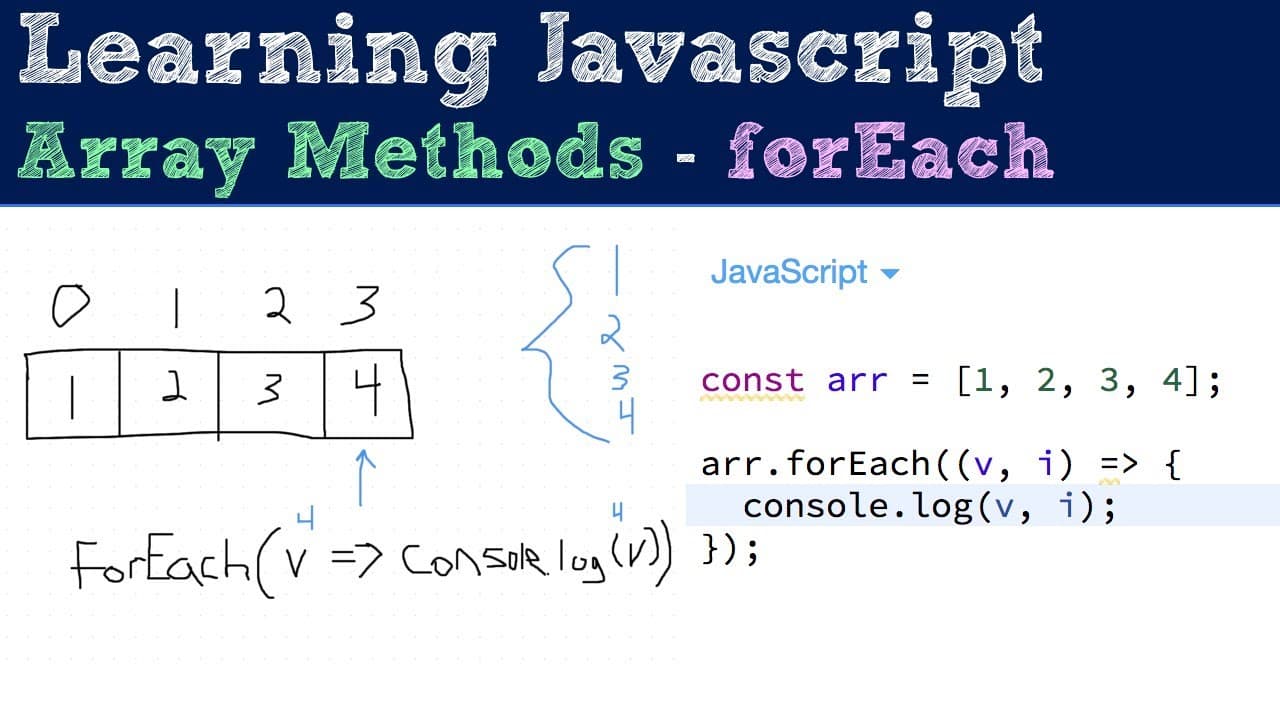
so now we're going to be looking at the for each method which is another really useful function that's on the array prototype basically this can be a replacement for a traditional while our for loop where when you need to loop over every element of an array you need to run some code or call a function etc it just makes the code a little bit cleaner... Read More
Key Insights
- ❓ The forEach method is part of the JavaScript array prototype, enabling function callbacks on array elements seamlessly.
- 🫰 It is particularly useful for executing operations that don’t require managing loop indices or break conditions, promoting simpler code structures.
- 🍗 Error handling is important within forEach since it cannot be exited prematurely. Using try-catch for exceptions is not the recommended practice.
- 🧑💻 The typical usage of forEach is for operations like logging or modifying elements through side effects rather than transforming data.
- 😒 Understanding when to use forEach versus other array methods enhances the effectiveness and performance of your JavaScript code.
- 🥺 The fluid syntax of the forEach method can lead to more concise and readable code, especially among developers familiar with callback functions.
- 🏃 It is advisable to avoid using forEach in cases where loop interruptions are necessary, as it runs continuously over the entire array.
Install to Summarize YouTube Videos and Get Transcripts
Explore YouTube Video Summarizer or Get YouTube Transcript Extractor
Questions & Answers
Q: How does forEach differ from traditional loops in JavaScript?
The forEach method differs from traditional loops like for and while by focusing on cleaner syntax for executing callbacks on each array element. It eliminates the need for loop variable management, making the code more readable. However, it lacks the ability to break out of the loop, meaning once it starts, it executes for all items, which can be limiting in certain scenarios.
Q: Can you break out of the forEach loop early?
No, the forEach loop does not support breaking out of the iterations. Once initiated, it will execute the callback for every element in the array. The only workaround is to throw an exception, but that approach is discouraged. For scenarios where early termination is needed, alternatives like the traditional for loop or the for...of loop are recommended.
Q: What arguments does the callback function receive in forEach?
The callback function in forEach receives three arguments: the current value of the array element, the index of that element, and the original array itself. This feature allows developers to gain context on each iteration and manipulate or log specific elements as needed, enhancing the functionality of the looping process.
Q: What happens if you return a value from the callback in forEach?
When a value is returned from the callback function in a forEach loop, it is disregarded, as forEach itself always returns undefined. The primary purpose of forEach is to perform side effects rather than accumulate values, which is where other methods like map or reduce would be more appropriate.
Summary & Key Takeaways
-
The forEach method provides a cleaner alternative to traditional loops for executing a callback function on each element of an array, returning undefined.
-
Unlike other looping methods, forEach does not allow breaking or continuing through iterations once started, making it unsuitable for scenarios requiring early loop termination.
-
The callback function can receive three arguments: the current value, the index of the current value, and the original array, facilitating diverse applications in array manipulation.
Read in Other Languages (beta)
Share This Summary 📚
Summarize YouTube Videos and Get Video Transcripts with 1-Click
Try YouTube Summary with ChatGPT & Claude or YouTube Transcript Generator
Explore More Summaries from Web Dev Cody 📚





Summarize YouTube Videos and Get Video Transcripts with 1-Click
Try YouTube Summary with ChatGPT & Claude or YouTube Transcript Generator