How I setup role based authorization Next Auth
TL;DR
Learn how to attach an access control list to JWT for effective user permissions management.
Transcript
I want to talk about something that's very important if you're doing JWT type of authentication and that is basically how do you attach an access control list to your JWT so that when your user hits different endpoints and tries to do different things in your system you have a cached list of what they should be able to modify already in your securi... Read More
Key Insights
- 👤 JWT offers a robust mechanism for managing user authentication and authorization by embedding user-specific information directly within the token.
- 👻 Utilizing access control lists simplifies permission management, allowing applications to function smoothly with minimal database interaction.
- 🤯 The integration of roles—admin, member, owner—tailors the user experience and secures application functions based on individual access levels.
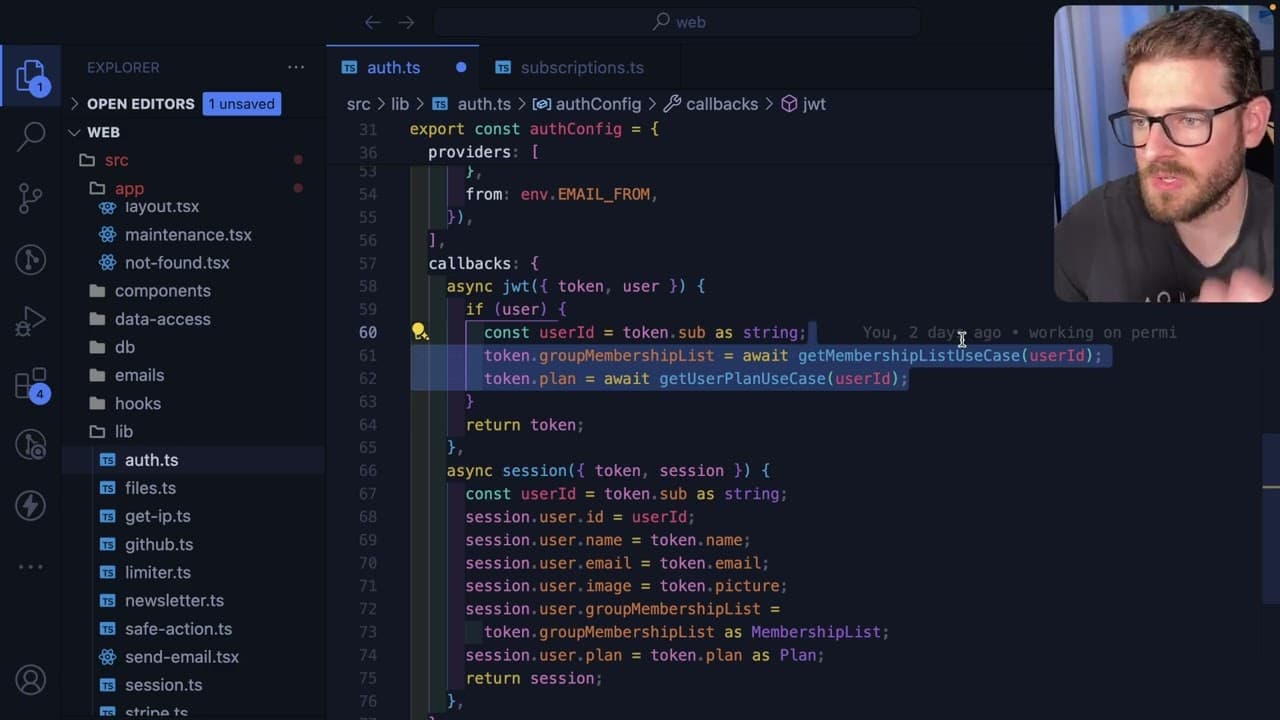
- 👻 Customizing NextAuth's callback functions allows for dynamic population of user data, enhancing performance and maintaining security protocols.
- 👨💻 Extending TypeScript types fosters more descriptive user objects, facilitating better development practices and clearer code.
- 🥺 Conditional rendering in the frontend is made possible by extracting user permissions from JWT, leading to a more dynamic application interface.
- 👤 Regular checks on subscription status during JWT generation help maintain proper billing and user experience as they interact with the application.
Install to Summarize YouTube Videos and Get Transcripts
Explore YouTube Video Summarizer or Get YouTube Transcript Extractor
Questions & Answers
Q: What is the main purpose of attaching an access control list to JWT?
Attaching an access control list (ACL) to JWT is essential for defining user permissions and roles within an application. By embedding this information directly in the token, the system can efficiently determine which actions are allowed for each user without needing to query the database on every request, thereby improving the application's performance.
Q: How does the implementation of this system reduce database queries?
This system reduces database queries by utilizing the embedded information within the JWT. When users log in or refresh their tokens, their roles and group memberships are stored within the JWT. This allows the application to validate user permissions by simply decoding the token instead of looking up each user's permissions in the database repeatedly.
Q: What are the different user roles mentioned in the content?
The content identifies three primary user roles: admin, member, and owner. Admins possess higher permissions, allowing them to manage groups effectively. Members have limited access, and owners have special rights, including the ability to create groups. This differentiation in roles is crucial for maintaining structured access control.
Q: How do you customize the user information attached to the JWT?
To customize user information in the JWT, you need to implement a callback function within NextAuth's JWT strategy. This function checks for an existing user object and attaches specific information—such as group memberships, plans, and roles—directly to the token during the login process, allowing your application to leverage this data efficiently.
Q: Why is it important to check subscription status when setting up the JWT?
Checking the subscription status ensures that users are assigned the appropriate plan (basic, premium, or free) when their JWT is generated. This process is critical since it dictates what features and accesses a user has within the application, thus facilitating proper management of user experience and billing practices.
Q: Can the JWT's content be inspected directly?
No, the content of the JWT is typically encrypted to ensure security and privacy. Although some basic information can usually be decoded, sensitive data remains protected, making it impossible for users to simply inspect the token and view its contents without appropriate access.
Q: What is the role of the NextAuth callbacks in managing user sessions?
NextAuth callbacks play a crucial role in customizing user session data, allowing developers to fetch and attach additional information—like membership lists and subscription plans—when a user logs in or when a token is refreshed, thereby enhancing the user's authentication experience.
Q: How can frontend components utilize information from the JWT?
Frontend components can leverage the embedded information within the JWT to conditionally render UI elements, such as buttons or menus, based on the user's roles and permissions. By checking the user object from the session, developers can enforce access controls directly in the user interface.
Summary & Key Takeaways
-
This content covers the integration of access control lists (ACLs) in JSON Web Tokens (JWT) using NextAuth, demonstrating how user roles and permissions can be embedded within authentication tokens.
-
It explores how user roles—such as admin, member, and owner—and subscription plans (basic, premium, or free) can be attached to the JWT during user login and token refresh, enhancing performance and reducing database queries.
-
The tutorial includes practical examples of modifying user session data in NextAuth and extending TypeScript types to incorporate additional user information, enabling effective role-based UI components in applications.
Read in Other Languages (beta)
Share This Summary 📚
Summarize YouTube Videos and Get Video Transcripts with 1-Click
Try YouTube Summary with ChatGPT & Claude or YouTube Transcript Generator
Explore More Summaries from Web Dev Cody 📚





Summarize YouTube Videos and Get Video Transcripts with 1-Click
Try YouTube Summary with ChatGPT & Claude or YouTube Transcript Generator