Products
Features
YouTube Video Summarizer
Summarize YouTube videos
Web & PDF Highlighter
Highlight web pages & PDFs
Chat with PDF
Ask any PDF questions with AI
Ask AI Clone
Chat with your highlights & memories
Audio Transcriber
Transcribe audio files to text
Glasp Reader
Read and highlight articles
Kindle Highlight Export
Export your Kindle highlights
Idea Hatch
Hatch ideas from your highlights
Integrations
Obsidian Plugin
Notion Integration
Pocket Integration
Instapaper Integration
Medium Integration
Readwise Integration
Snipd Integration
Hypothesis Integration
Apps & Extensions
Chrome Extension
Safari Extension
Edge Add-ons
Firefox Add-ons
iOS App
Android App
Discover
Discover
Ideas
Discover new ideas and insights
Articles
Curated articles and insights
Books
Book recommendations by great minds
Posts
Essays and notes from readers
Quotes
Inspiring quotes collection
Videos
Curated videos and summaries
Explore Glasp
Glasp Newsletter
Weekly insights and updates
Glasp Talk
Interview series with great minds
Glasp Blog
Latest news and articles
Glasp Use Cases
Learn how others use Glasp
Build & Support
Glasp API
Access Glasp's API for developers
MCP Connector
Connect Glasp to Claude & ChatGPT
Community
Glasp Reddit Community
Students
Student discount and benefits
FAQs
Frequently Asked Questions
AboutPricing
DashboardLog inSign up

Using the Tone Mapper in Iray for Rhino
July 6, 2016
by
NVIDIA
YouTube video player
Using the Tone Mapper in Iray for Rhino

TL;DR

Learn how to use exposure, compress highlights, gamma, and more for optimal image results in IRA.

Transcript

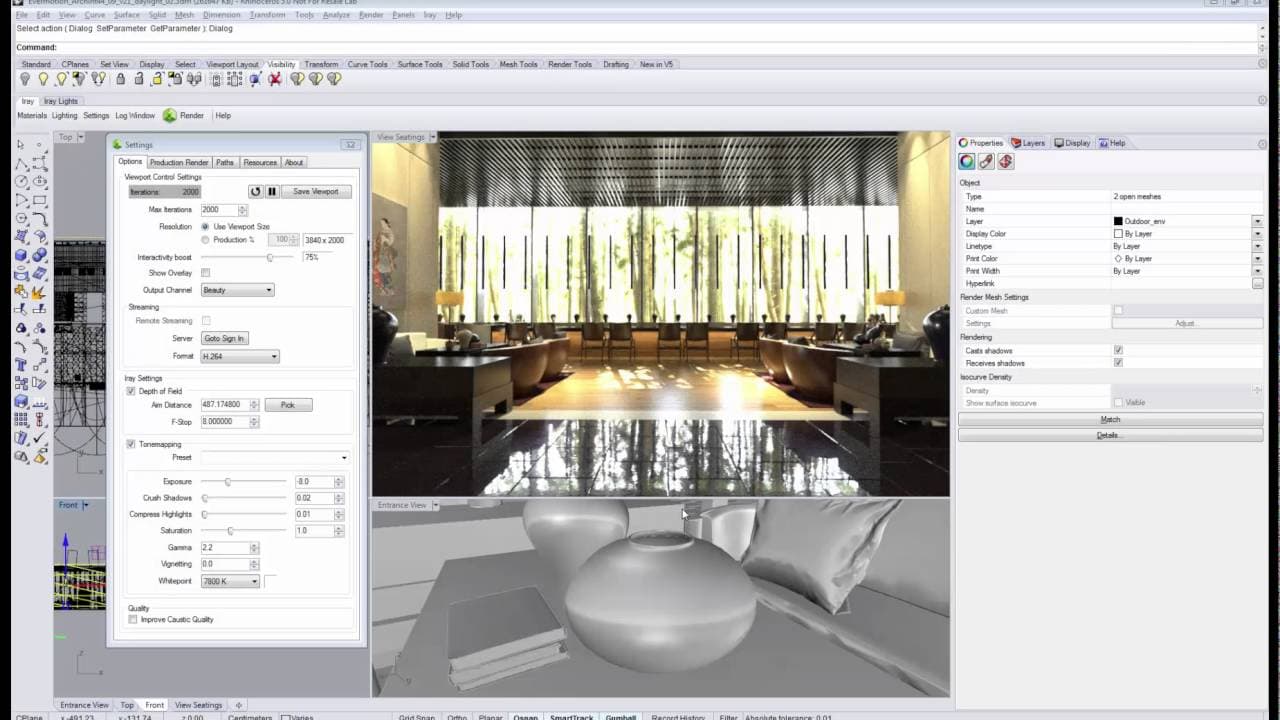
in this video I'm going to show how to use tone mapping in IRA for I know the most important slider of the tone mapper is the exposure slider because it sets general brightness of your image use it to adjust the image to have a good price that you can work with and as you can see in case you have overly bright areas like here we can distinguish the... Read More

Key Insights

  • 🥌 The exposure slider is crucial for establishing the baseline brightness of an image in tone mapping.
  • 🔅 Compress highlights can help recover details in overly bright areas for a balanced image.
  • 〽️ Adjusting the gamma value can significantly alter image contrast and color richness.
  • 🪜 Vignetting effects can add a unique aesthetic to images by darkening the corners.
  • 😒 Be cautious with excessive use of compress highlights to avoid overly shallow image appearances.
  • 🖐️ Playing with gamma values and saturation can help fine-tune image contrast and color richness.
  • 😵 Utilize cross shadow sliders to enhance dark areas and overall contrast in images.

Install to Summarize YouTube Videos and Get Transcripts

Explore YouTube Video Summarizer or Get YouTube Transcript Extractor

Questions & Answers

Q: What is the key function of the exposure slider in tone mapping?

The exposure slider helps set the overall brightness of the image, providing a base for further adjustments for optimal image quality.

Q: How can compress highlights be utilized in tone mapping?

Compress highlights can be used to recover details in overly bright areas, balancing the brightness across the image while avoiding overexposure.

Q: What is the purpose of adjusting the gamma value in tone mapping?

Changing the gamma value can alter image contrast, with lower values enhancing contrast and richer colors while higher values soften contrast for a different look.

Q: How does the vignetting effect impact image aesthetics in tone mapping?

The vignetting effect simulates darkening around the corners, adding a nostalgic touch similar to analog cameras, enhancing the focus on the central subject.

Summary & Key Takeaways

  • Adjust the exposure slider for the general brightness of the image.

  • Use compress highlights to regain details in overly bright areas.

  • Experiment with gamma values and vignetting effects for desired image looks.


Read in Other Languages (beta)

English

Share This Summary 📚

Summarize YouTube Videos and Get Video Transcripts with 1-Click

Download browser extensions on:

Try YouTube Summary with ChatGPT & Claude or YouTube Transcript Generator

Explore More Summaries from NVIDIA 📚
Synthetic Brain Project | King’s College London on NVIDIA Cambridge-1 thumbnail
Synthetic Brain Project | King’s College London on NVIDIA Cambridge-1
NVIDIA
An Introduction to NVIDIA Iray for 3ds Max Rendering Plug-In thumbnail
An Introduction to NVIDIA Iray for 3ds Max Rendering Plug-In
NVIDIA
Track and Understand VR User Behavior with EASE thumbnail
Track and Understand VR User Behavior with EASE
NVIDIA
NVIDIA GeForce RTX Launch Event at Gamescom 2018 thumbnail
NVIDIA GeForce RTX Launch Event at Gamescom 2018
NVIDIA
NVIDIA GTC DC Keynote - Day Two thumbnail
NVIDIA GTC DC Keynote - Day Two
NVIDIA

Summarize YouTube Videos and Get Video Transcripts with 1-Click

Download browser extensions on:

Try YouTube Summary with ChatGPT & Claude or YouTube Transcript Generator

Apps & Extensions

  • Chrome Extension
  • Safari Extension
  • Edge Add-ons
  • Firefox Add-ons
  • iOS App
  • Android App

Key Features

  • YouTube Video Summarizer
  • Web & PDF Summarizer
  • Web & PDF Highlighter
  • Chat with PDF
  • Ask AI Clone
  • Audio Transcriber
  • Glasp Reader
  • Kindle Highlight Export
  • Idea Hatch

Integrations

  • Obsidian Plugin
  • Notion Integration
  • Pocket Integration
  • Instapaper Integration
  • Medium Integration
  • Readwise Integration
  • Snipd Integration
  • Hypothesis Integration

More Features

  • APIs
  • MCP Connector
  • Blog & Post
  • Embed Links
  • Image Highlight
  • Personality Test
  • Quote Shots

Company

  • About us
  • Blog
  • Community
  • FAQs
  • Job Board
  • Newsletter
  • Pricing
Terms

•

Privacy

•

Guidelines

© 2026 Glasp Inc. All rights reserved.