Why Should You Use a Monitor Light Bar for Your Desk?
TL;DR
A monitor light bar significantly enhances desk lighting by eliminating shadows and reflections, improving visibility for tasks like reading and writing. It also helps reduce eye strain with non-flicker and anti blue-light technology, making it an essential accessory for anyone spending long hours at a computer.
Transcript
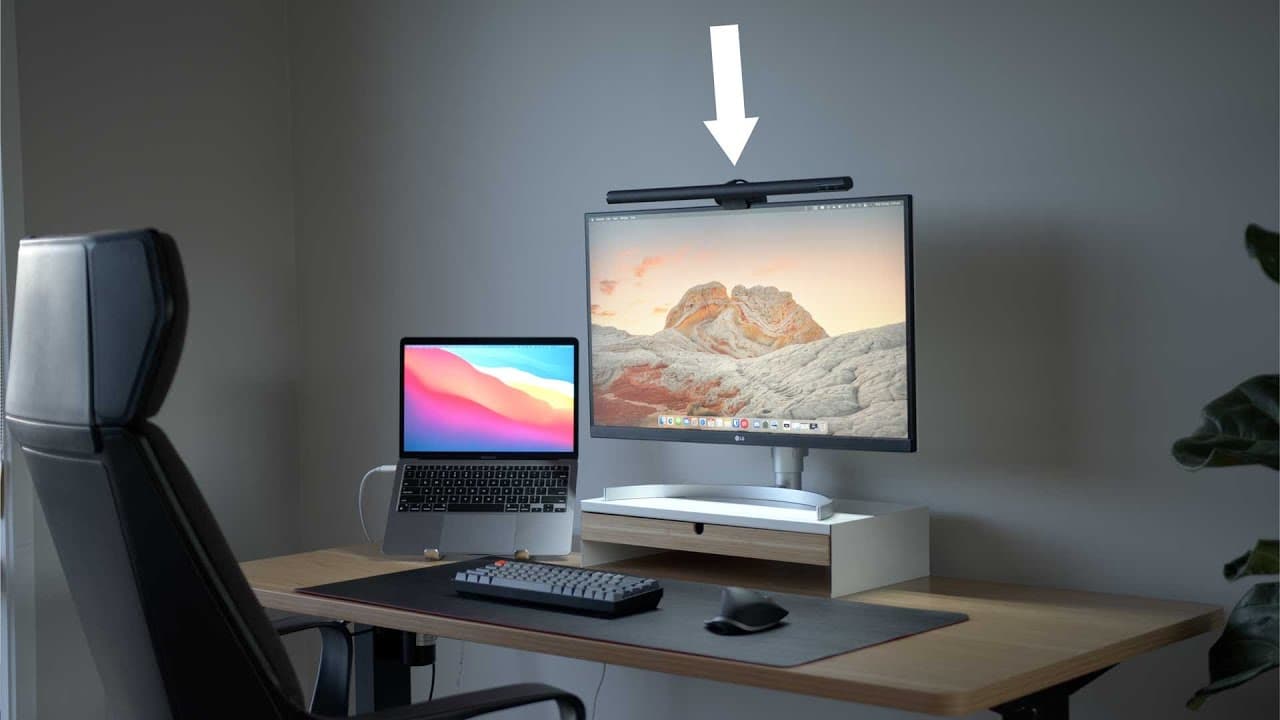
You might have seen this particular accessory in some of my videos, and a couple of people have commented asking what it is. Well, it's called a light bar. And if you're someone who spends a lot of time at your desk, it could be one of the best desktop accessories you've ever bought. In particular, if you're a student or you read, write, draw, or b... Read More
Key Insights
- 🙂 Light bars are a practical solution for individuals who require well-lit desk spaces for studying, reading, writing, drawing, or building.
- 😃 Using a light bar improves visibility, reduces eye strain, and eliminates shadows and reflections on screens or work surfaces.
- 🙂 Light bars come in various styles and price ranges, with budget options offering similar functionality to more expensive models.
- 🙂 Plugging the light bar into the monitor's USB port allows for automatic on/off functionality when using the computer.
- 👤 Customizable brightness and color temperature settings enhance user experience and accommodate different preferences.
- 🩵 Light bars with anti blue-light technology are beneficial for individuals working long hours at a computer, minimizing the negative effects of blue light on sleep patterns.
- 🙂 Light bars offer a compact and space-saving lighting solution compared to traditional lamps.
Install to Summarize YouTube Videos and Get Transcripts
Explore YouTube Video Summarizer or Get YouTube Transcript Extractor
Questions & Answers
Q: How does a light bar compare to a lamp for desk lighting?
Unlike a lamp, a light bar eliminates shadows and reflections, providing direct and evenly distributed light on your desk without taking up much space.
Q: What are the health benefits of using a light bar?
Light bars with anti blue-light technology and ergonomic positioning reduce eye strain, headaches, and blurry vision caused by sitting in dimly lit rooms for extended periods.
Q: How do light bars attach to the top of a monitor?
Light bars have a round, weighted part that hangs off the back and a hook at the front for stability. They are easy to install by placing them on the top center edge of your monitor.
Q: Can light bars be customized?
Most light bars allow customization of brightness and color temperature. Some models can automatically adjust these settings based on ambient light conditions in the room.
Summary & Key Takeaways
-
A light bar is a strip of LEDs that sits on top of your monitor and projects light onto your desk, providing better illumination than traditional lamps.
-
Using a light bar eliminates shadows and reflections on your screen, making it ideal for activities like note-taking or drawing.
-
Light bars with non-flicker and anti blue-light technology help reduce eye strain and headaches caused by poor lighting conditions.
Read in Other Languages (beta)
Share This Summary 📚
Summarize YouTube Videos and Get Video Transcripts with 1-Click
Try YouTube Summary with ChatGPT & Claude or YouTube Transcript Generator
Explore More Summaries from Created Tech 📚

Summarize YouTube Videos and Get Video Transcripts with 1-Click
Try YouTube Summary with ChatGPT & Claude or YouTube Transcript Generator