Is the CalDigit TS4 Thunderbolt 4 Dock Worth the Price?
TL;DR
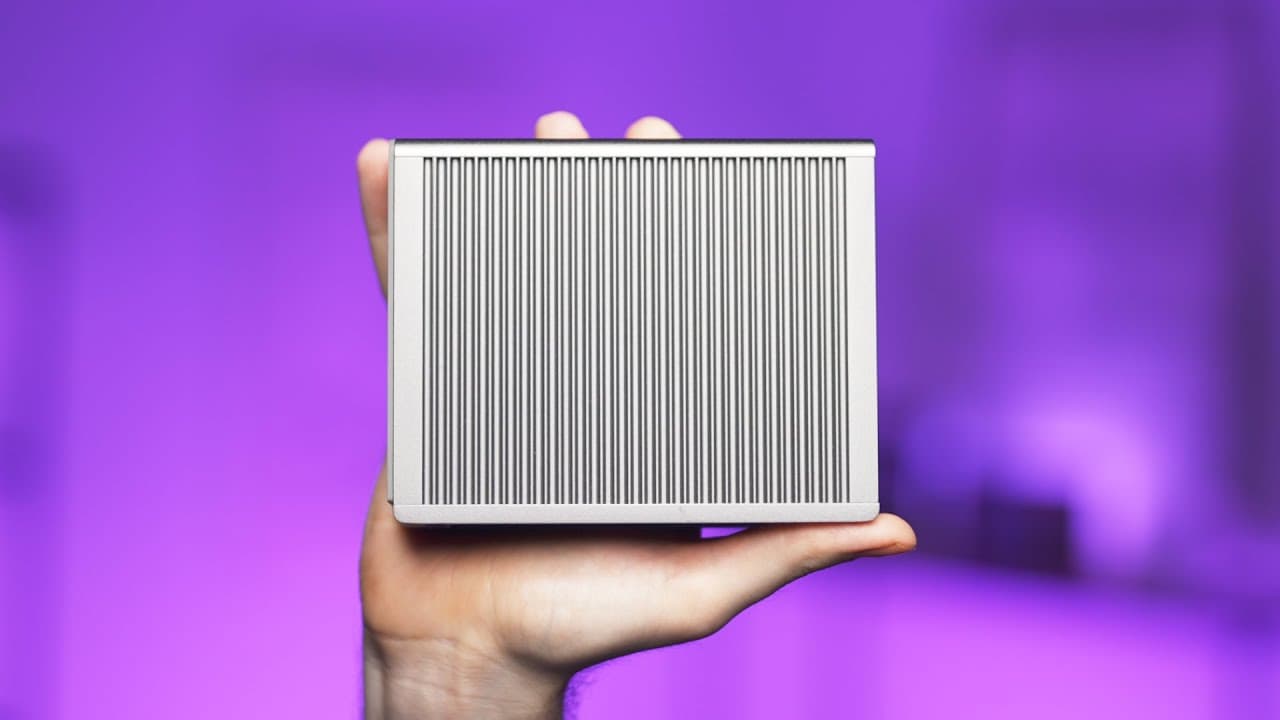
The CalDigit TS4 Thunderbolt 4 dock is worth considering for its 18 ports, compact design, and reliable connectivity, which simplifies accessing multiple devices with a single cable. Despite its high price, it offers excellent build quality and functionality, though it lacks certain features like 10-gigabit Ethernet and HDMI. It's ideal for users needing extensive connectivity for their workstation.
Transcript
As someone who spends over eight hours every single day sitting at a desk, I've tried my best to make my setup as functional and as productive as possible. The problem is though I use a laptop and depending on the laptop, ports and connectivity start to become a big issue. Take the M1 MacBook Air, for example. It only has two ports and they both us... Read More
Key Insights
- 💻 Laptop connectivity: Depending on the laptop, ports and connectivity can be a problem, especially with limited USB-C ports. Adapters or dongles are often necessary to attach non-USB-C devices.
- 💡 Functionality and productivity: A dock like the CalDigit TS4 Thunderbolt 4 dock can provide a solution to connect multiple devices with just one cable, making it easier to access everything on the desk.
- 🔌 Form factor: The CalDigit TS4 has a small and compact form factor, with a sturdy metal chassis that can be positioned upright or flat on the desk. Rubber strips may not securely hold the dock in place.
- 📱 Front connectivity: The front of the TS4 dock includes UHS-II SD and micro SD card slots, an audio combo jack, two 10 gigabit USB-C ports, and one 10-gigabit USB-A 3.2 gen two port. An additional USB-A port would have been beneficial, but the SD card slot may be redundant for some users.
- 🔌 Back connectivity: The back of the TS4 dock features numerous ports, including the host port for connecting the computer, 2.5 gigabit Ethernet, two dedicated downstream Thunderbolt 4 or USB4 ports, and a display port 1.4 port. There are no easily accessible Thunderbolt options on the front.
- 🔗 External drive speeds: For high-performance drives, there may be slightly reduced performance when using the dock compared to direct attachment to the computer. This is likely due to individual drive controllers and not an issue with the TS4 dock itself.
- 📺 Display options: The TS4 dock offers a display port 1.4 port instead of HDMI, catering to users with high refresh rate and high-resolution monitors. HDMI connectivity is still possible with active display port to HDMI adapters or USB-C to HDMI adapters.
- 💰 Price considerations: The TS4 dock is expensive, which may deter some users. However, its functionality, build quality, and extensive port selection make it a worthwhile investment for those who require multiple devices to be connected to their workstation. The price should be weighed against the importance of other components in the setup.
Install to Summarize YouTube Videos and Get Transcripts
Explore YouTube Video Summarizer or Get YouTube Transcript Extractor
Questions & Answers
Q: How does the CalDigit TS4 Thunderbolt 4 dock compare to other docks in terms of form factor and design?
The CalDigit TS4 Thunderbolt 4 dock stands out with its compact and sturdy form factor, making it suitable for both upright and flat positioning. The minimal and spartan metal design adds to its aesthetic appeal, differentiating it from bulkier and more corporate-looking docks in the market.
Q: What are the main ports available on the CalDigit TS4 Thunderbolt 4 dock?
The dock offers a wide range of ports, including UHS-II SD and micro SD card slots, an audio combo jack, USB-C and USB-A ports, and a display port 1.4. On the back, users will find Thunderbolt 4 ports, an Ethernet port, and additional USB ports.
Q: Does the CalDigit TS4 Thunderbolt 4 dock support high refresh rate and high-resolution monitors?
Yes, the dock's display port 1.4 allows users to connect to high refresh rate and high-resolution monitors, such as the 4K 144 Hertz Eve Spectrum. However, for HDMI monitors, users can utilize active display port to HDMI adapters or USB-C to HDMI adapters.
Q: Is the CalDigit TS4 Thunderbolt 4 dock future-proof?
The TS4 Thunderbolt 4 dock is equipped with Thunderbolt 4 technology, ensuring compatibility and guaranteed capabilities for years to come. While Thunderbolt 3 and Thunderbolt 4 have similar speeds, Thunderbolt 4 guarantees specific features like minimum video output requirements and PC wake from sleep capability. Users looking for future-proof options are advised to choose the TS4 over the TS3 dock.
Summary & Key Takeaways
-
The CalDigit TS4 Thunderbolt 4 dock is a compact and sturdy dock that offers 18 ports for connectivity, making it convenient for users with multiple devices.
-
The dock features a variety of ports on the front, including a UHS-II SD and micro SD card slot, an audio combo jack, and USB-C and USB-A ports, providing all the necessary front connectivity.
-
While the dock lacks support for 10-gigabit Ethernet and HDMI, it compensates with a display port 1.4 and Thunderbolt 4 ports on the back, allowing users to connect high-resolution monitors and external drives.
Read in Other Languages (beta)
Share This Summary 📚
Summarize YouTube Videos and Get Video Transcripts with 1-Click
Try YouTube Summary with ChatGPT & Claude or YouTube Transcript Generator
Explore More Summaries from Created Tech 📚


Summarize YouTube Videos and Get Video Transcripts with 1-Click
Try YouTube Summary with ChatGPT & Claude or YouTube Transcript Generator