The BEST YouTube Setup for 2024 // SIMPLE AND EASY - Camera, Audio, Lighting, and more!
TL;DR
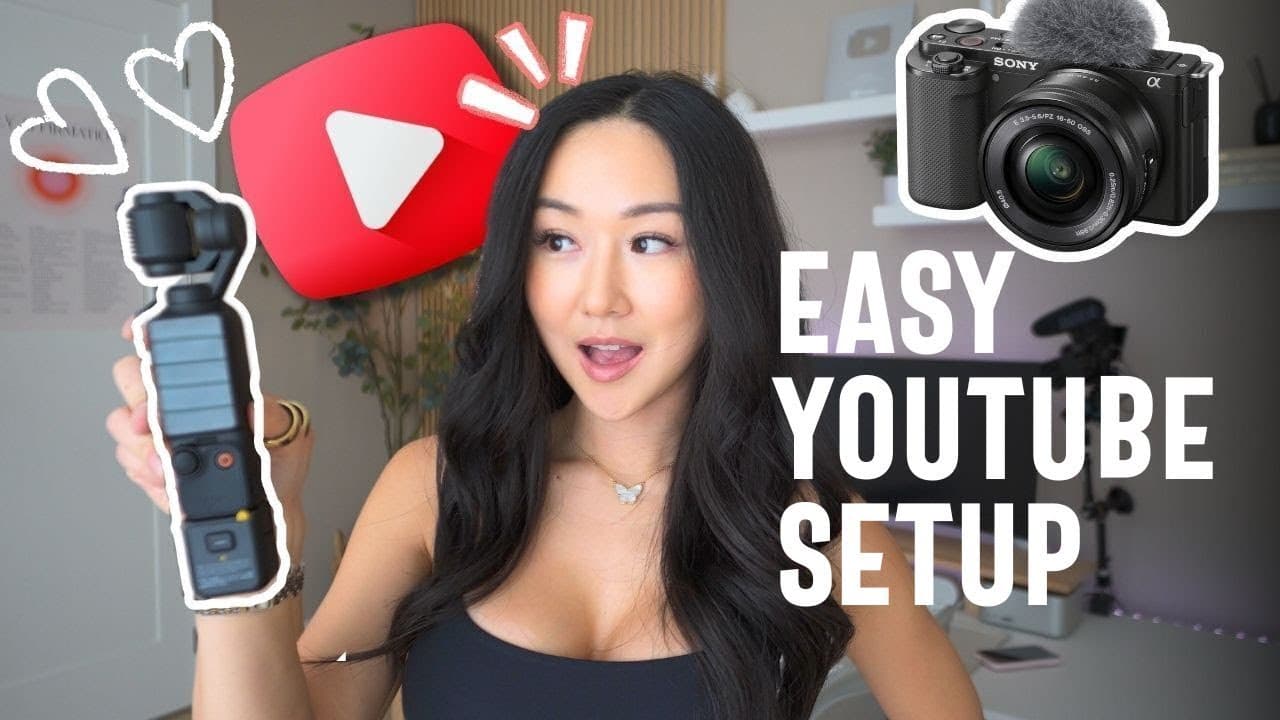
Guide to YouTube setups: main, desktop, and vlogging.
Transcript
now when it comes to filming YouTube videos I have three different setups my main YouTube setup my desktop setup and my vlogging setup so if you want to know what gear and Equipment I'm using for all three of these setups and by the way I am not a YouTube Tech bro I am a girl who likes to make videos in a simple hassle-free way then keep on watchin... Read More
Key Insights
- The main YouTube setup involves a Sony ZV-E10 camera, favored for its side flip screen and lightweight, making it ideal for filming without blocking the microphone.
- Lenses are crucial for video quality; the Sony 11 mm F18 ultra-wide lens is preferred for its ability to capture more space and provide flexibility in filming distances.
- The Rode VideoMic Pro Plus shotgun microphone is recommended for its superior audio quality and echo reduction compared to cheaper alternatives.
- Investing in a high-quality tripod like the Neewer Carbon Fiber 66in ensures camera stability and protects equipment from damage.
- A dummy battery is essential for long filming sessions, preventing interruptions due to battery depletion by connecting directly to a power source.
- The desktop setup utilizes a Sony A6400 camera with a Sigma 16 mm lens, ideal for tutorials and screen sharing, mounted using a Manfrotto arm for flexibility.
- For high-quality audio at the desktop, the Shure SM7B microphone, though complex and expensive, is recommended for professional content creators.
- The DJI Osmo Pocket 3 is highlighted for vlogging due to its 4K filming capability, compact size, gimbal stabilization, and face tracking features.
Install to Summarize YouTube Videos and Get Transcripts
Explore YouTube Video Summarizer or Get YouTube Transcript Extractor
Questions & Answers
Q: What camera is recommended for the main YouTube setup?
The Sony ZV-E10 is recommended for the main YouTube setup due to its lightweight design, side flip screen, and superior autofocus. It's particularly favored for its ability to change lenses and its compatibility with tutorials, making it a versatile choice for content creators.
Q: Why is lens choice important in video production?
Lens choice is crucial because it significantly impacts the quality and style of the video. An ultra-wide lens, like the Sony 11 mm F18, allows for more space to be captured and provides flexibility with filming distances, enhancing the overall composition and viewer experience.
Q: What are the benefits of using a dummy battery for filming?
A dummy battery is beneficial for long filming sessions as it connects the camera directly to a power source, preventing battery depletion and ensuring continuous filming. This setup eliminates the need for multiple backup batteries and reduces interruptions during the filming process.
Q: How does the DJI Osmo Pocket 3 enhance vlogging?
The DJI Osmo Pocket 3 enhances vlogging through its compact size, 4K filming capability, and gimbal stabilization, which ensures smooth footage. Additionally, its face tracking feature and ability to film in both horizontal and vertical modes make it versatile for creating dynamic content.
Q: What makes the Rode VideoMic Pro Plus a preferred microphone?
The Rode VideoMic Pro Plus is preferred for its excellent audio quality and ability to reduce echo, especially in challenging environments. Its shotgun design focuses on capturing sound directly in front of the microphone, making it ideal for talking head videos and reducing ambient noise.
Q: Why is the Neewer Carbon Fiber 66in tripod recommended?
The Neewer Carbon Fiber 66in tripod is recommended for its high quality and stability, ensuring that the camera remains secure during filming. Its heavy-duty design protects expensive equipment from damage and provides flexibility in height adjustment, catering to different filming preferences.
Q: What are the challenges of using the Shure SM7B microphone?
The Shure SM7B microphone, while offering professional audio quality, requires additional equipment such as an XLR cable, cloudlifter, and audio interface, making it complex and expensive. It's best suited for experienced content creators who can justify the investment and navigate the setup requirements.
Q: How does the desktop setup differ from the main setup?
The desktop setup differs from the main setup by utilizing the Sony A6400 camera paired with a Sigma 16 mm lens, mounted on a flexible Manfrotto arm. This configuration is ideal for screen sharing and tutorials, providing a different background and angle compared to the main setup, enhancing video engagement.
Summary & Key Takeaways
-
The video discusses various YouTube setups, including the main, desktop, and vlogging setups, highlighting the importance of choosing the right camera, lens, and microphone for each setup.
-
Key equipment includes the Sony ZV-E10 camera for the main setup, known for its lightweight design and side flip screen, and the Rode VideoMic Pro Plus for superior audio quality.
-
The vlogging setup features the DJI Osmo Pocket 3, praised for its compact size, 4K capability, and face tracking, making it ideal for dynamic and on-the-go filming.
Read in Other Languages (beta)
Share This Summary 📚
Summarize YouTube Videos and Get Video Transcripts with 1-Click
Try YouTube Summary with ChatGPT & Claude or YouTube Transcript Generator
Explore More Summaries from Vanessa Lau 📚

Summarize YouTube Videos and Get Video Transcripts with 1-Click
Try YouTube Summary with ChatGPT & Claude or YouTube Transcript Generator