How to connect Next.js to a database (in 5 minutes)
TL;DR
Learn how to quickly set up a Next.js app with a SQLite database using Drizzle ORM.
Transcript
I'm going to show you how to set up a nextjs application and connect to a database with as little time as possible so we have a xjs app over here already created I'm going to be using drizzle orm to connect to a database and for a database I'm using sqlite more specifically turo as the host this is not sponsored I just like turo so let's just go to... Read More
Key Insights
- 😀 Setting up a Next.js app with a SQLite database can be quickly accomplished using Drizzle ORM for effective database management.
- 🖐️ Environment variables play a crucial role in configuring databases securely without exposing sensitive data in source code.
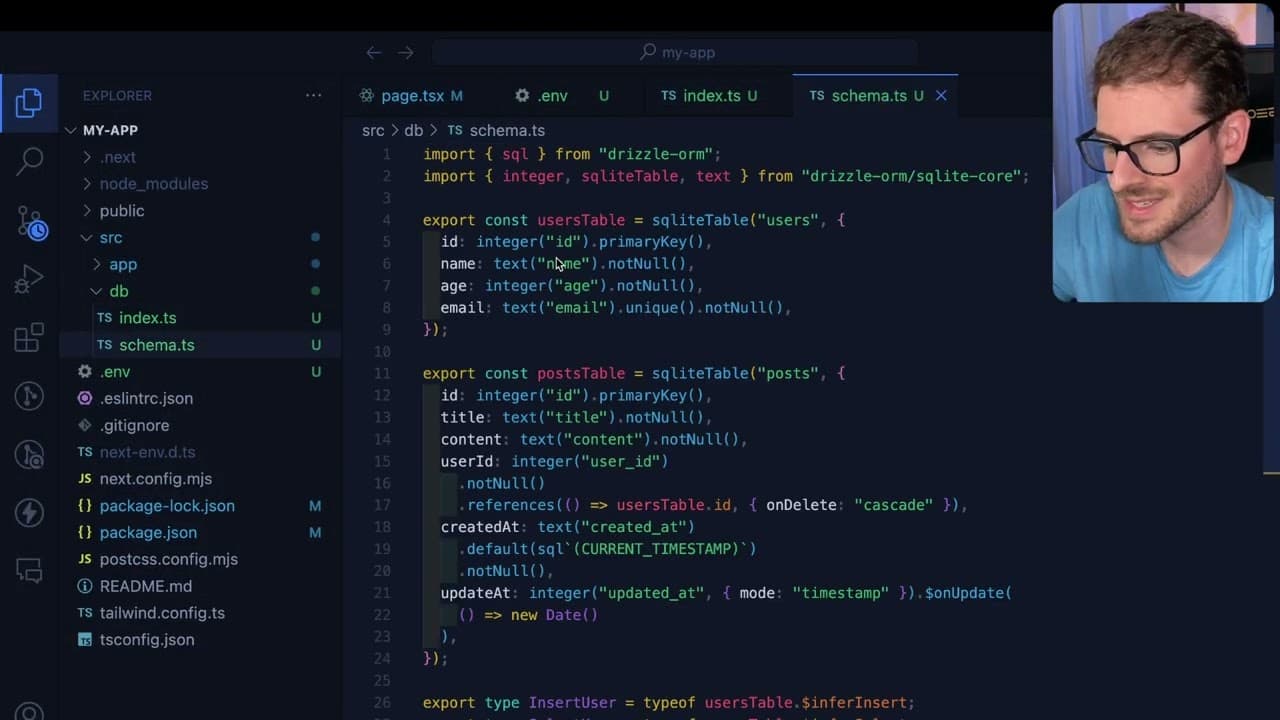
- 🚰 Defining the schema accurately is critical for ensuring that your application can interact properly with the database tables.
- 🏃 Running database migrations via Drizzle ORM simplifies managing changes to the database schema.
- 👻 Integrating server actions in Next.js allows for seamless data submission and retrieval, enhancing user interactivity in web applications.
- 💄 Turo provides an efficient hosting solution for SQLite databases, making it suitable for quick application setups.
- 👤 Handling potential errors during database operations requires thorough testing and validation of user entries and table relationships.
Install to Summarize YouTube Videos and Get Transcripts
Explore YouTube Video Summarizer or Get YouTube Transcript Extractor
Questions & Answers
Q: What is Drizzle ORM and why is it used in this tutorial?
Drizzle ORM is a TypeScript-based Object-Relational Mapping library that simplifies database interactions in applications. It is utilized in this tutorial to provide a straightforward method for connecting to a SQLite database, managing migrations, and defining schemas, enhancing the development experience for building web applications.
Q: What are the initial steps for setting up the database on Turo?
First, create an account on Turo and navigate to the databases section to create a new database. Assign a name (like "my app") to the database, and after creation, you will retrieve the URL and token needed to connect your Next.js app to the database.
Q: How do you define the database schema in the Next.js application?
The database schema is defined by creating a schema.ts file where you specify the tables and their columns. In this tutorial, the user and post tables are created, with defined columns like title in the post table, enabling structured data storage and retrieval.
Q: What error was encountered during data insertion, and how was it resolved?
The error encountered was that a post entry couldn't be created since there was no corresponding user in the users table. This was resolved by first inserting a user entry with an ID of one to establish the necessary relationship before attempting to insert a post.
Q: How is data fetched from the database after insertion?
Data is fetched using an asynchronous function that employs the db.query() method. By ensuring the schema is imported into the connection, the app can access the tables and query for all entries, making the data available for display in the application.
Q: What are the benefits of using environment variables in this setup?
Environment variables help to securely manage sensitive information, like database URLs and tokens, without hardcoding them into the source code. This practice enhances security and makes it easier to switch configurations between development, testing, and production environments without changing the code.
Q: What should you do if the tutorial doesn’t provide enough information for debugging?
If you encounter issues, consult the Drizzle ORM documentation, explore common error messages, and check online communities or forums for similar cases. Additionally, reviewing related tutorials can provide insights and alternative solutions to problems faced during setup.
Summary & Key Takeaways
-
The tutorial demonstrates how to create a Next.js application integrated with a SQLite database hosted on Turo, utilizing Drizzle ORM for database interactions.
-
Step-by-step instructions are provided for creating a database, setting up environment variables, and generating migration files while ensuring easy connections between the app and database.
-
The final steps include creating user and post entries, handling submissions through server actions, and fetching data back to display in the app.
Read in Other Languages (beta)
Share This Summary 📚
Summarize YouTube Videos and Get Video Transcripts with 1-Click
Try YouTube Summary with ChatGPT & Claude or YouTube Transcript Generator
Explore More Summaries from Web Dev Cody 📚





Summarize YouTube Videos and Get Video Transcripts with 1-Click
Try YouTube Summary with ChatGPT & Claude or YouTube Transcript Generator